Build a RAG Knowledge Base
You have documents such as equipment manuals, safety procedures, and maintenance protocols, and you want answers that cite the exact page. The RAG Agent, the agent that reads documents, builds a knowledge base from them. RAG stands for retrieval-augmented generation: the agent looks up the relevant passages first, then writes its answer from them and cites them.
The knowledge base is a wiki that the RAG Agent writes: a set of linked pages, one for each document, topic, role, and machine it finds. The agent keeps adding pages as you ask questions, so later answers build on earlier ones.
Build and use a knowledge base in three steps:
- Attach your documents and ask the agent to build the knowledge base.
- Ask questions, then open each cited page to confirm the answer.
- Ask the agent where the documents contradict each other.
Along the way, a knowledge-graph card shows what the agent extracted, and a few prompting habits keep later answers accurate.
Before you start
The RAG Agent needs only documents, such as PDF files, so it works in any conversation. Start in either of two ways:
With the Smart Factory example: use the three PDF documents from the sample data, in the Smart Factory conversation or a new one. Compare your results with this page:
- Equipment-Operation-and-Maintenance-Manual.pdf (document ID EQ-MAN-01): sensor limits, maintenance tasks, and troubleshooting procedures for each machine type.
- Preventive-Maintenance-Protocol.pdf (MP-02): the maintenance schedule rules, technician skills, shifts, and downtime costs.
- Maintenance-Safety-Procedure.pdf (SOP-03): protective equipment, lockout, hot components, hydraulic safety, and return to service.
To create the documents, see Generate the Sample Data.
With your own documents: attach them to the request that builds the knowledge base, and ask your questions in your own words. Use the prompts on this page as patterns.
Your run produces its own page counts, wording, and citations, and each step ends with what to look for, so you can check your own result. To learn how conversations, agents, and attached files behave, see Conversation Features.
Build the knowledge base
Attach the documents and send one short request. The request names only the outcome, because building the knowledge base is the whole task and the agent decides how to organize the pages:
Build a knowledge base from these documents.Attach the three PDF files with Attach files, the paperclip in the message box, and send the request.
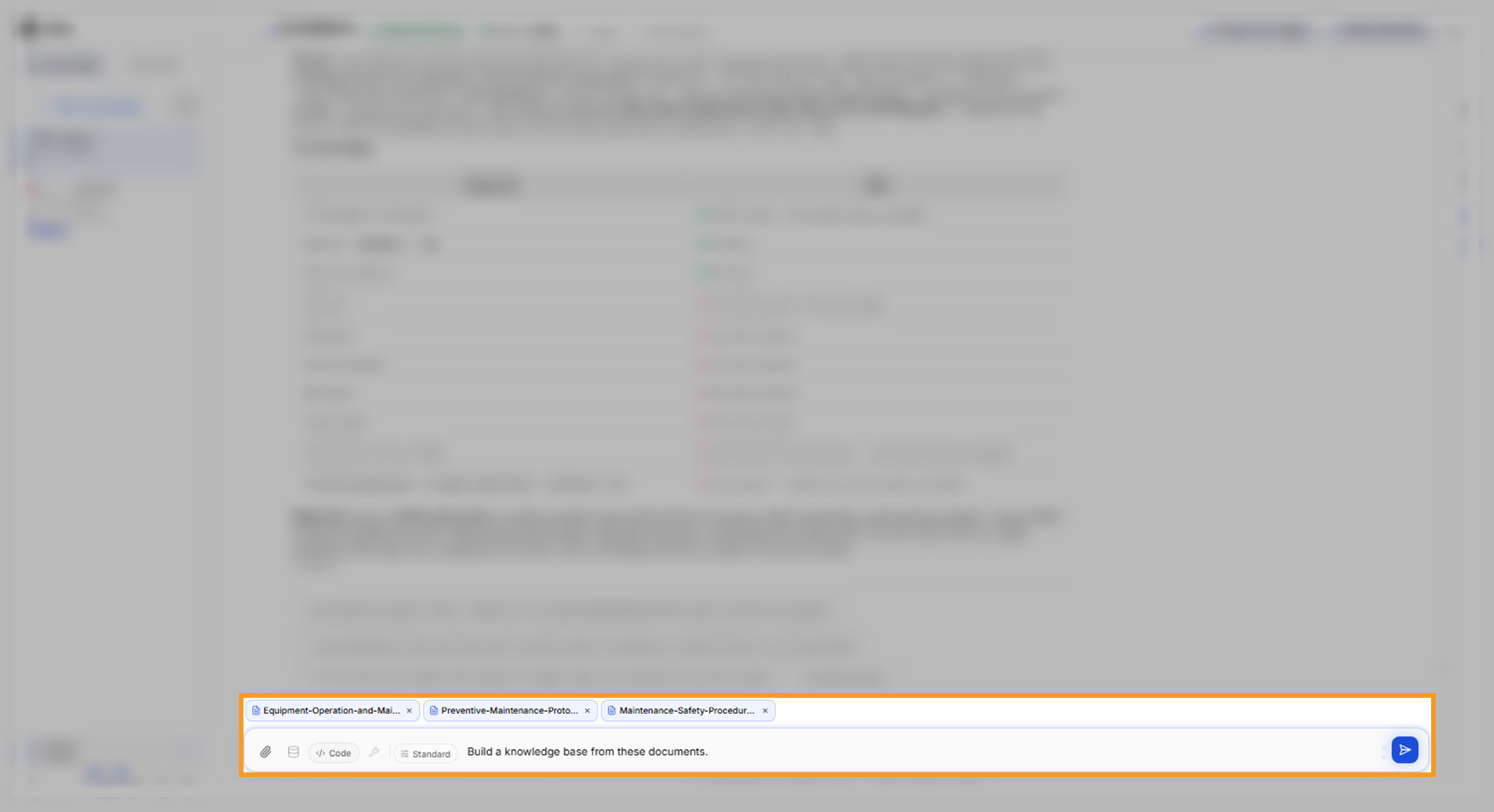
The orchestrator, the agent that reads each request and routes it, is shown as C3 Intelligence. It sends this request to the RAG Agent. Building a knowledge base from three short PDFs can take up to about half an hour.
The reply summarizes what the agent built. In this run the agent reported 45 wiki pages joined by 637 links. The reply also named the topics that tie the documents together and listed its sources. It ends with suggested next steps, such as querying the knowledge base or resolving a conflict it found.
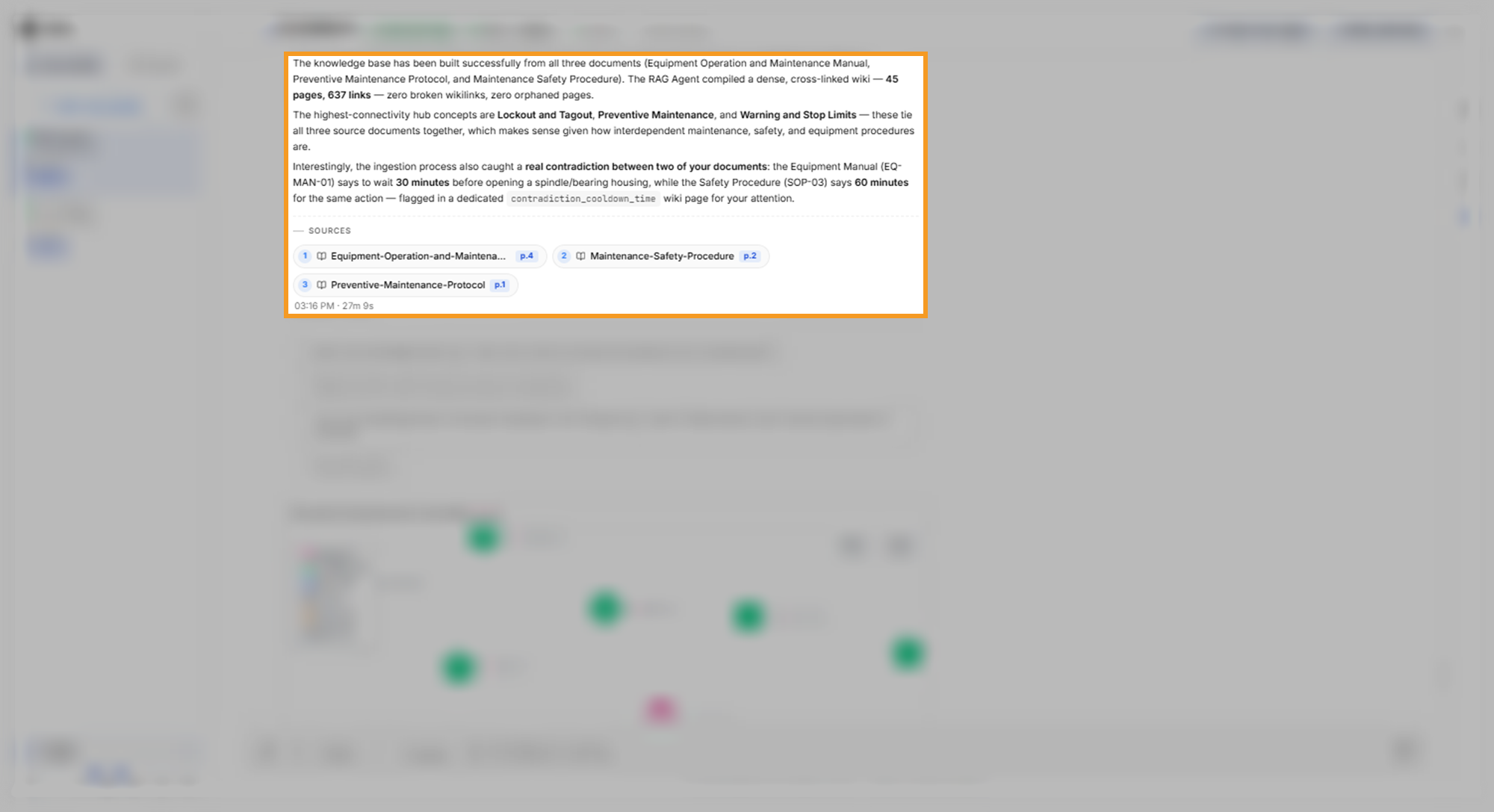
What to look for:
- Every document is named: the reply or its source chips mention each file you attached.
- Conflicts are flagged early: the agent reports contradictions it meets while reading. In this run it flagged, on its own, that the manual and the safety procedure give different cool-down times. It also filed a wiki page about the conflict.
Read the knowledge-graph card
The reply comes with a knowledge-graph card, a map of the knowledge base's pages by type, such as analyses, concepts, entities, sources, and tables. A concept page covers a topic, such as lockout or hot components, and an entity page covers a named role, machine type, or site. Use the card to see which topics, roles, and machines the agent extracted, and how many pages and links the knowledge base holds.
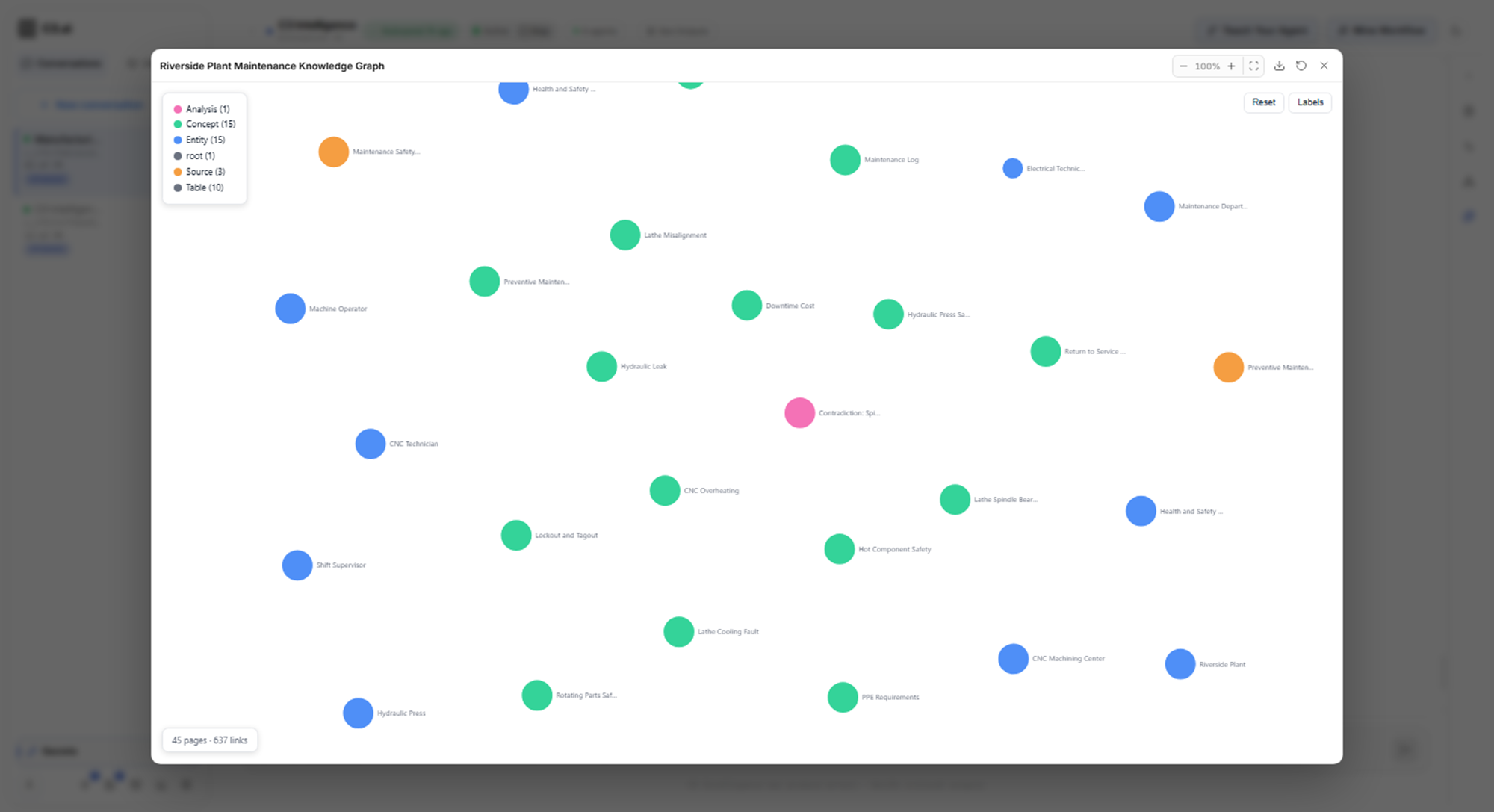
To ask for a fresh graph later, ask the agent to visualize the knowledge graph. To learn the full-screen controls that every card shares, see Conversation Features.
Ask a question and check the citations
Ask a question that names the knowledge base, the situation, and the evidence you want. Each part of this request does a job. "Using the knowledge base" tells the orchestrator to route the question to the RAG Agent, and the lathe bearing sets the scope. "Cite the document for each step" is the checkpoint:
Using the knowledge base, explain what a technician should do when a lathe's bearing overheats and how long the repair takes. Cite the document for each step.The answer arrives within a few minutes. In this run the answer listed the symptoms and ten numbered steps, each with the document and page it came from. The steps combine the manual's repair procedure with the safety procedure's lockout, protective equipment, and test-run rules.
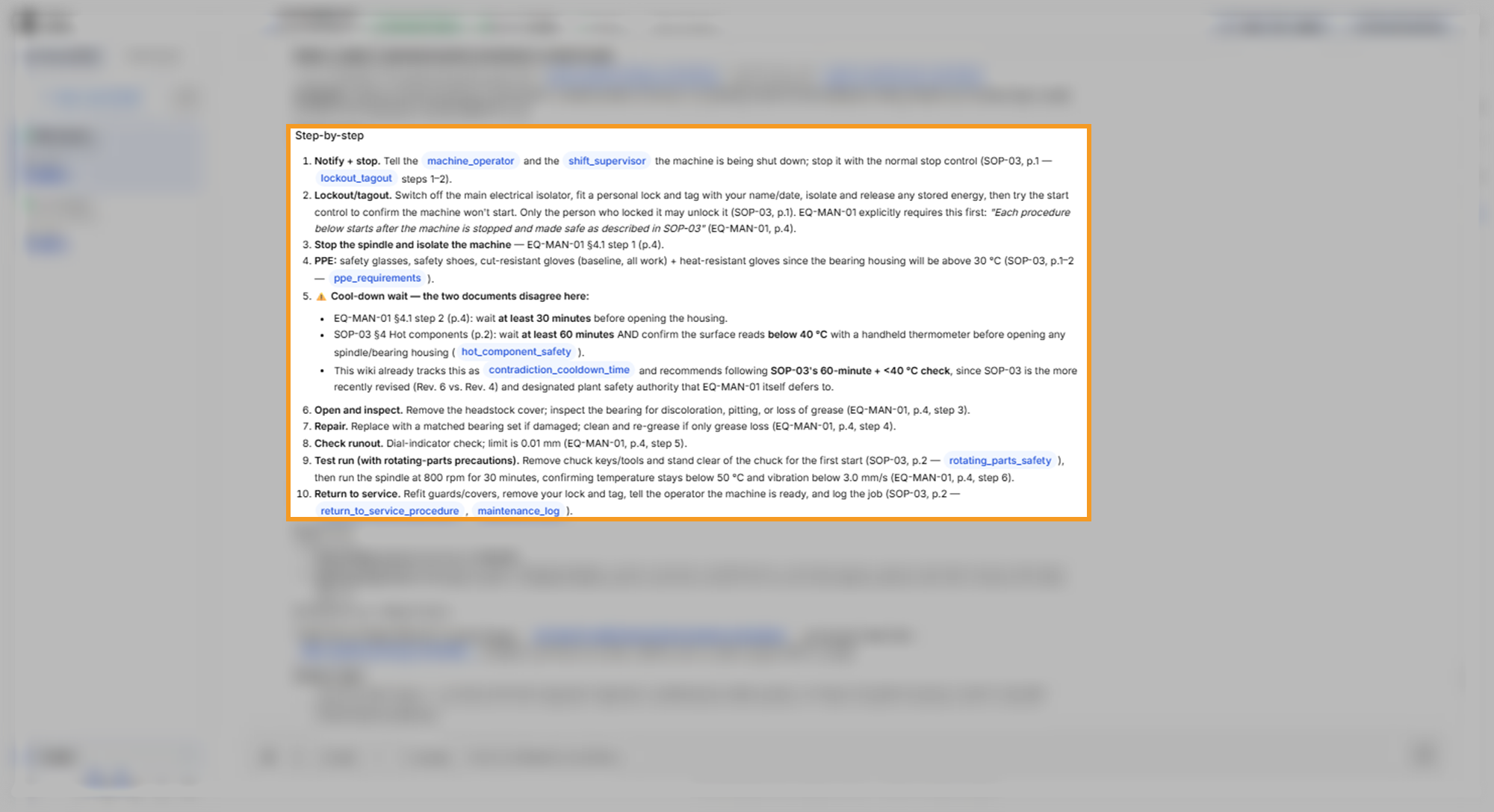
The agent flagged the cool-down conflict inside the step where it matters. The manual says to wait 30 minutes, and the safety procedure says 60 minutes and a surface below 40 °C. It recommended the safety procedure and gave its reasons: a newer revision, and the manual itself defers to it.
The answer closed with the repair time and the passages it relied on. Re-greasing takes about 1.5 hours, and a bearing replacement takes about 4 hours plus the cool-down and a 30-minute test run.
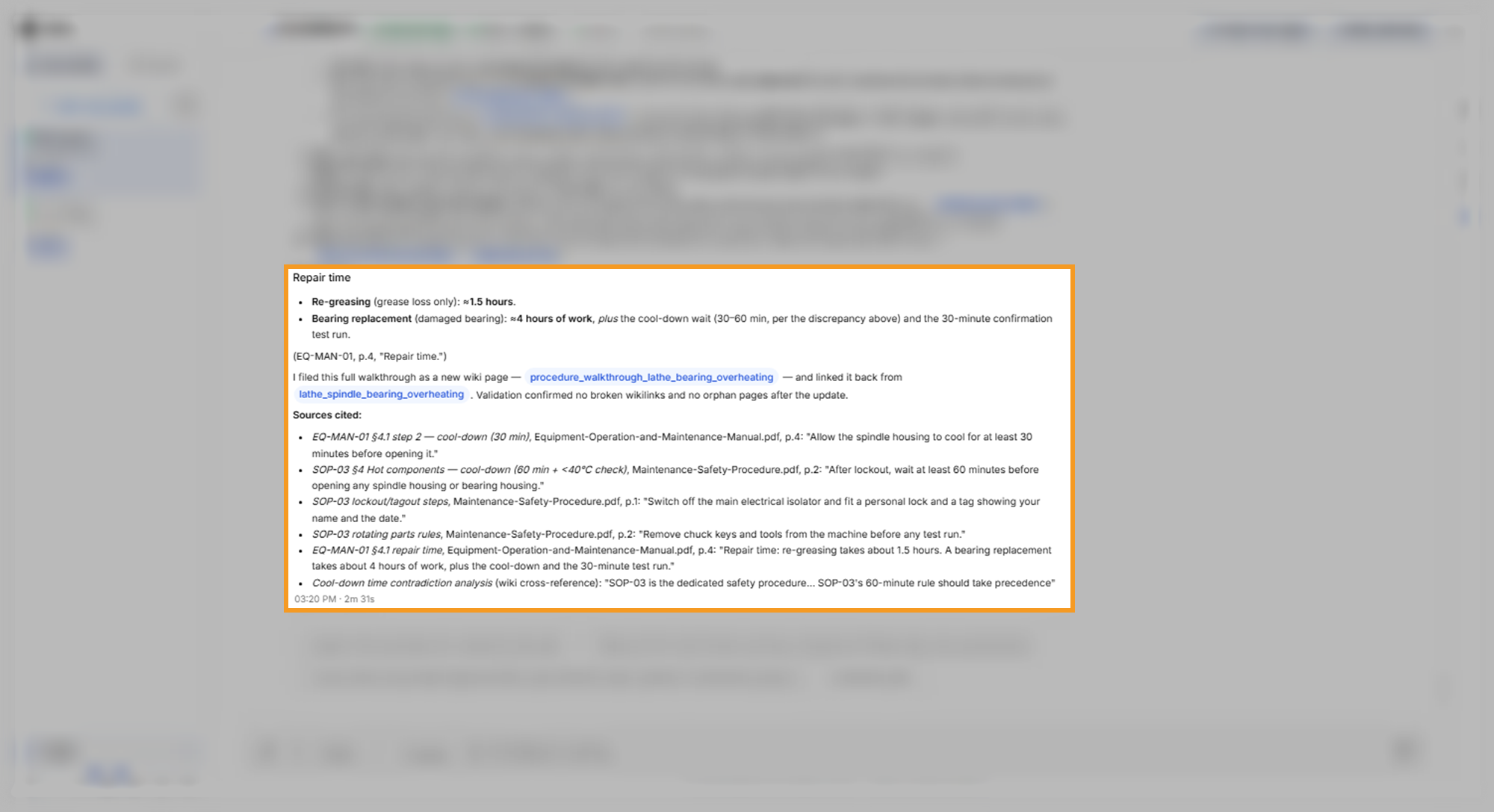
The agent also filed the walkthrough as a new wiki page and named that page in the reply. The next question about the same machine starts from that page.
Open a cited page
Sources appear in one of two forms: chips under the reply, or a Sources cited list that quotes each passage with its page. In this run the build reply and the contradiction audit showed chips, and the repair answer showed a list. Open a chip to read the passage in its original document:
- Under the build reply, select a source chip, such as Equipment-Operation-and-Maintenance-Manual with p.4.
- Read the cited passage on the page that opens in the PDF viewer.
The viewer opens the document at the cited page and highlights the text it matched for that citation. When the viewer marks more than one passage, Previous highlight and Next highlight move between them.
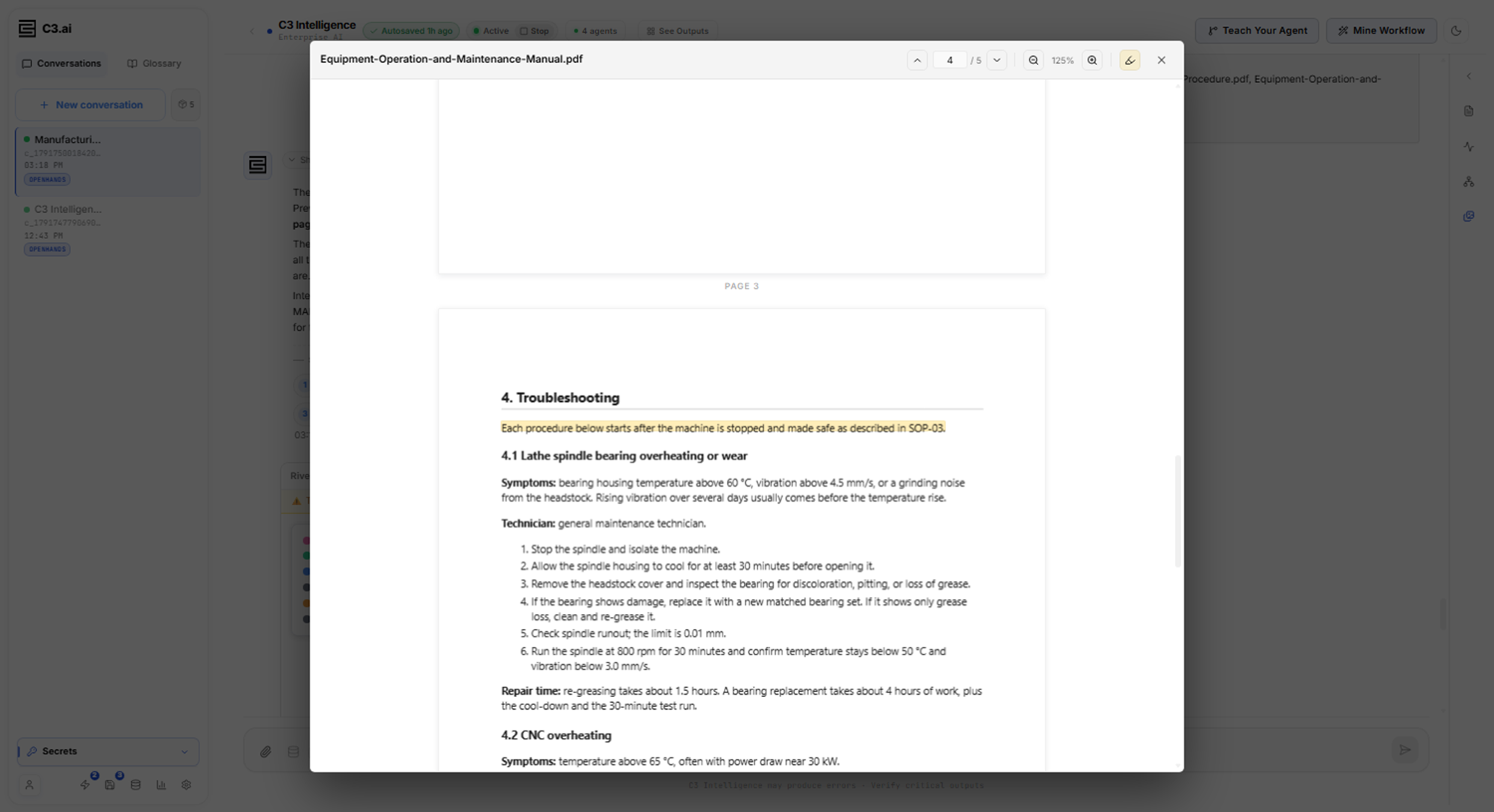
Read the whole passage, not only the highlighted text. In this run the chip opened the correct page, but the highlight marked the section's opening sentence. The 30-minute cool-down that the citation supports is step 2 of section 4.1 on the same page.
What to look for:
- Each step names a document and page: a step without a citation is the agent's own reasoning.
- The numbers match the page: compare times, temperatures, and limits with the passage itself.
- A recommendation comes with its reason: when the agent prefers one document, it says why. Treat that choice as the agent's inference, and confirm it with the owner of your procedures.
Find contradictions between the documents
Ask for a full check across the documents. The agent flags conflicts it meets while it builds the knowledge base, but this request makes it re-read every document against the others. Asking for the quoted passages is the checkpoint, because it lets you verify each conflict:
Identify any places where these documents contradict each other, and quote the conflicting passages.The audit can take several minutes. In this run the reply quoted each conflicting passage with its document, section, and page. It said which document should take precedence and why, and filed the full audit as a wiki page.
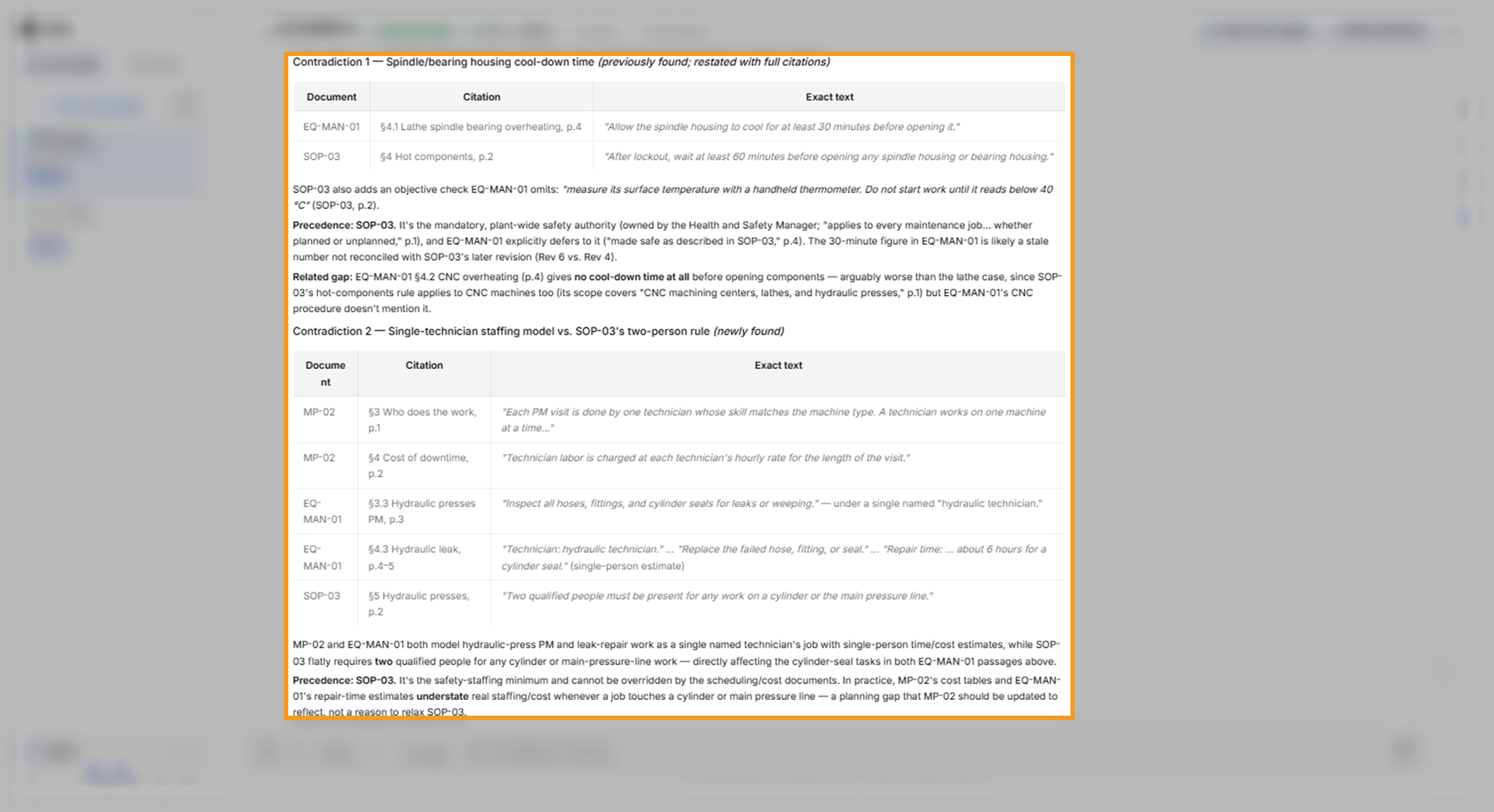
The sample documents contain one deliberate contradiction. The agent found it, found a second contradiction, and noted a gap inside one document. All three hold up when you check them against the documents:
- Cool-down time (the deliberate one): the manual says to let a lathe spindle housing cool for at least 30 minutes. The safety procedure says at least 60 minutes, and a surface below 40 °C.
- Two-person rule: the protocol and the manual treat hydraulic cylinder and leak work as one technician's job. The safety procedure requires two qualified people for any work on a cylinder or the main pressure line.
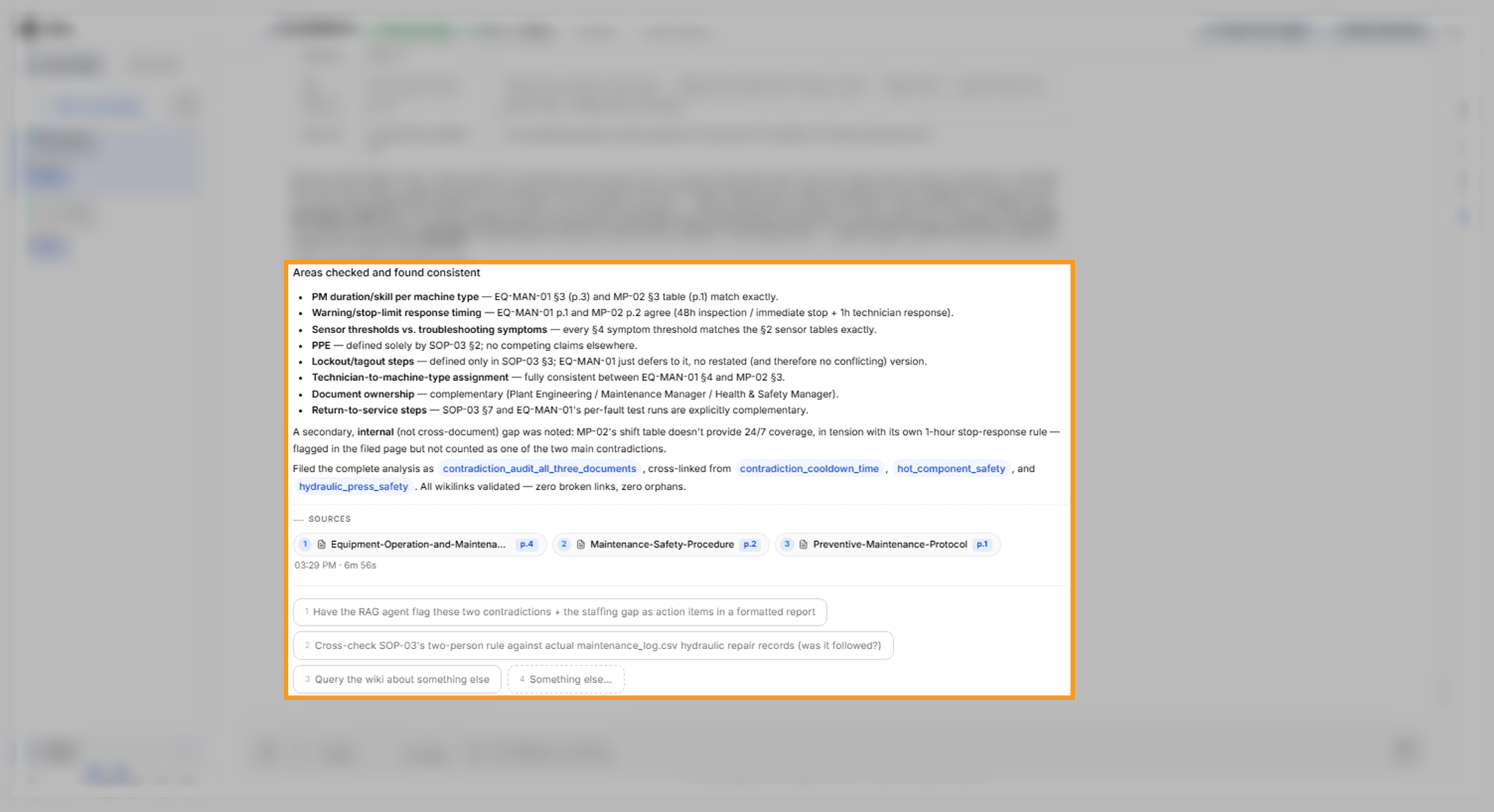
- Shift coverage (a gap inside the protocol): the protocol's shift table leaves some hours with no technician on duty, such as weekday evenings and weekend nights. The same protocol requires a technician to respond within 1 hour of a stop. The agent reported this gap apart from the two contradictions.
The agent also noted that the manual's procedure for an overheating CNC machine gives no cool-down time at all. The reply ends with the areas it checked and found consistent, such as maintenance durations, sensor limits, and lockout steps.
What to look for:
- Both sides are quoted: each contradiction shows the passage from each document, with section and page. Open the chips to confirm the quotes.
- The consistent list covers your concerns: if a topic you care about is missing, ask about it by name.
- The options suggest the next check: in this run they offered an action-item report and a check of the two-person rule against the maintenance log.
Get better answers from the knowledge base
The RAG Agent answers from the pages it has written, and every answer adds to them. These practices keep the answers useful:
- Name the knowledge base: starting with "Using the knowledge base" makes clear which agent should answer.
- Ask for a citation per step: a citation on each step lets you check each one, instead of trusting a summary.
- Ask for quotes when documents disagree: quoted passages show the exact wording, so you can decide which rule applies.
- Add documents later: attach new files in the same conversation and ask the agent to add them to the knowledge base. It reads the new files and links them to the existing pages.
The RAG Agent accepts common document types, including PDF, Word (DOCX), text, Markdown, CSV, Excel (XLSX), and images. To keep a copy of the wiki, ask the agent to download the knowledge base as a ZIP file. The knowledge base belongs to this conversation, so it stays available while the conversation does. To learn how saving, stopping, and reviving a conversation affect the agents' work, see Conversation Features.
Where to go next
With a knowledge base to answer from, pick the next step for your goal:
- To plan maintenance at the lowest cost under rules you state, see Optimize Decisions.
- To analyze the data that the documents describe, see Analyze Data.
- To put the answers into a report, see Generate Code.
- To choose another agent for your goal, see Use Data Science Agents.