Find Similarities with Time Series Data
A machine starts to behave oddly, and you want to know whether you have seen this before and how it ended last time. The RAI Engine answers that question in a C3 Intelligence conversation. RAI stands for retrieval-augmented interpretability: the agent retrieves past events that resemble the one you name, then checks them against the readings before it explains what they mean.
C3 Intelligence builds the library of past events for you, from your sensor readings, fault records, and machine list. Find similar past events in four steps:
- Ask for a searchable library of past events, and approve the plan.
- Answer the questions the agents ask while they build it.
- Ask which past events resemble a machine's recent readings, and approve the RAI Engine's plan.
- Read the ranked matches, the reason for each one, and the verdict.
Read the reason for each match, not only its score. The reason shows whether the match shares the same fault or only looks alike by chance.
What the RAI Engine does for you
Each kind of request answers one question about your equipment:
| Task | The question it answers | What you get |
|---|---|---|
| Find similar incidents | Has this event happened before? | The past events most similar to the one you name, ranked by score, including events on other machines of the same kind |
| Monitor a fleet | Which machines show this fault pattern right now? | Machines whose recent change from normal points the same way as the fault, with opposite changes flagged |
| Classify a fault | What fault is this? | The likely fault class, with a probability for each class, checked against the readings |
| Find missed cases | Are there past cases like this one that nobody flagged? | Similar events from other equipment, with weak and opposite matches removed |
The RAI Engine uses similarity scores to choose candidates, then judges the candidates on other evidence, such as the change from normal: how alike two events are after the agent subtracts each machine's normal behavior. Before it concludes anything, it compares the readings of the event you named with the readings of each candidate.
Before you start
The RAI Engine needs a history of sensor readings and a record of past events. The agents turn them into a searchable library. A collection file you already have also works, as described in Bring a collection you already have. Start in either of two ways:
With the Smart Factory example: continue the conversation from Analyze Data or Build ML Models. It already holds the three files the library is built from. Compare your results with this page:
- sensor_readings.csv: one reading per machine per hour for six sensors, such as temperature and vibration.
- fault_events.csv: the past breakdowns, each with the machine, the fault type, the severity, and the start and end times.
- machines.csv: the eight machines and their details.
In a new conversation, attach the three files with the first request. To create them, see Generate the Sample Data.
With your own data: attach your sensor readings and event records to your first request, and describe the events you want to find in your own words. Use the prompts on this page as patterns.
The orchestrator, shown as C3 Intelligence, reads each request and routes it to the agents that fit. The work here involves three agents: the DI Engine, which prepares data; the ML Agent, which encodes readings with CHARM; and the RAI Engine, which searches. Your run produces its own plan, matches, and scores, and each step ends with what to look for, so you can check your own result. To learn how agents and plans behave, see Conversation Features.
Ask for a library of past events
The RAI Engine searches a collection: one file that holds a summary of every past event it can search. You describe the library you want, and the orchestrator plans how to build the collection. Send this request in the same conversation:
I want to look up past breakdowns that resemble what a machine is doing now. Using the sensor readings, fault records, and machine list in this conversation, set up a searchable library of past events, with one entry for each breakdown and a sample of normal periods, based on all six sensor readings. Show me your plan before you start.The request states the goal, the data to use, what each entry covers, and which readings to include. The normal periods give the search a contrast, so it can tell a breakdown from ordinary running. The request names no agent and no method, and it asks for the plan first.
In the example, the orchestrator checked the three files and proposed a plan within a few minutes. The plan splits the work into four steps across three agents:
- DI Engine: cut a window, a fixed stretch of readings, around each breakdown. Each window covers the 48 hours around the breakdown's start, for all six sensors. It also cuts one 48-hour window per machine per week as a sample of normal running.
- ML Agent: encode each window with CHARM, a C3 AI foundation model for time-series data. The encoding, called an embedding, is a list of numbers that summarizes a window. Windows that behave alike get similar numbers.
- DI Engine: package the windows and their embeddings into one collection file.
- RAI Engine: register the file as a collection that is ready to search.
Approve the plan, adjust it, or run all four steps without pausing between them. The example ran all four steps without pausing.
What to look for: a plan that lists the window around each breakdown, the sample of normal periods, and which agent does each step.
Answer the agents' questions
An agent can stop to ask you a decision that changes the result, even when you chose to run without pausing. The orchestrator relays the question with the options and the agent's recommendation.
In the example, the ML Agent paused before it encoded the windows. Each breakdown window had a gap of 5 to 15 hours, during the breakdown itself, where the sensors recorded nothing. The ML Agent asked how to fill the gap and offered three options: a straight line between the readings on either side, a CHARM forecast of normal behavior, or the last reading held flat. It recommended the straight line, because the other two either made a breakdown look normal or added a flat stretch. The run answered with the recommended option.
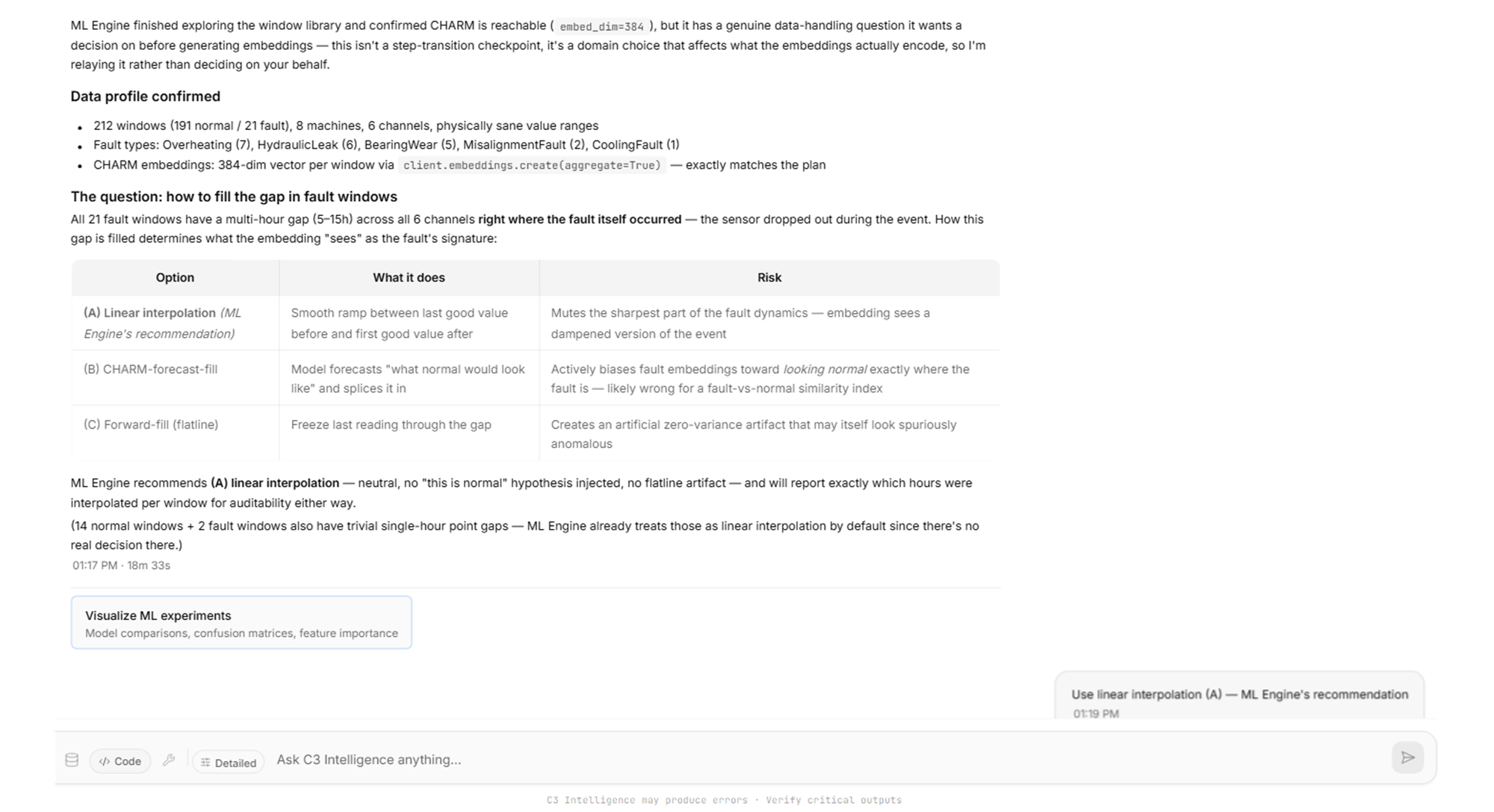
What to look for: a question with options, what each one changes, and a recommended choice. Answer in the chat, or select an option if the reply offers them.
Check the finished library
The completion reply lists the four steps and what each agent did. Building the library can take a while. In the example, of the 212 windows, 21 were breakdowns and 191 were normal periods, across all eight machines. The ML Agent filled gaps in 35 windows: the 21 breakdown windows and 14 normal windows with one-hour gaps. It kept a record of each filled hour.
The DI Engine also ran a statistical check on its own. Temperature, vibration, and oil level differed clearly between breakdown and normal windows. Pressure, speed, and power did not, so any signal in those three lies in how the readings change over time, not in their average.
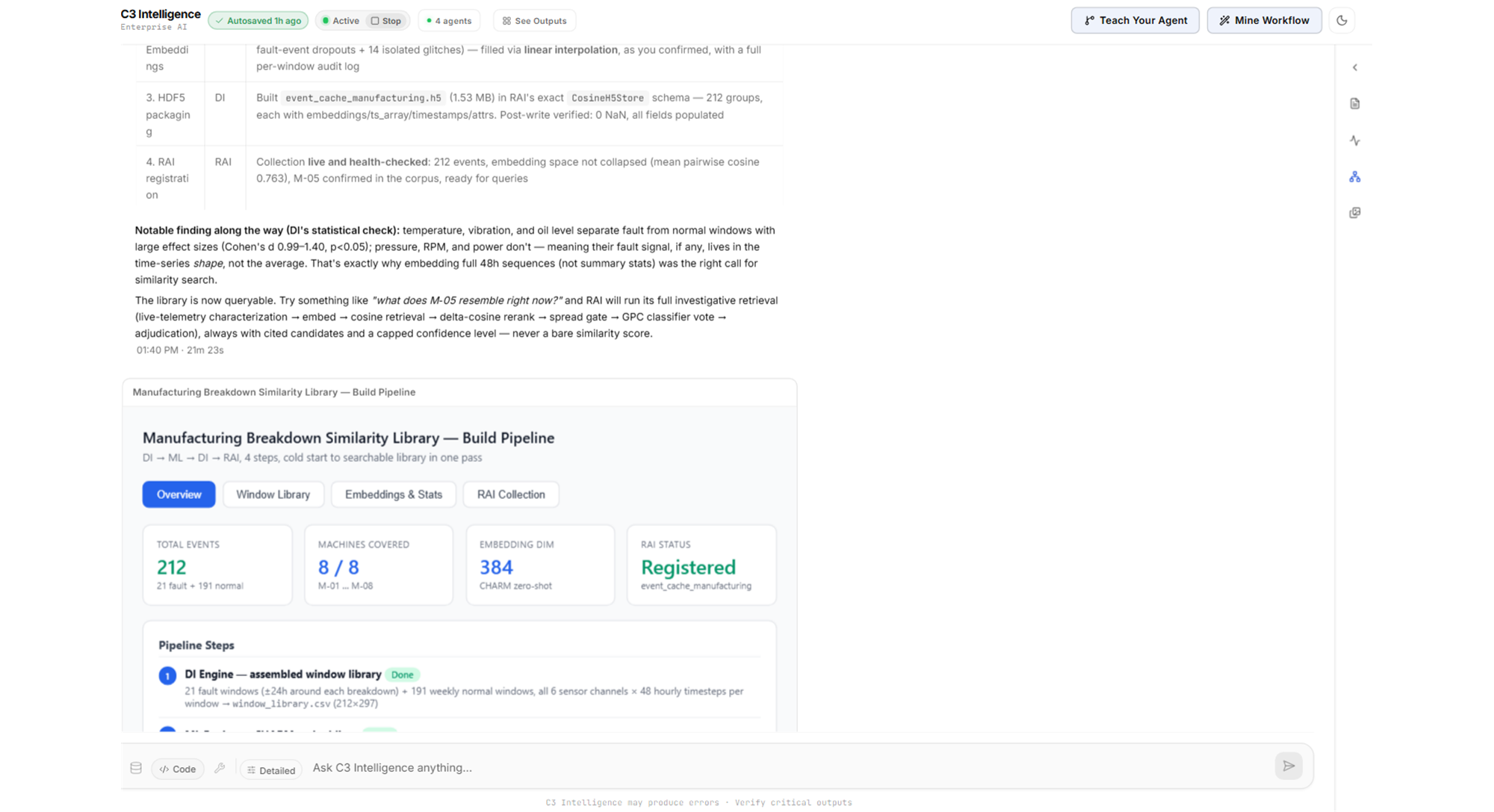
The card Manufacturing Breakdown Similarity Library - Build Pipeline summarizes the library. Its RAI Collection tab names the collection, counts the events, and confirms that no event ID appears twice. Point to the card and select Expand to full screen to read it.
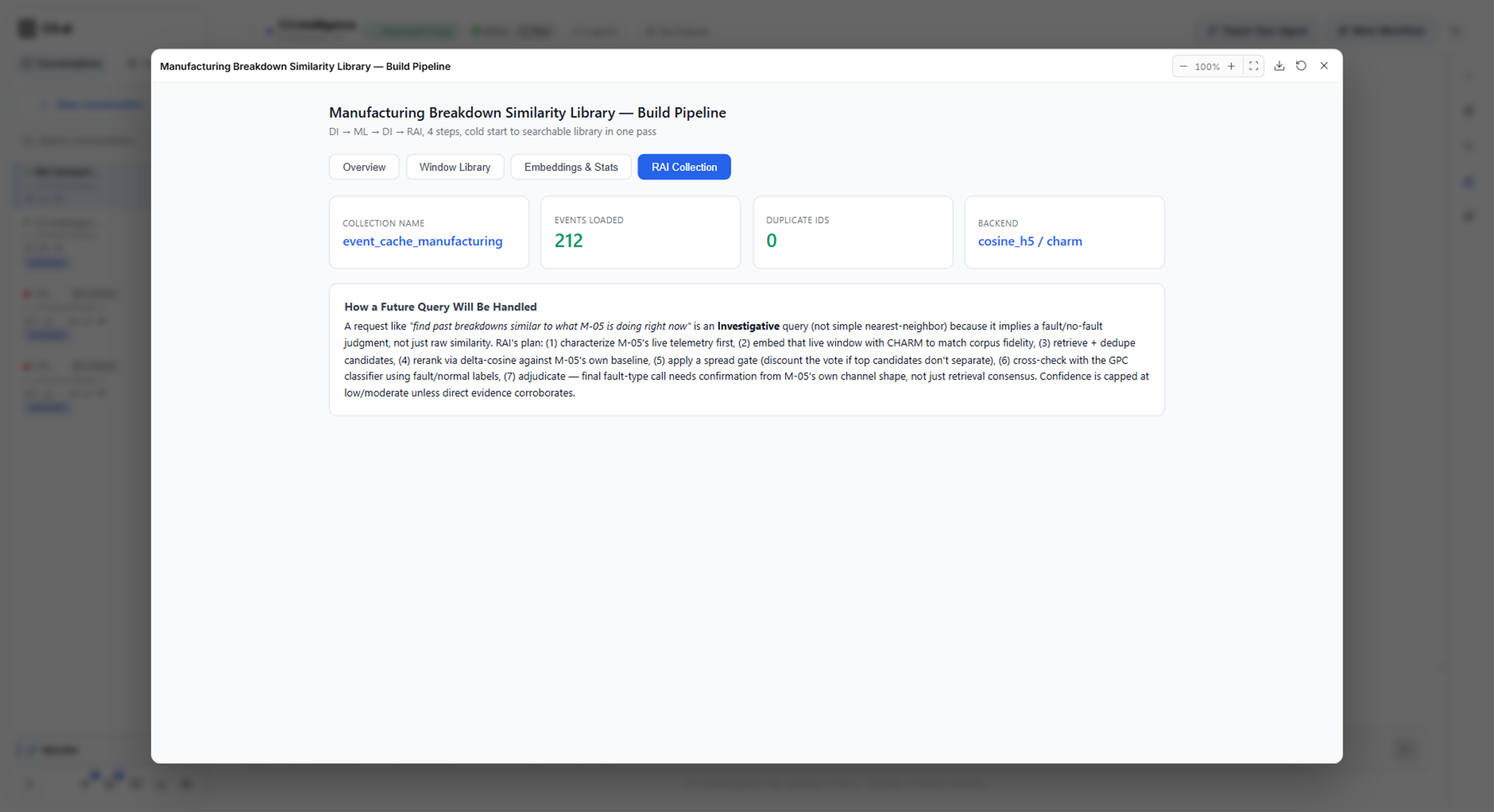
What to look for: the number of breakdown and normal windows, a note on how the agents handled gaps, and a registered collection with the expected number of events.
Find past events like a machine's recent readings
With the library ready, ask about one machine. Send this request in the same conversation:
Which past events look most like machine M-05's readings in the 48 hours before its last breakdown? Explain each match.The request names the machine, the stretch of readings to compare, and what to return. "Explain each match" asks for a reason per match, so the RAI Engine does more than rank by score. To ask about a machine's current readings, ask about its last 48 hours instead.
Approve the retrieval plan
The RAI Engine chooses how to work from the wording of the request:
- Quick search: a request for the most similar events, with no question about cause. The agent ranks the events and returns the list.
- Investigation: a request that asks why, asks for an explanation or a classification, or asks for anything beyond raw similarity. The agent examines the readings, shows you a plan, and waits for your approval.
"Explain each match" makes this request an investigation. Before it retrieves anything, the RAI Engine studies the readings you named. In the example, the plan came with these findings:
- The main signal: M-05's vibration climbed steadily from about 3.2 to 10.0 mm/s over the window, while the other sensors stayed flat.
- An overlap with a known outcome: the library's own entry for M-05's last breakdown already covers part of those 48 hours. A match to that entry would only look up the known answer, so the agent reports it separately.
- A difference in shape: the stored breakdowns show vibration rising and then falling, while the query shows only the rise. The agent warned that this difference can lower the scores of real matches.
- A check on the encoding: it encoded a stored window again and got the same result, so the query compares fairly with the library.
The plan lists the retrieval steps and the assumptions you can change, such as how many matches to show.
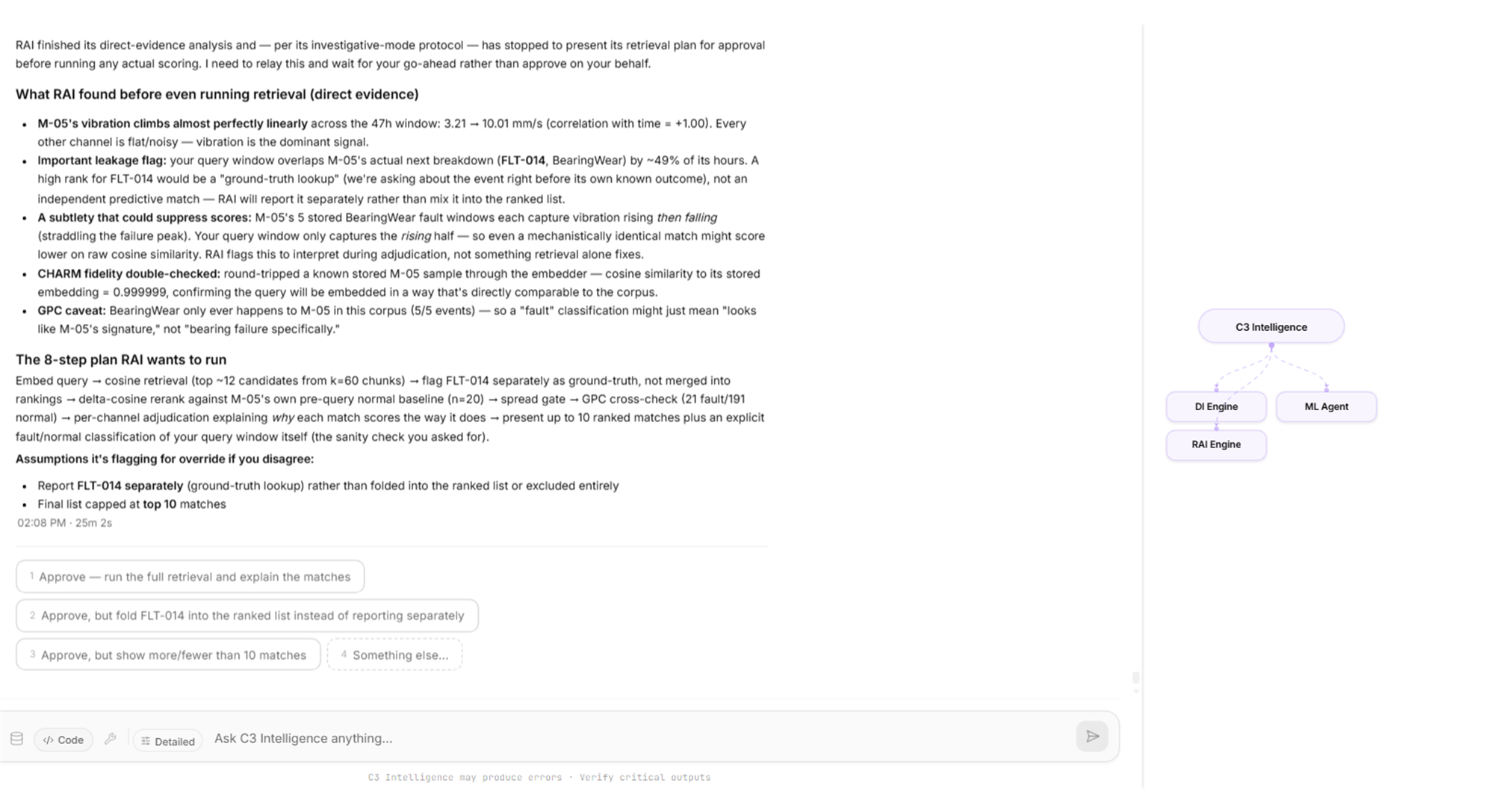
Approve the plan, or reply with the assumption to change. To skip this step in future requests, say in the request that the agent should proceed without approval.
What to look for: what the agent found in the readings before it searched, any overlap with a known outcome, and assumptions you can change before it runs.
Read the matches and the verdict
The reply ranks the ten closest past events and gives each one a match type and a reason:
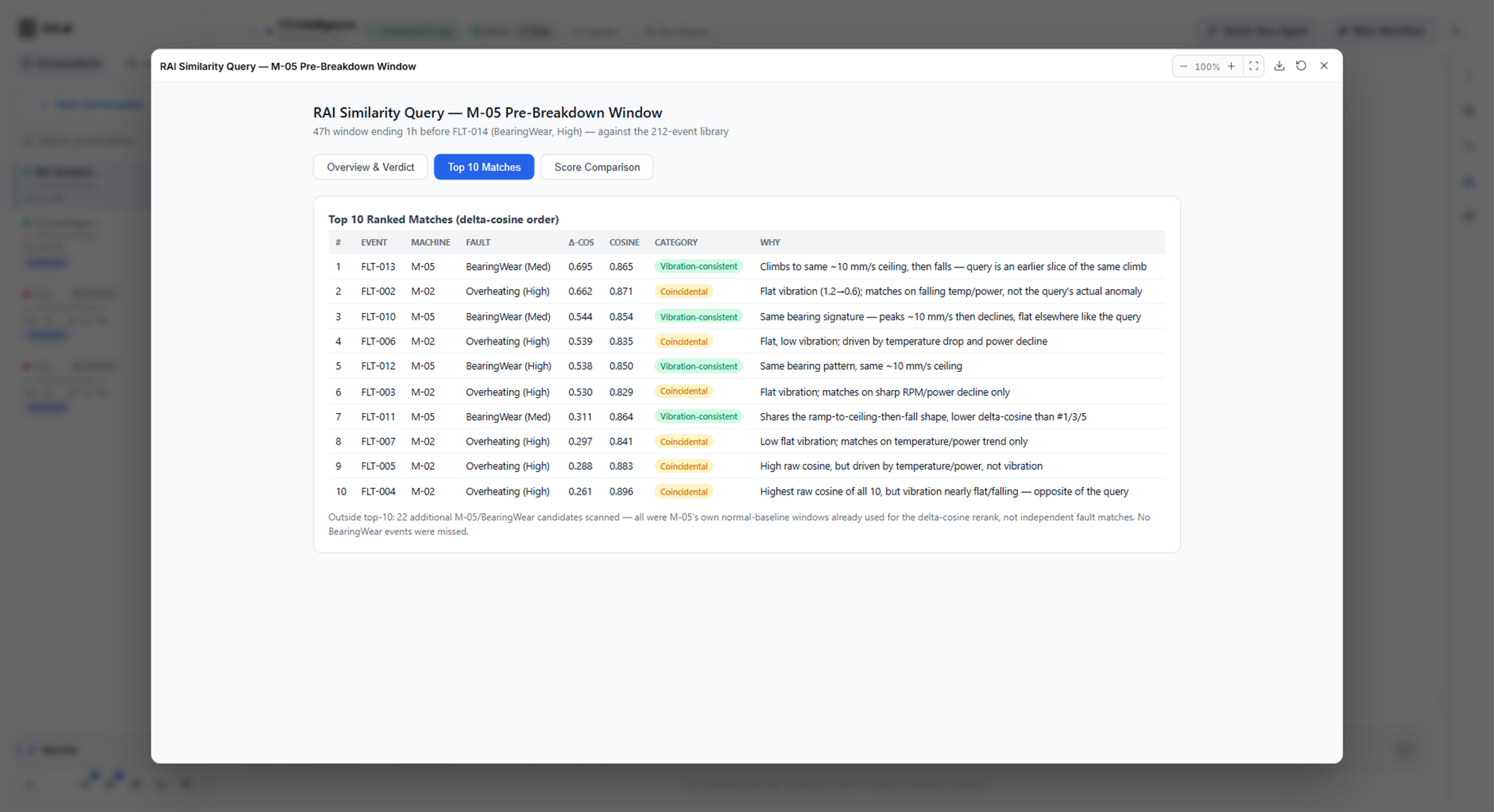
- Real match: four earlier bearing failures on M-05 itself, where vibration climbs to the same level of about 10 mm/s.
- Coincidental: six overheating breakdowns on M-02, which look alike overall but come from temperature and power, with flat vibration.
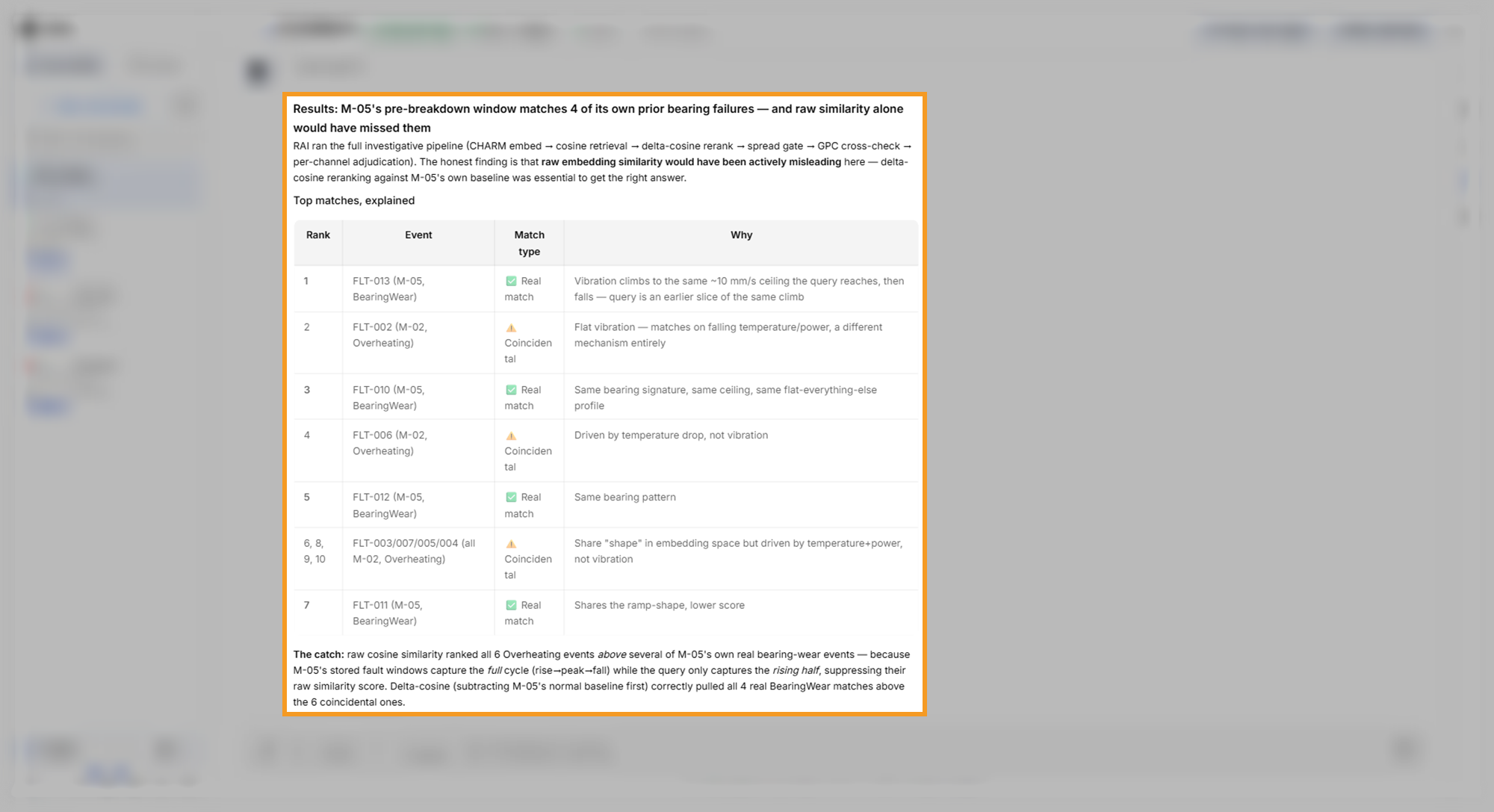
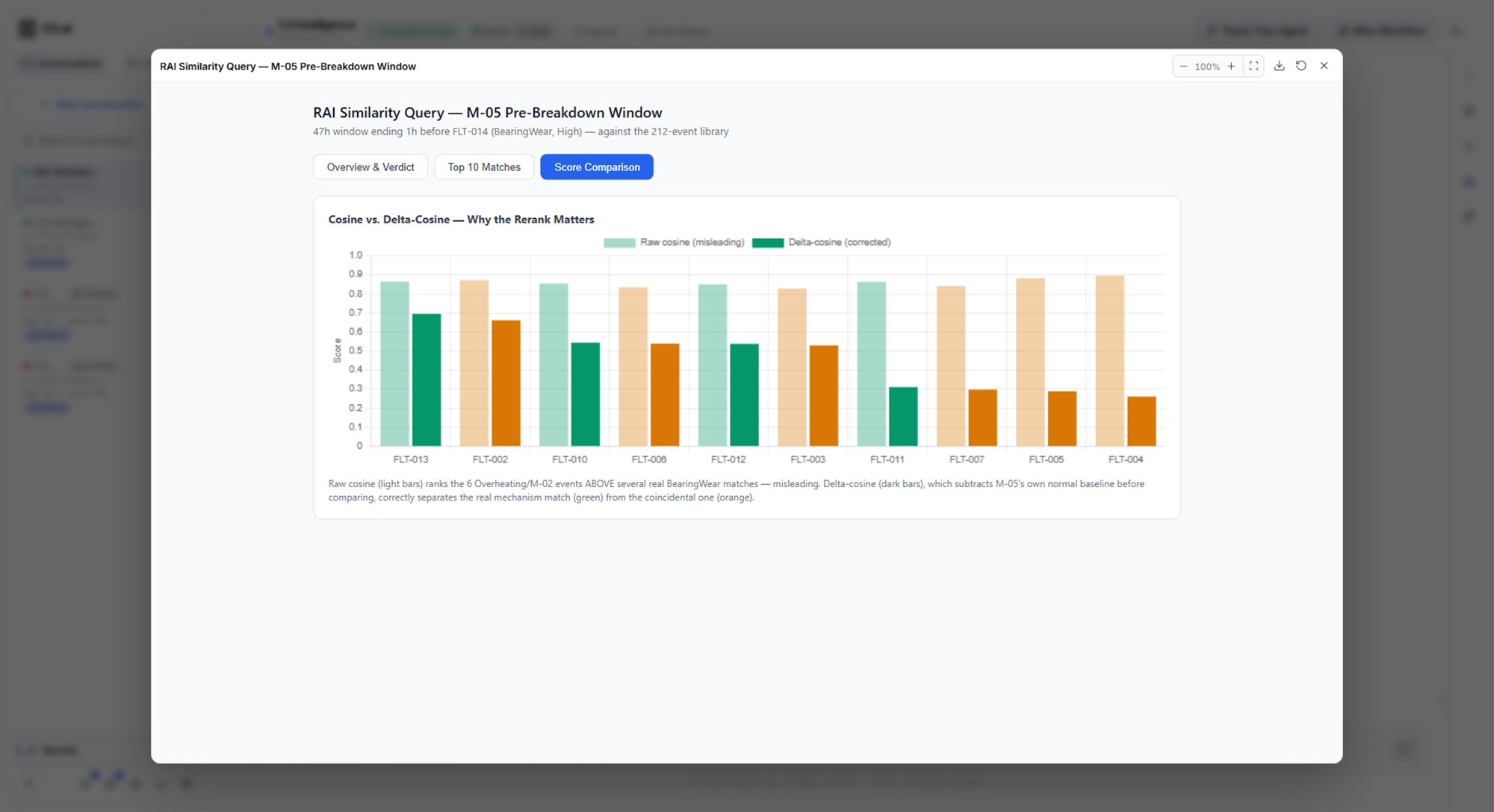
The ranking rests on a second score, the change from normal. The agent subtracts each machine's normal behavior, its baseline, before it compares two windows. By plain similarity, the overheating events ranked higher than several of the bearing failures. After the agent subtracted M-05's own baseline, the bearing failures moved up.
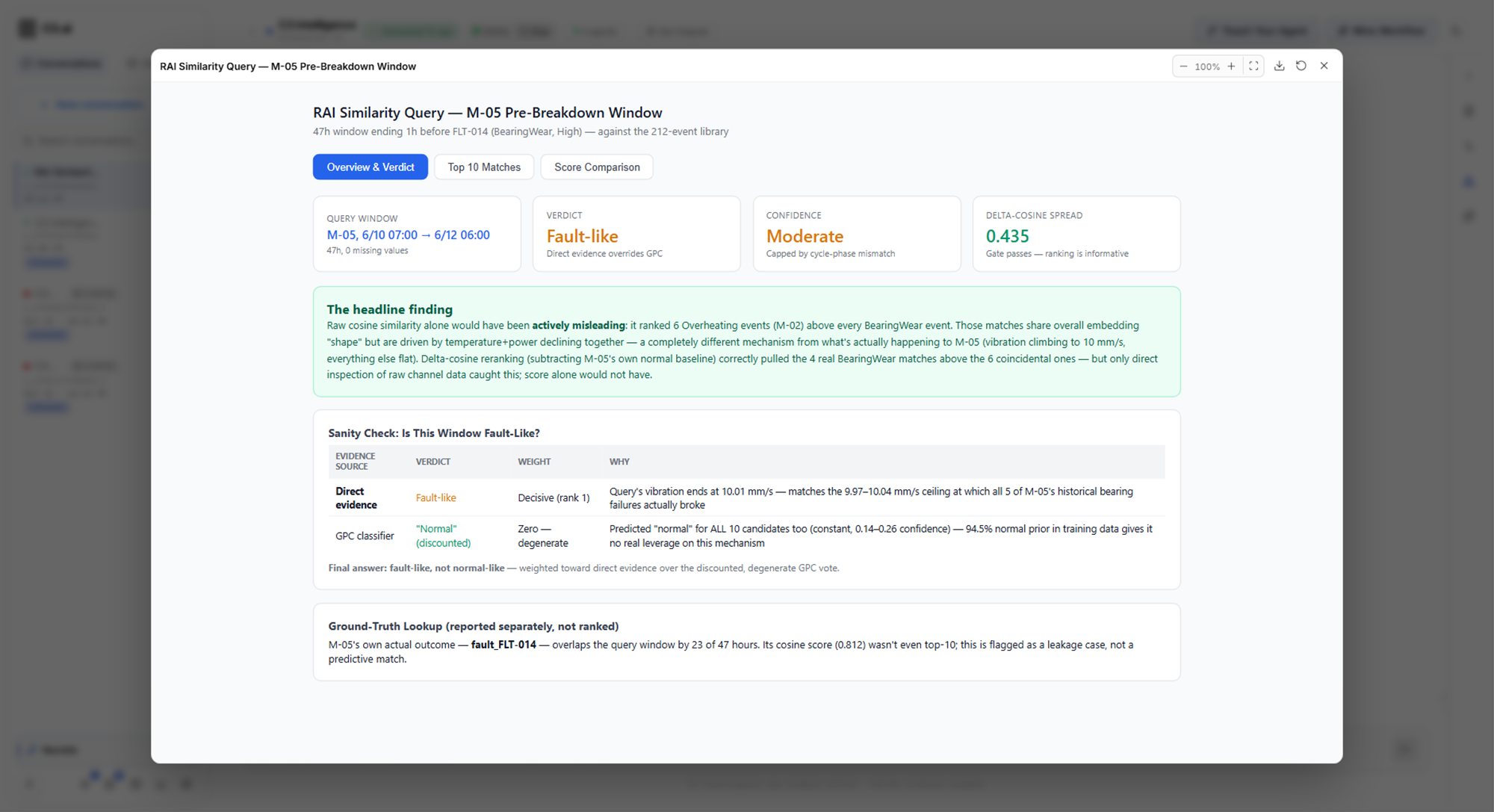
The card RAI Similarity Query - M-05 Pre-Breakdown Window has three tabs:
- Overview & Verdict: the verdict, the confidence level, the main finding, and a check of the verdict against each kind of evidence.
- Top 10 Matches: each match with its machine, fault, both scores, category, and reason.
- Score Comparison: a chart of the plain similarity score next to the change from normal for each match.
In the example, the verdict read Fault-like with Moderate confidence. The deciding evidence was the readings themselves: M-05's vibration ended at 10.01 mm/s, the level where all five of its stored bearing failures occurred, counting the four matches and the breakdown the query overlaps. For a second check, the RAI Engine trained a classifier, a model that sorts windows into fault and normal, on the library's labels. The classifier called every candidate normal, so the agent set that vote aside. M-05's last breakdown appears in the Ground-Truth Lookup section of Overview & Verdict as a lookup of the known outcome, not as a ranked match.
What to look for: a reason for every match, a split between real and coincidental matches, a verdict with a confidence level, and a separate note for any overlap with a known outcome.
Understand the evidence behind a result
The RAI Engine combines several kinds of evidence and lets none of them decide alone:
- Similarity score: how alike two embeddings are overall. Two machines can score high because they run in the same conditions, even when their faults differ.
- Change from normal: how alike two events are after the agent subtracts each machine's baseline. A negative score means the machine changed in the opposite direction, so the agent drops that match or flags it.
- Class probability: the chance of each fault class, from a classifier trained on labeled examples. The agent sets this vote aside when it gives every candidate the same class.
- Direct evidence: the readings of the event and of each candidate, which the agent compares itself. When the kinds of evidence conflict, the readings win.
The confidence level is high, moderate, low, or uncertain, with the evidence for and against it. A conclusion that rests only on similarity scores is a hypothesis, and the RAI Engine labels it with low confidence. When the scores are all close together, the agent reports that they are too close to rank.
Choose the RAI Engine or the ML Agent
Both agents work with time-series data and use CHARM. They answer different questions:
- The ML Agent predicts: it trains and compares models on your readings, forecasts future readings, and scores unusual behavior.
- The RAI Engine compares: it searches a collection of past events for the ones that resemble a given event, and it explains each match.
Ask the ML Agent for a forecast or a trained model. Ask the RAI Engine for past evidence about something you see now. Describe the result you want, and the orchestrator routes the request to the right agent. To learn about CHARM and the ML Agent, see Build ML Models.
Bring a collection you already have
If you already have a collection, attach it instead of building one. A collection is an HDF5 file, a standard format for large numeric arrays, with the extension .h5 or .hdf5. The RAI Engine reads this layout inside the file:
- An
eventsgroup: one entry for each past event, named by the event ID. - Embeddings for each event: an array named
embeddings, with one row per window of the event, which the file calls a chunk. The agent skips an event that has noembeddingsarray. - Window times, optional: arrays named
chunk_start_timesandchunk_end_times. The agent uses the start times to find each machine's baseline. - Raw readings, optional: an array named
ts_array. The agent uses the readings as direct evidence, so include them when you can. - Event details: attributes of each entry, such as
equipment_nameandchannel_names. The agent reads them to filter candidates and to find each machine's baseline.
Build every embedding the same way, from windows of the same length and the same sensors, because the agent compares the embeddings number by number. You can add CSV files next to the collection, such as fault labels. The agent reads them for extra details, while the search runs only over the collection file. Classifying a fault needs at least two fault classes, with at least two labeled examples in each.
Attach the collection with Attach files and ask the RAI Engine to use it. The collection takes the file name without its extension. Before your first question, ask the RAI Engine to list its collections to confirm it has yours.
Find the RAI Engine's files
The RAI Engine keeps its work in the rai folder of its workspace, the agent's storage area for this conversation:
rai/data/: the collections and metadata files it searches.rai/registry.yaml: the list of registered collections.rai/artifacts/: the reports and figures it produces.trace.md: the decision trace, a numbered record of every step, choice, and check. Ask the agent how it reached a result, and it answers from this file.
To open the files, select Files on the right edge of the conversation, then choose RAI in Select workspace agent.
Know where the RAI Engine stops
The RAI Engine searches and explains collections. Other work goes to other agents:
- Building a collection from raw files: the orchestrator plans it across the DI Engine and the ML Agent, as in the walkthrough, and the RAI Engine registers the result.
- Encoding a new event: the RAI Engine encodes a new event with CHARM only when it can encode it the same way as the collection.
- Training, tabular analysis, optimization, and general code: training goes to the ML Agent, tabular analysis to the DI Engine, optimization to the Alchemist, and general code to the Coding Agent.
- Long result lists: the RAI Engine reports at most 50 events for one request.
Where to go next
With similar past events found, pick the next step for your goal:
- To predict when the matched fault may happen again, or forecast the readings, see Build ML Models.
- To look up the repair steps for a matched fault in your manuals, see Build a RAG Knowledge Base.
- To plan the maintenance a match calls for, at the lowest cost, see Optimize Decisions.
- To choose another agent for your goal, see Use Data Science Agents.