Generate Code
Your analysis is spread across many replies in one conversation. The DI Engine ranked the problem machines, the ML Agent predicted breakdowns, and the Alchemist, the optimization agent, planned the maintenance schedule. The Coding Agent writes and runs code for tasks the other agents do not cover, such as combining those results into one report you can share. It also builds dashboards, scripts, and documents on request.
Build the report and check it in three steps:
- Ask for one report that combines the three results, with charts and recommended actions.
- Read the report in full screen and check it against the earlier replies.
- Ask which results the agent is least confident in, and why.
What the Coding Agent can do
The Coding Agent handles code and documents that no other agent owns. Describe the task in plain words; the orchestrator decides which agents to involve:
| Capability | What you get |
|---|---|
| Combine results from other agents | One report or dashboard built from the results of several agents |
| Build reports and documents | HTML pages, PDF files, and Markdown documents with text, tables, and charts |
| Build dashboards | Interactive pages that open as cards in the chat |
| Write scripts and automation | Scripts that transform data or automate a task, which the Coding Agent writes and runs |
| Build applications and tools | Small Web applications and utilities, saved in the Coding Agent's workspace |
Before you start
The Coding Agent works with anything: your files, results from other agents, or a description alone. Start in either of two ways:
- With the Smart Factory example: continue the Smart Factory conversation. It already holds a machine ranking, breakdown predictions, and a two-week maintenance schedule, from Analyze Data, Build ML Models, and Optimize Decisions. Your report follows the same structure as this page, with its own wording and charts.
- With your own data: attach any files, or none, and ask for a script, a chart, a document, or a report in your own words. Use the prompts on this page as patterns.
The orchestrator, shown as C3 Intelligence, collects results from the agents that produced them and passes them to the Coding Agent. To learn how agents, workspaces, and sandboxes behave, see Conversation Features.
Ask for one report that combines the results
A request for a combined report works best when it names the reader, the results to cover, and the layout. Send this request in the same conversation:
Create one report for my manager that covers the problem machines, the breakdown predictions, and the maintenance schedule. Include a chart for each section and a short list of recommended actions at the top.The request names the reader, so the report stays short and plain. It names the three results by what they are instead of by agent. It also sets the layout: actions first, then one chart per section of the report.
The orchestrator brings in the Coding Agent the first time the conversation needs it. To list every agent at work with its tokens so far, the units of text its AI model has read and written, select the agent count in the conversation header:
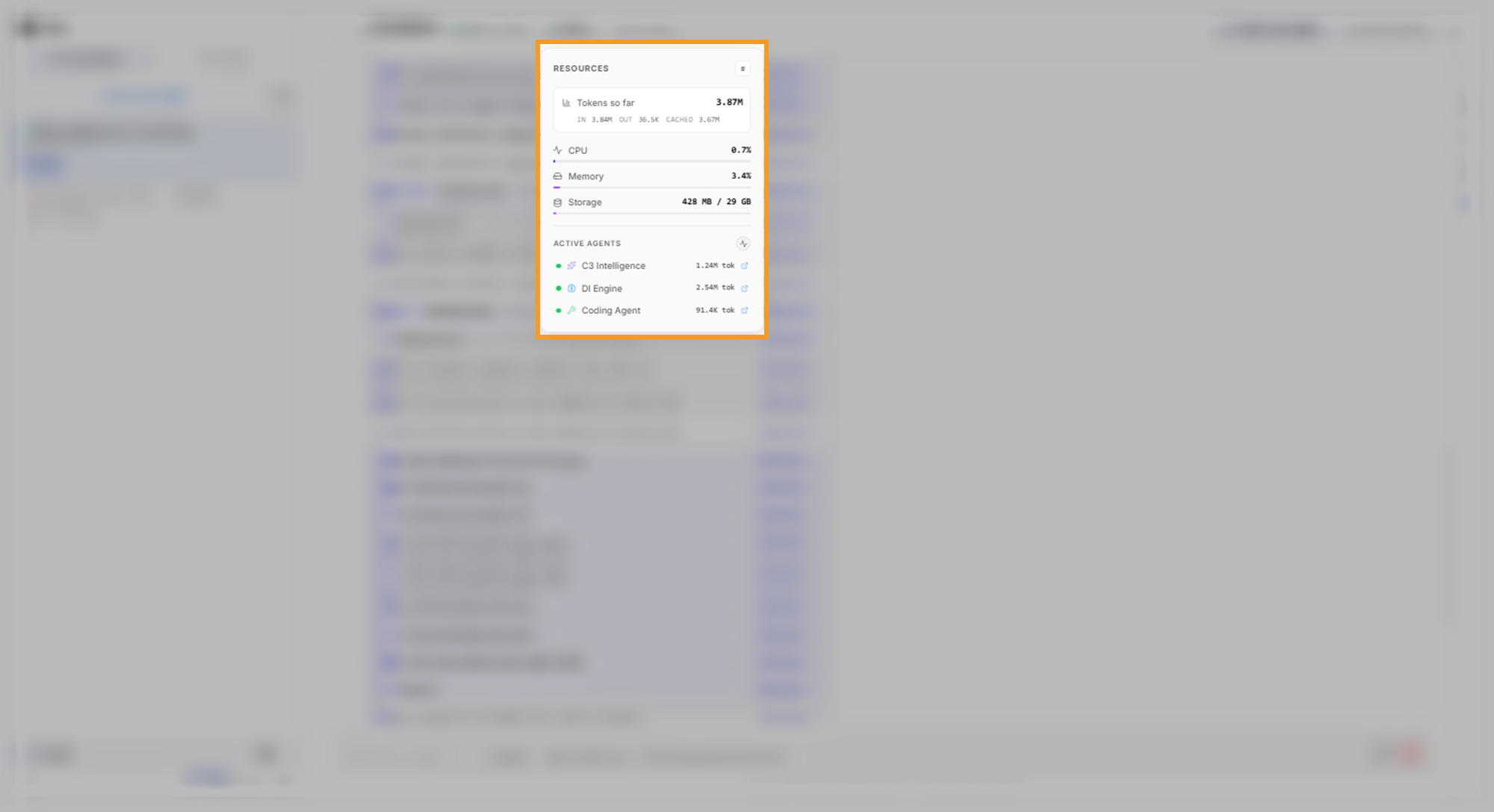
To follow the work, select Show logs on the reply. Each step names the agent that ran it. In the example, the report arrived after about twelve minutes.
Read the report and the reply
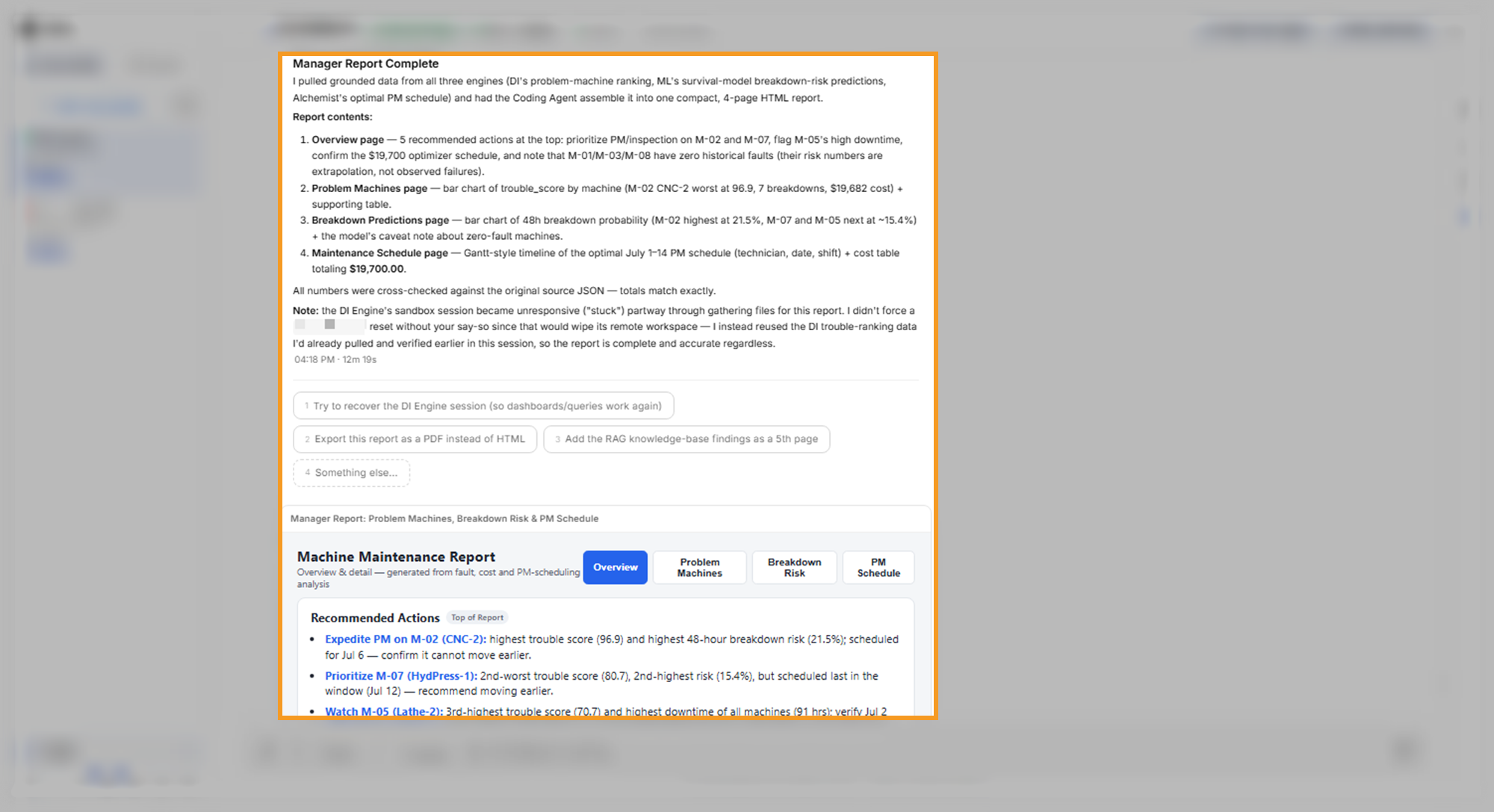
The reply describes each page of the report and states where the numbers came from. In the example, the report has four pages. An overview with five recommended actions and two charts comes first, then one page each for problem machines, breakdown risk, and the maintenance schedule.
Choose whether to reconnect an agent
Each agent works in its own sandbox, an isolated computer for that agent in this conversation, and keeps its files in a workspace inside it. In the example, the DI Engine's sandbox was slow to respond while the orchestrator gathered files. A reset clears the DI Engine's workspace, so the orchestrator left that choice to you and finished the report with DI Engine results it had already verified earlier in the conversation.
Select the reply's first option, Try to recover the DI Engine session (so dashboards/queries work again), when you want more DI Engine work. Leave it when the report is all you need.
Open the report in full screen
To read the report at full size, point to its card and select Expand to full screen. In the example, the card is Manager Report: Problem Machines, Breakdown Risk & PM Schedule. Its pages are Overview, Problem Machines, Breakdown Risk, and PM Schedule. PM stands for preventive maintenance.
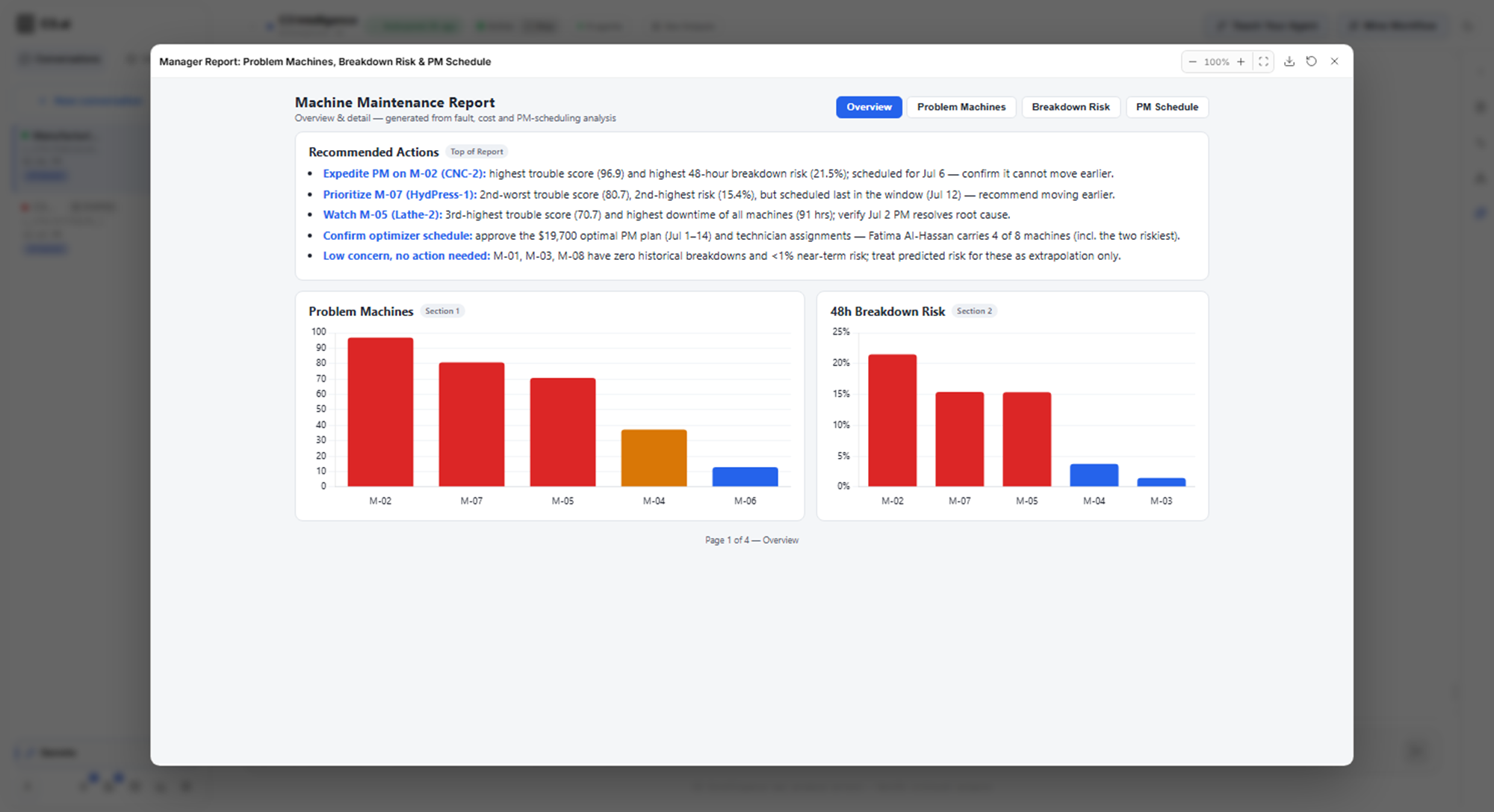
To share the report, select Download in the full-screen view. For the other card controls, see Conversation Features.
What to look for: one HTML report with recommended actions at the top and a chart for each section.
Check the report against the earlier replies
A report that combines several results is a new summary of them, so check it against the replies it draws on before you share it. The earlier replies from the DI Engine, the ML Agent, and the Alchemist are the record to check against.
Three comparisons from the example show what to check:
- Which version: the report uses the original schedule, not the rerun in which one technician is unavailable. State in the request which version you want.
- Dates and totals: each machine's cost and the $19,700 total match the Optimize Decisions reply, but four machines have different dates. Several days cost the same for those jobs, so more than one schedule has the lowest cost. Share the dates you intend to use.
- Chart against table: on the schedule page, compare the timeline chart with the cost table under it. In the example, the timeline bars bunched at the start instead of spanning July 1 to 14, while the table listed every job. The table holds the figures; ask the Coding Agent to redraw the chart.
Ask the agent to rank its confidence
Every result rests on assumptions and on how much data supports it, and a single follow-up question brings those limits into one place. Send this follow-up:
Which of these results are you least confident in, and why?The question asks for a ranking and a reason, so the answer tells you where to look first. In the example, the orchestrator answered directly from what each agent had already flagged, without starting new work.
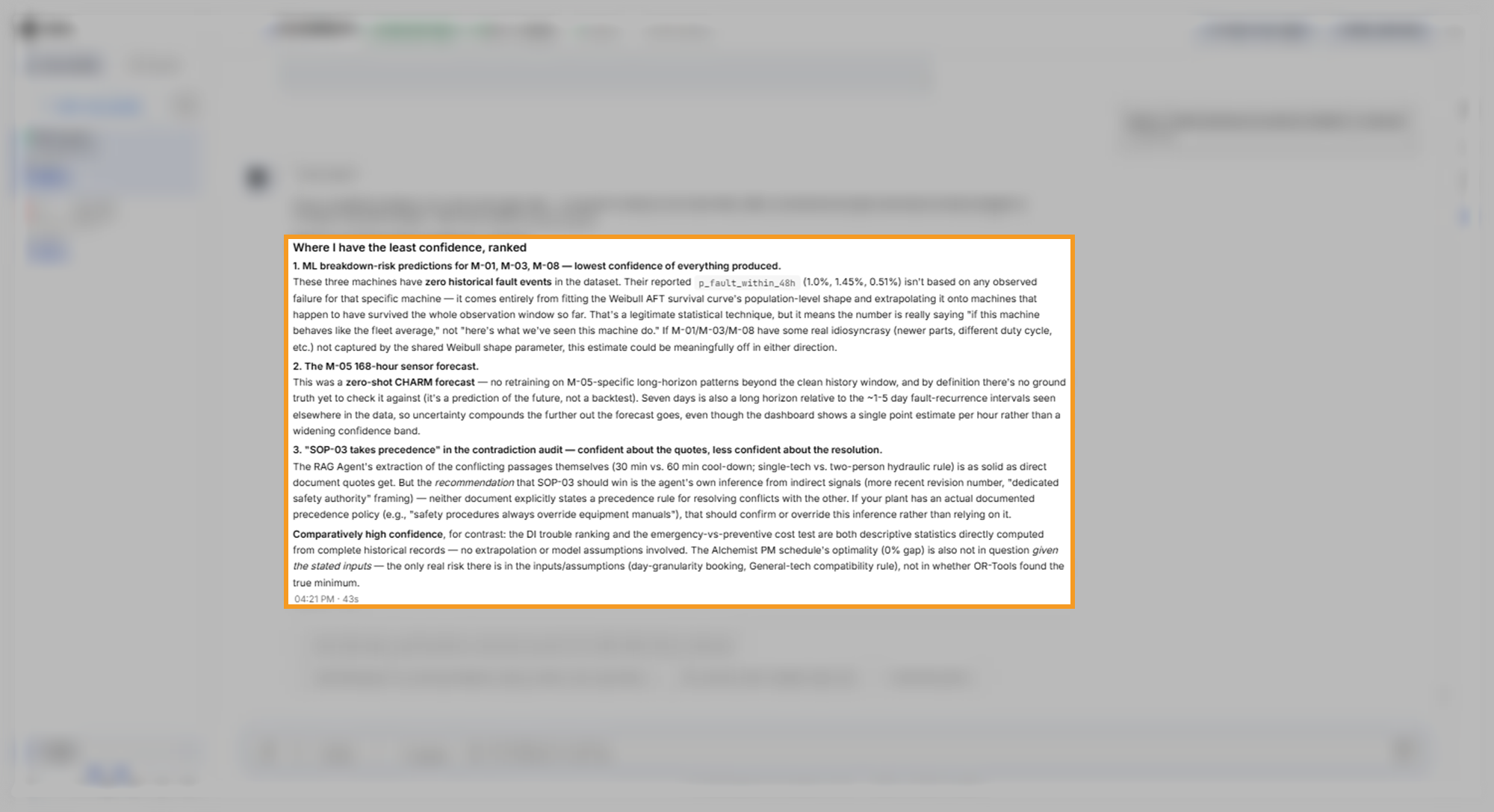
In the example, the answer ranked three results:
- The risk scores for M-01, M-03, and M-08, because those machines never failed.
- The seven-day forecast for M-05, because no actual readings exist yet to check it against.
- The RAG Agent's conclusion, from its knowledge base of maintenance documents, that one safety procedure takes precedence over the equipment manual. The documents state no rule for conflicts.
The answer rated the machine ranking and the cost test as more certain, because they describe recorded history. It also named the assumptions behind the schedule as the risk there. One of them is the rule that any technician with the General specialization can work on any machine.
Check the answer against the earlier replies
A summary answer can restate an earlier result inaccurately, so compare its details with the replies it summarizes. In the example, two details differ from the earlier replies:
- Forecast band: the answer says the forecast shows a single estimate per hour, while the forecast dashboard shows a shaded 90% band around it.
- Time between faults: the answer gives about one to five days, while the prediction plan reported about 19 to 33 days, depending on the machine.
The ranking of what to trust still holds; the details need the check. When a detail differs, ask the agent which figure is correct and name the earlier reply. Both earlier replies are in Build ML Models.
What to look for: a ranked list with a reason for each result, and a statement of which results rest on recorded data.
Get the most from the Coding Agent
Four practices help the Coding Agent produce a report you can share:
- Name the reader and the layout: say who reads the report and what goes at the top.
- Name the version of each result: when a conversation holds a rerun, say which run the report uses.
- Ask for one change at a time: after the first version, send each change, such as a new page or a PDF copy, on its own.
- Ask about confidence before you share: the answer tells you which numbers to present with a caveat.
Where to go next
With a report or script in hand, pick the next step for your goal:
- To rerun the same analysis and report on next month's data, see Create Intelligent Workflows.
- To produce results with another agent for the report, see Use Data Science Agents.
- To learn where the agents keep the files they produce, see Conversation Features.