C3 Generative AI Architecture
The C3 Generative AI Application indexes documents and structured data for search and retrieval. The application uses natural language processing to generate responses grounded in relevant content. The architecture supports data organization and retrieval at query time.
System overview
The application includes two main stages:
Ingest and index data: The application integrates unstructured documents and structured tables from external sources, then processes and indexes the content.
Retrieve content and generate responses: The application accepts natural language questions, retrieves relevant content, and generates responses using agents and large language models (LLMs).
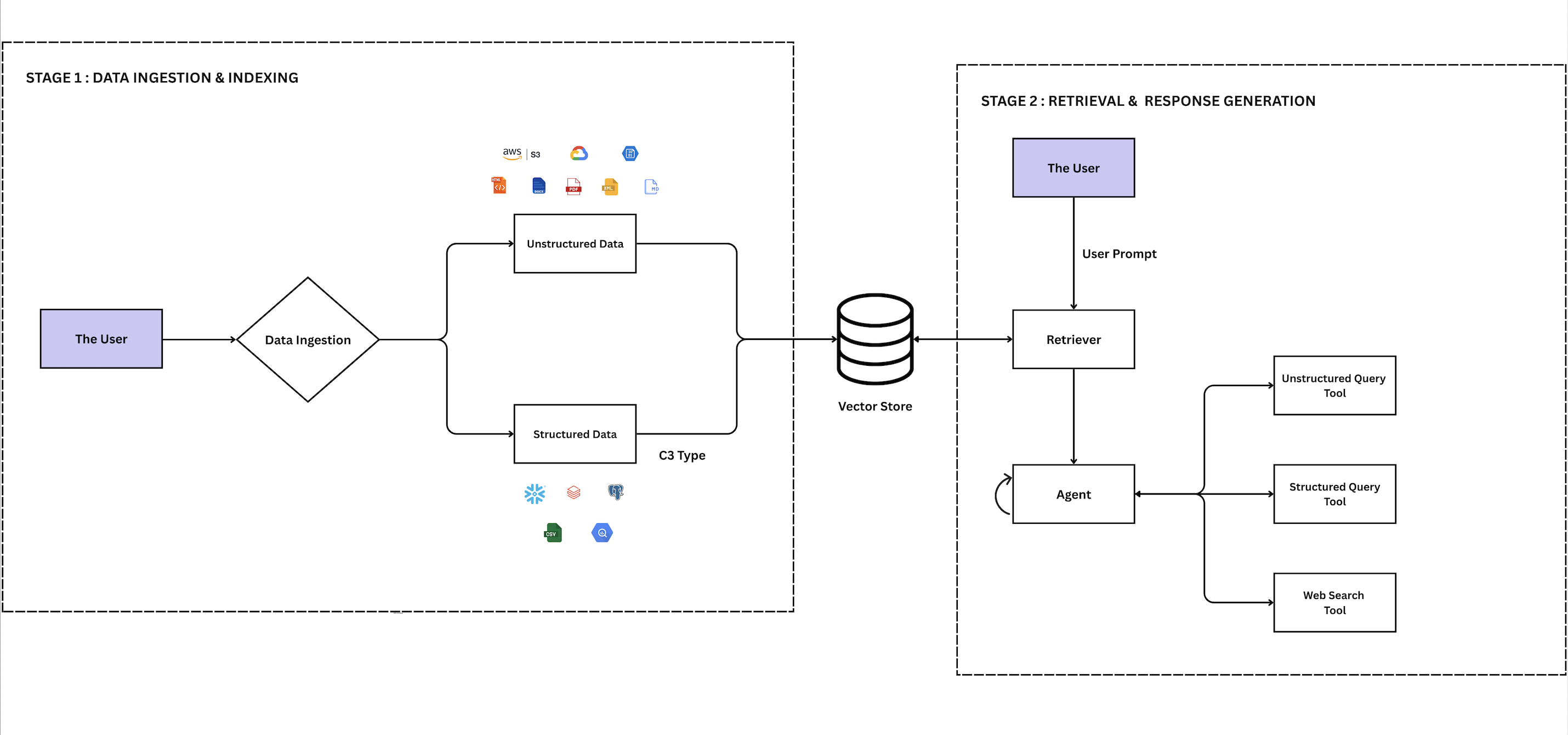
The diagram shows how the application processes data to generate responses. Each component builds on the previous one to convert raw input into contextual answers.
Ingest and index data
The C3 Generative AI Application processes unstructured documents and structured data tables. The application converts raw content into a searchable format to support question answering.
Unstructured data
The application supports unstructured file types, including PDF, HTML, Markdown, and image formats. The application transforms these files before indexing. The application does not support queries on raw or unprocessed content.
You can upload files directly or connect blob storage systems such as AWS S3. These sources contain reports, logs, scanned documents, and similar files.
Source syncing
The application syncs files from external blob stores before processing. The application uses the following Types:
- Genai.SourceSystem: Models external blob store systems such as AWS S3 or Azure Blob Storage.
- Genai.SourceCollection: Represents document collections within each blob store.
- Genai.SourceFile: Represents synced files within each collection.
The application updates metadata for each SourceFile during sync. You can use this metadata to configure how each file is processed.
Process flow
After syncing, unstructured files undergo a multi-step transformation to prepare them for semantic search:
Extract: Extracts plain text by removing layout, formatting, and visuals. This content forms the basis for further processing.
Chunk: Splits full documents into smaller parts called chunks. This improves search precision by allowing the application to return only the most relevant portions of a document. The application uses Genai.SourceFile.Chunker to split files into searchable parts.
Embed: Converts each chunk into a vector, a numerical representation that captures its semantic meaning. The application uses the embedding engine defined in Genai.Retriever to generate these vectors, enabling comparisons based on meaning rather than exact word matches.
Index: Stores these vectors in a vector database as Genai.SourcePassage objects. The application identifies the most semantically similar chunks during retrieval to construct the response.
At query time, the application compares the question you submit to stored vectors and retrieves similar chunks, even if the wording differs. For example, the application can relate "engine overheating" to "thermal spike."
Structured data
The application connects to structured sources. These include CSV files, Snowflake, Data Lake, SAP HANA, PostgreSQL, and ServiceNow.
The application performs a structured search when a question matches values in a structured table. The application sends the results to the language model to generate a response.
For example, the question "How many engines failed last month?" prompts the application to count matching rows in the engine table and return the result.
The application supports common structured data sources through the core ingestion pipeline. Additional features are available for complex formats and enhanced processing.
Additional data ingestion capabilities
The application provides advanced features that support complex formats and improve processing quality:
| Capability | Description |
|---|---|
| Structured Data Ingestion | Processes databases, spreadsheets, and JSON with defined schemas. |
| Unstructured Data Ingestion | Handles documents, emails, and multimedia content without fixed formats. |
| Multi-modal PDF parsing | Extracts text, tables, and images from complex files. |
| Automatic Metadata Extraction (AME) | Extracts metadata like title and date to improve search. |
These features prepare data for accurate and relevant retrieval during question answering.
Retrieval and response generation
In this phase, the application retrieves relevant content based on the input question and uses retrieval and generation techniques to produce a contextual response.
Unstructured data retrieval (RAG)
Retrieval Augmented Generation (RAG) powers how the application answers document-based questions. RAG retrieves semantically relevant chunks and includes them in the prompt to produce a response.
Search by meaning: The application compares the input to stored vectors to identify semantically similar content.
Include in prompt: The application adds the most relevant chunks to the prompt provided to the language model.
Generate response: The application produces a response based only on retrieved content.
This workflow uses the following Types:
- Genai.Agent.Tool.UnstructuredDataQuery: Retrieves content from the vector store.
- Genai.Retriever: Embeds queries and performs similarity search.
- Genai.UnstructuredQuery.Engine.Config: Configures retrieval behavior.
Structured data retrieval
Structured queries target enterprise data such as relational tables, time series, or entity attributes. The application handles these queries through a tool-based workflow that translates natural language into database queries.
This flow uses the following Types:
- Genai.Agent.Tool.StructuredDataQueryPy: Processes structured queries.
- Genai.Agent.Tool.StructuredDataQueryPy.Config: Configures connection behavior, available fields, and query handling.
- Genai.StructuredData.DataModelGraph: Defines the schema, including entities, fields, and relationships accessible to the agent.
Query processing capabilities
The application supports the following enhancements in the query pipeline to manage complexity, maintain context, or enforce policy:
| Capability | Description |
|---|---|
| Configuring the Data Model for Retrieval | Configure whitelisted structured data sources and field mappings for agent database queries and analysis. |
| RAG Unified Tool | Modular retrieval tool with customizable query rewriting, retrieval, reranking, and question answering for unstructured data. |
After retrieving the relevant content, the application uses agents and tools to answer the question. Agents interpret the query, choose the appropriate data, and invoke the necessary tools, such as document search, table queries, or chart generation.
Agents and tools
Agents and tools coordinate to interpret queries and generate responses. The agent identifies the query intent and selects tools to retrieve content, query tables, summarize data, or generate charts.
For example, if the query is "Who is Tom Siebel?" and no relevant data is found, the agent invokes the Web Search Tool to retrieve information from external sources. If the query is "How many engines failed last month?", the agent uses the Structured Query Tool to filter the data and generate a response based on the results.
Tools
Tools perform specific operations. The application implements each tool as a Genai.Agent.Dynamic.Tool and accesses it through a Genai.Agent.Dynamic.Toolkit. The application uses agents that access tools to collect and process the information needed to answer your question. Some tools are built-in, and others are custom.
Dynamic agent
The Dynamic Agent is the default agent for the application. The Genai.Agent.Dynamic.Persistable Type represents the Dynamic Agent and Genai.Agent.Dynamic.Config configures it. The Dynamic Agent supports multi-step queries by selecting appropriate tools and returning responses as text or visual output.
The application includes two pre-configured Dynamic Agents:
Dynamic Agent Canvas: Allows you to work with your enterprise data and applications through data analysis, document creation, and visualization capabilities.
Deep Research Agent: Allows you to perform research and document creation tasks, including in-depth analysis, structured reporting, and comprehensive documentation.
For more information on the Dynamic Agent, see Dynamic Agent Overview.
Reasoning and tool capabilities
The following capabilities extend agent reasoning and tool functionality:
| Capability | Description |
|---|---|
| Dynamic Agent System Prompts | Define predefined inputs that shape agent behavior and determine response sequences using available tools. |
| Dynamic Agent Few Shot Examples | Provide example responses to guide agent reasoning through in-context learning for better accuracy. |
| Creating Custom Tools | Extend the application by building your own tools for the dynamic agent. |
Agents and tools provide the intelligence and functionality to answer questions. To ensure you only access authorized information, the application also enforces strict access control mechanisms.
Workflows
The application includes workflow capabilities that automate multi-step business processes. Workflows are visual sequences of connected tasks that can process data, make decisions, and generate outputs without manual intervention.
Workflow fundamentals
Workflows consist of individual processing steps called nodes, connected by paths called edges that control execution order. Each workflow maintains a shared data workspace that nodes can read from and write to during processing.
You can design workflows through a visual interface where you can see how data flows between different steps. The system handles execution, state management, and error handling automatically.
The workflow system uses the following Types:
- Genai.Agent.Resource.Workflow: The core workflow functionality that manages workflow creation, execution, and state.
- Genai.Workflow.Node: Represents individual processing steps within a workflow.
- Genai.WorkflowExecution: Tracks individual workflow runs and manages outputs.
- Genai.Workflow.Config: Defines global settings for workflow generation and available components.
Workflows can handle tasks like document processing, data analysis, approval chains, and automated reporting. Workflows integrate with the broader application ecosystem to access data sources and generate responses.
To learn more about building workflows, see C3 AI Workflows Overview.
See also
After learning how the C3 Generative AI Application processes data, start by reviewing infrastructure and access requirements in C3 Generative AI Application Prerequisites.
Then follow the steps in C3 Generative AI Application Initialization to deploy the application in your environment.