8.10 Release Notes for the C3 Agentic AI Platform
Discover what is new in C3 Agentic AI Platform 8.10 release. The following release notes describe new features, and enhancements introduced in this release of C3 Agentic AI Platform.
C3 Agentic AI Platform
The C3 Agentic AI Platform 8.10 release delivers significant updates and enhancements across the user interface (UI), Code Editor, Observability, and Core Infrastructure, with a strong focus on improving scalability, stability, and overall performance. This release reflects continued investment in foundational improvements that enhance system robustness, optimize workload execution, and elevate the user experience—helping organizations operate their AI applications with greater confidence and efficiency.
Removal of C3 Code Assistant
The C3 Code Assistant in VSCode and Jupyter is no longer supported as of C3 AI Platform 8.10. However, the documentation chat feature (C3 AI Assistant) continues to be supported.
Improved functionality is now available in the following C3 products:
- C3 MCP services (which can be used by third party agents like GitHub Copilot and Cursor)
- C3 Documentation Chat (C3 AI Assistant)
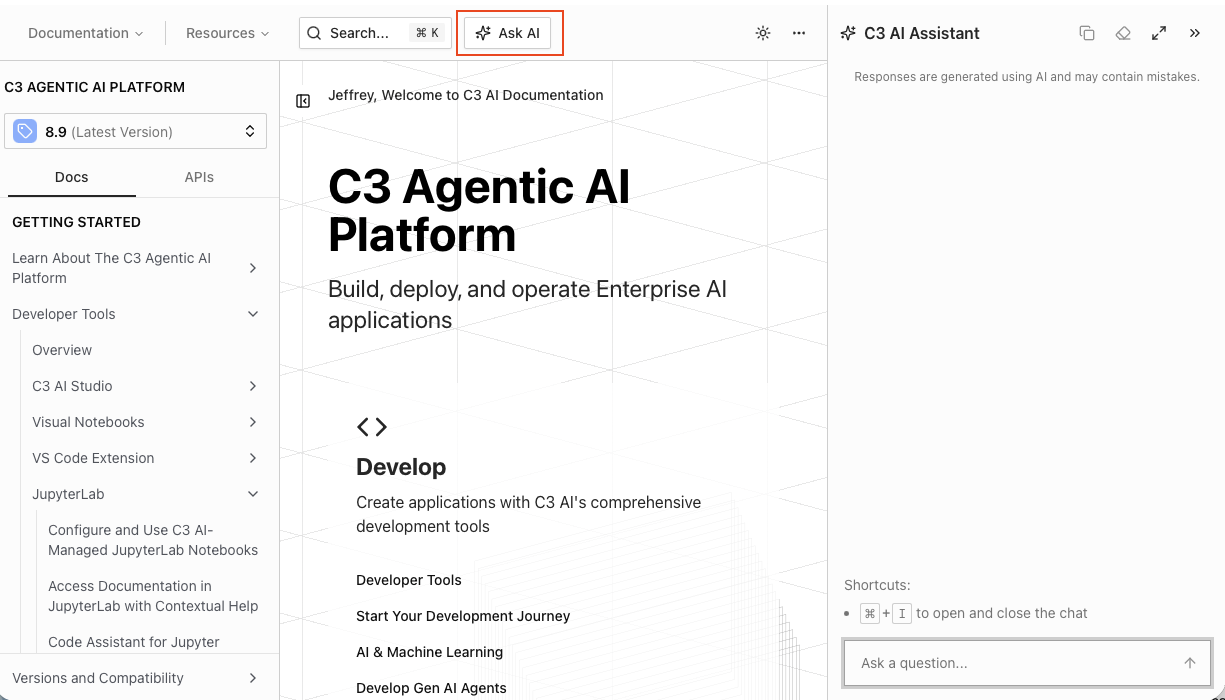 |
| C3 Documentation Chat |
C3 AI Studio
C3 AI Studio accelerates AI application development, deployment, release management, and operations by offering a visual interface to the C3 Agentic AI Platform.
Agent Lifecycle Management
This release introduces significant enhancements to Agent Lifecycle Management with expanded UI-driven configuration, tooling, evaluation, and reusable skills. For concepts and workflows, see Agent Evaluation Overview and Getting Started — Agent Evaluation.
See the following for more information on Agents:
Configuration
- Auto Context Compaction and Summarization: Now supported for the built-in LangChain agent GenaiCore.Agent.LangChain and enabled by default.
- Data Model Graph Configuration UI: Allows users to add information about an application’s data model directly in the Agent Workbench, ensuring the agent is able to more successfully query the application.
NOTE: Data Model Graph Configuration is only supported for Dynamic Agent.
- Agent Workbench UI Skills Support: Users may add skills to their agents directly through the UI on the Agent Workbench.
Tools
Semantic Search Tool UI: Users can now create semantic search tools GenaiCore.Tool.SemanticSearch for their agents in the UI using the Tool Workbench. This enables Retrieval‑Augmented Generation (RAG) workflows for their C3 Agents.
Evaluation
C3 Agent Evaluation is a framework for measuring, comparing, and improving agent behavior using versioned datasets, experiments, runs, and metrics.
Backend
- The evaluation lifecycle is modeled with Datasets GenaiCore.Eval.Dataset and GenaiCore.Eval.Experiment
- Datasets consist of structured (CSV like) or unstructured (JSON) test cases.
- Experiments can run different Agents against the Datasets and evaluate the results with DeepEval metrics, a built in rubric-based metric, or custom Python metrics
UI In C3 AI Studio, open Agents → Evaluation. From there you can:
- Manage experiments.
- Inspect runs and per-test-case results.
- View Traces of test cases runs for debugging.
- Use Compare Runs to see side-by-side regressions and improvements with metric deltas.
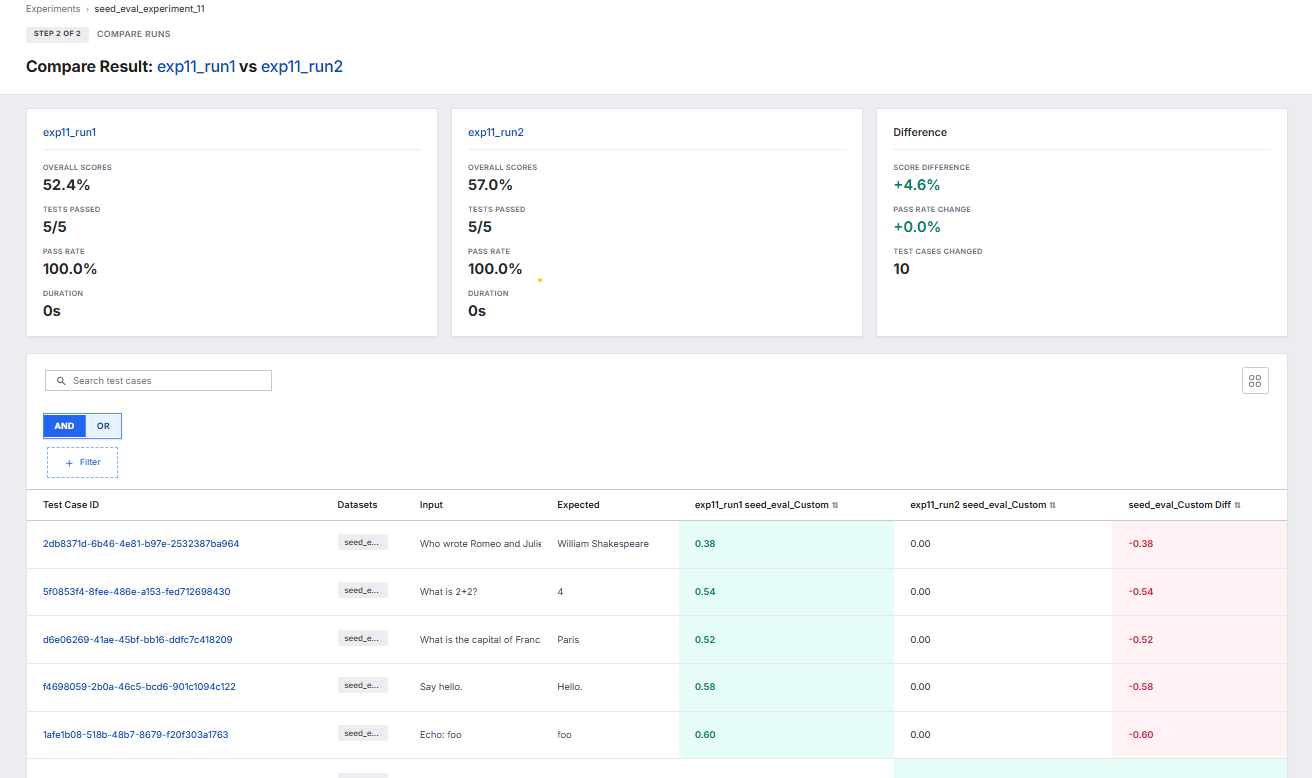 |
| Compare Runs in Agent Gallery |
Skills
C3 Agents now support skills GenaiCore.Skill. Use Agent Skills to provide task-specific instructions, reference materials, and executable scripts at runtime. Skills encapsulate repeatable workflows in self-contained packages, enabling agents to produce consistent outputs across environments. See Create and Add Skills for more information.
The C3 AI Platform 8.10 release includes numerous available skills covering a wide range of platform capabilities. These skills provide specialized knowledge and automation for common development and debugging tasks. Skills span the following categories:
- Data & Storage (time series, data lakes, batch processing, caching, file systems)
- Data Sharing & Connectivity (cross-application data sharing, REST clients)
- Compute & Orchestration (cron jobs, workflows, MapReduce, async queues)
- Machine Learning & AI (agents, feature stores, ML pipelines, metrics)
- Platform & Configuration (ACLs, config management, roles & permissions, schema migrations)
- Developer Tooling (testing, skill creation, type generation)
Data Fusion
C3 AI Data Fusion 8.10 delivers a comprehensive visual interface for data integration pipeline management. This release consolidates source system management, pipeline configuration, and monitoring into a single unified canvas, eliminating the need to navigate between separate tabs. Data engineers and application developers can now build and manage complete data pipelines from source to entity in one place.
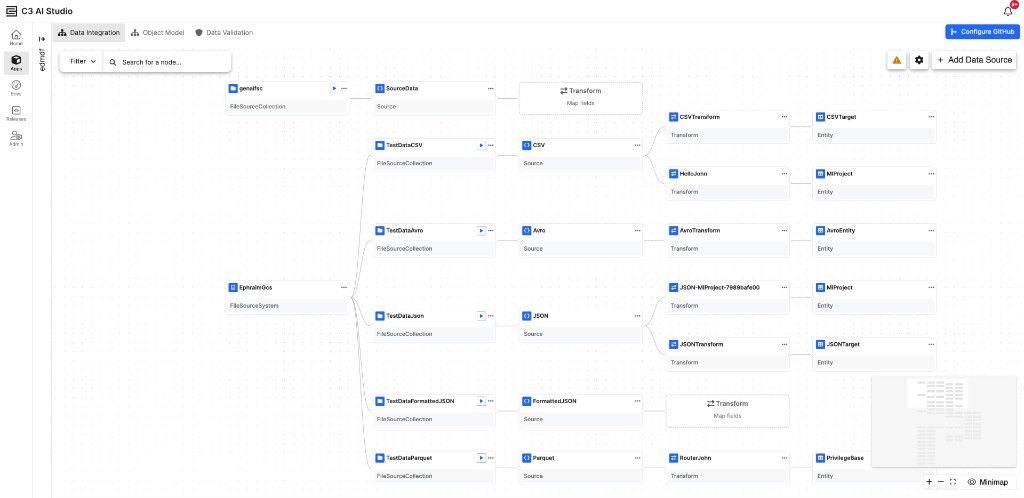 |
| Data Integration Canvas in C3 AI Studio |
See the following for more information on Data Fusion:
- Data Fusion Overview
- Select and Modify Data Sources for Data Integration in Data Fusion
- Configure the Source System and Source Collection
Unified Canvas Experience
The Data Integration Canvas is now the single point of entry for all pipeline configuration, including source system management. The separate Data Sources tab has been removed; all configuration is performed directly on the canvas.
- Left-to-Right Pipeline Visualization: Pipelines are displayed as a left-to-right flow of nodes: Source System, Source Collection, Source, Transform, and Entity. Each node type has distinct icons and states (configured, unconfigured, error, disabled) for immediate visual clarity.
- Multi-Pipeline Visualization: When a Source Collection is shared across multiple pipelines, it is displayed as a duplicate node on each pipeline, making data flow dependencies explicit.
- Inline Error Visibility: Right-click context menus on any node surface package errors, runtime failures, and configuration issues directly in the canvas, without navigating to separate error pages.
- User-Defined Naming: All node configuration modals support user-defined names for generated package files and runtime instances, giving meaningful identifiers in version control.
Pipeline Reconnection
When pipeline components are deleted or become disconnected, 8.10 introduces a left-to-right reconnection model that restores pipeline integrity:
- Left-to-Right Workflow: Reconnect broken pipelines by selecting existing, valid nodes from left to right. For example, when a Source System is deleted, configure a new Source System and then select the existing Source Collection to reconnect.
- Existing Node Selection: When adding a new node, the configuration flow shows existing valid nodes (with no package errors) for selection, enabling reconnection to same or different source systems.
- Broken Pipeline Safeguards: Broken pipelines (invalid configuration, missing dependencies) cannot be manually executed. The Execute pipeline action is disabled until the pipeline is repaired.
Source System Enhancements
Source systems represent connections to external data sources. In 8.10, they are created and managed directly from the Data Integration canvas.
- Source System Switching: Change a configured source system to a different connector of the same type without reconfiguring the entire pipeline. For example, switch from an S3 source system to Azure Blob Storage, or from one Snowflake database to another.
- Context Menus: Left-click opens the connector properties modal for editing; right-click provides actions to delete the connector or view package errors.
Source Collection Enhancements
- Path Updates: Source Collections can now be updated to point to different file paths, database tables, or streams without re-creating the pipeline.
- Enhanced Execute Pipeline Modal: The execute pipeline modal now displays per-file processing status (Not Processed, Processing, Processed, Failed), glob filtering, file selection via checkboxes, and runtime configuration parameters.
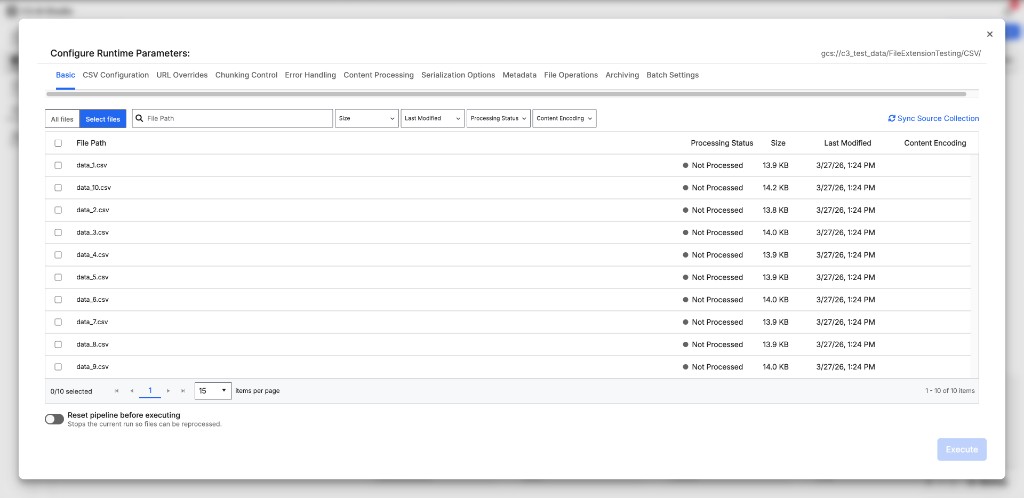 |
| Execute Pipeline with per-file processing status and runtime parameters |
- SQL Source Collection Preview: SQL Source Collections feature an enhanced preview with a toggle between Virtual Table (query-only, no ingestion) and Load Data (ingest through Data Integration pipeline) modes, with CDC ordering configuration when Load Data is selected.
Transform & Entity Enhancements
- Integrated Filter Conditions: Filter logic is now configured directly within transforms rather than as separate filter nodes, reducing canvas complexity.
- Remixing Support: Transforms and entities from dependency packages can be edited through a two-pane remixing experience. The left pane shows the original definition, while the right pane shows the remix.
- Entity Node Actions: Entity nodes now include context menu actions to view data in a paginated table, edit properties, remove all entity data, and navigate directly to the entity in the Object Model tab.
- Preview Source and Preview Transform: Buttons to preview source data and transform output are positioned directly in the transform configuration modal.
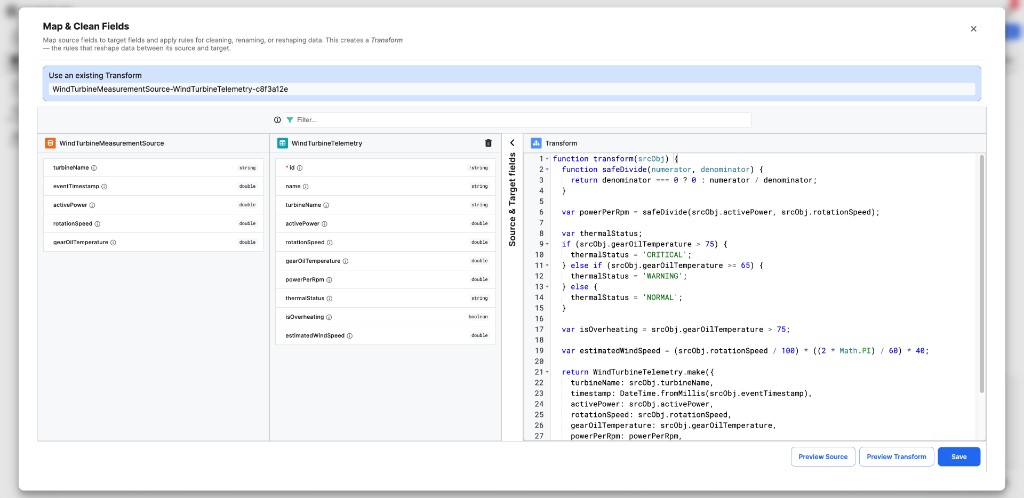 |
| Map & Clean Fields with source schema, target schema, and transform code |
Expanded Connector Library
Release 8.10 expands the authentication options for cloud storage and database connectors to support enterprise security requirements:
- Snowflake: RSA key pair authentication for service accounts, in addition to standard username/password.
- Azure Blob Storage: Managed Identity, Service Principal, and Workload Identity Federation, in addition to Connection String and SAS Token.
- OneDrive: User OAuth interactive flow and Service Principal authentication.
- Amazon S3: EKS Pod Identity/IRSA (Kubernetes service account identity), IAM Role for cross-account access, and OIDC Web Identity federation, in addition to Access Key/Secret Key.
- Google Cloud Storage: GKE Workload Identity and Workload Identity Federation, in addition to Service Account Key and Access Token.
- Google Drive: Service Principal with domain-wide delegation.
- Azure Event Hubs: Connection String, Service Principal, and SAS Token.
Change Data Capture (CDC) Pipelines
Release 8.10 introduces first-class CDC support for SQL-based sources, enabling incremental data loading through the visual pipeline interface.
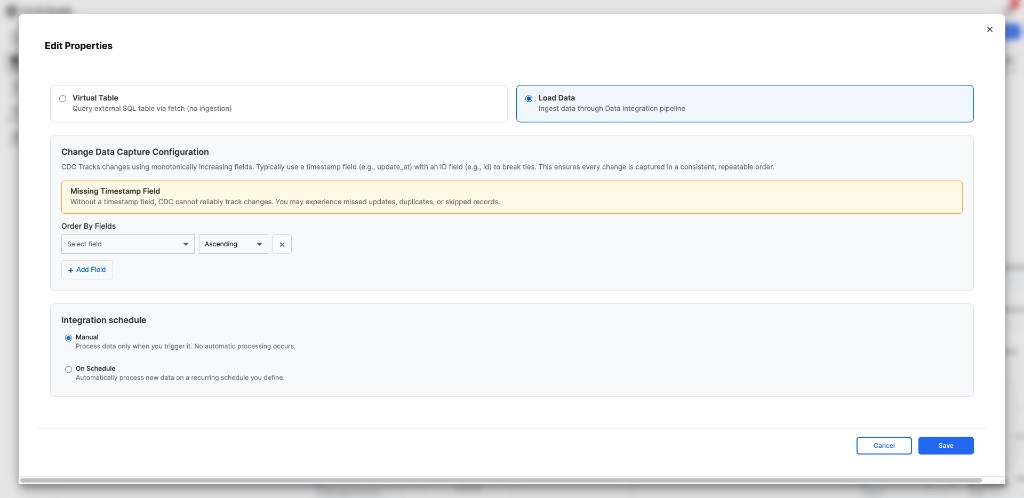 |
| CDC configuration with Virtual Table and Load Data modes |
- End-to-End CDC Flow: Configure CDC ordering fields, checkpoint tracking, and scheduling directly from the Source Collection properties modal. The Virtual Table vs. Load Data toggle controls whether the source operates as a query-only view or ingests data through the pipeline.
- Execute Pipeline for CDC: The CDC execute pipeline modal shows the last checkpoint status and supports standard incremental, custom time range, and full reprocess execution modes.
- Scheduling and On-Demand Sync: Configure incremental scheduled syncs on supported tables and trigger on-demand runs with clear last-sync status and timestamps.
See the following for more information on Change Data Capture:
- Understanding Change Data Capture (CDC) in Data Fusion
- Configure Change Data Capture (CDC) in Data Fusion
Production Mode Safeguards
When an application is in test or production mode, the Data Integration canvas operates with restricted permissions to prevent accidental configuration changes.
- Read-Only Configuration: All context menus (except Entity node), node editing, source system changes, delete operations, and configuration interfaces are disabled in production mode.
- Available in Production: Manual pipeline execution for File and SQL Source Collection pipelines, stream control (pause/start) for Cloud Message streams, and entity data viewing remain available.
- Restricted Execute Pipeline: The production mode Execute pipeline modal removes the reprocess files, clear target data, and clear queues/statuses toggles, while retaining glob filtering, file selection, and execution mode selection.
Unstructured Data Integration (UDI)
In 8.10, the core unstructured data integration engine has been integrated directly into the C3 Agentic AI Platform. Previously available only within the standalone Generative AI application, these document ingestion, parsing, chunking, embedding, and retrieval capabilities are now platform-level infrastructure accessible to any C3 application.
- End-to-End Document Processing Pipeline: A configurable pipeline orchestrates the full document lifecycle: file synchronization from cloud storage, format-specific parsing, passage extraction, LLM-powered metadata tagging, vector embedding, and indexing into a vector store.
- Universal Document Parsing: A universal chunker automatically delegates to format-specific parsers for PDF (via the Mew3 multimodal parser), Microsoft Office (Word, PowerPoint), Excel, Markdown, HTML, plain text, and images. Each parser produces structured passages (text, table, and image subtypes) with bounding box metadata.
- LLM-Powered Metadata Tagging: Configurable metadata extraction uses LLMs to automatically categorize and tag documents with structured attributes. Supports extraction, labeling, and clustering strategies with configurable prompts and category definitions.
- Vector Embedding and Retrieval: Dense and sparse embedding support with configurable embedding models. PgVector-based retrieval supports HNSW indexing, cosine similarity search, Maximal Marginal Relevance (MMR), and Reciprocal Rank Fusion (RRF) for hybrid search.
- Parallel Processing at Scale: MapReduce-based parallel chunking and batch jobs for file synchronization and post-chunking operations enable efficient processing of large document corpora.
- Dedicated Python Runtimes: Three isolated Python 3.12 runtime groups -- document parsing, embedding and retrieval, and content safety -- provide dependency isolation and independent scaling.
- ACL-Based Access Control: Source collections and source files support per-object access control lists with configurable roles, enabling secure multi-tenant document management.
Object Model (ERD)
The Object Model tab displays an Entity Relationship Diagram (ERD) that surfaces the overall structure of data within your integration. Version 8.10 introduces new visualization and management capabilities. See Manipulate ERD Views with Object Model for more information.
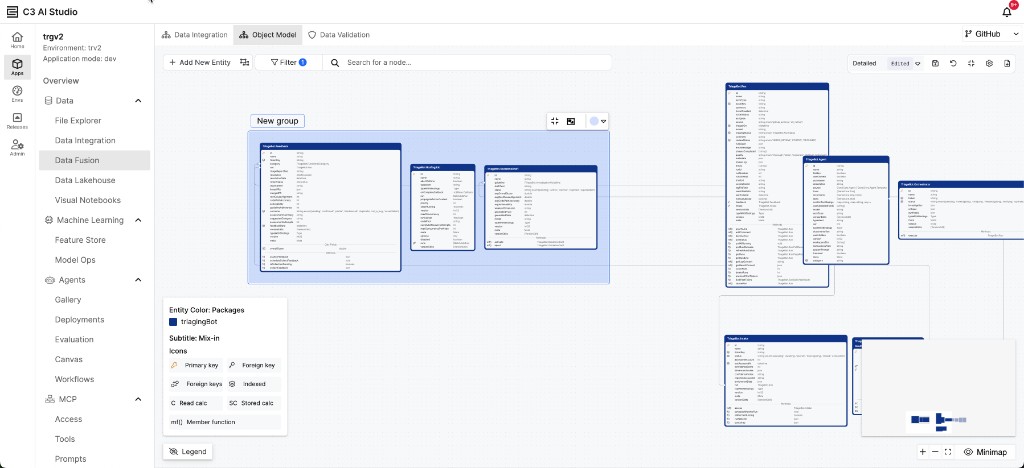 |
| Object Model with entity grouping in C3 AI Studio |
- Entity Grouping: Group related entities together in the ERD canvas for visual organization and clarity. Select entities to create named groups that keep related types together.
- File-Based Creation: Upload CSV or JSON files with automatic schema inference to generate entities directly in the Object Model tab.
- GenAI Integration: AI-powered code suggestions and diff analysis for entity type definitions.
- Virtualized Entities: Create virtualized entities directly in the Object Model tab.
Data Validation
A new framework for defining, executing, and monitoring data quality rules. See Build and Run Data Validation Rules in Data Fusion for more information.
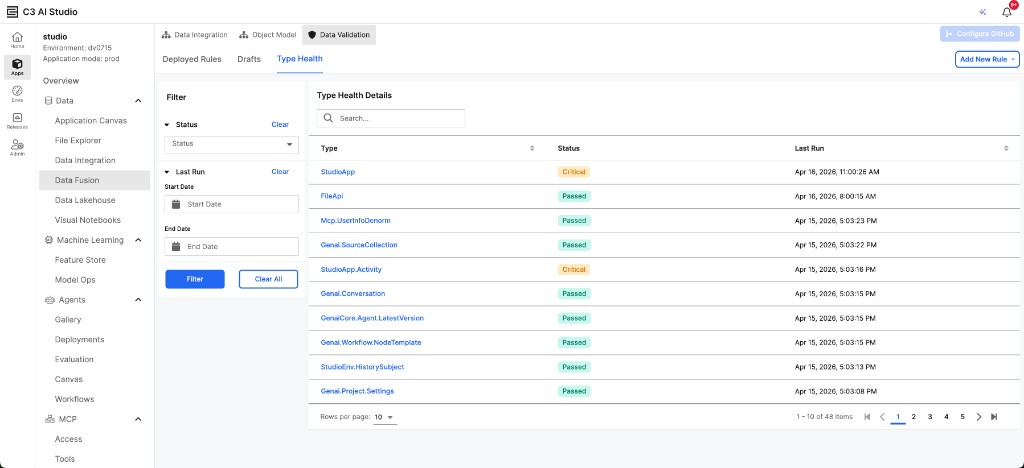 |
| Type Health Dashboard in Data Validation |
- Rule Types: Built-in Foreign Key Reference checks for referential integrity, and custom Lambda rules (Python or JavaScript) for complex validation logic using MapReduce.
- Templates: Pre-built templates accelerate rule creation for common use cases: Tutorial (comprehensive examples), Blank Template, Timeliness Rule (validates data freshness within a time window), and Data Point/Interval Count Rule (validates record counts for specified locations).
- Type Health Dashboard: Monitors the aggregate validation status of data types (Passed, Critical, Error) with detailed execution history, failure analysis, and filtering by status and date range.
- Management: Full lifecycle management includes rule drafting, deployment to production, recurring schedules, and failure notification.
GitHub Integration
Connect your application to GitHub either when first creating your application or from within Data Fusion. See Version Control with GitHub for more information.
- Publishes packages to Git with clear conflict resolution options (use local version, force push, or resolve using the GitHub UI).
- Contains enriched status information (PR links and conflict indicators).
- Uses enhanced Git history APIs to query changes by user, date range, and other filters for easier auditing and troubleshooting.
C3 AI Data Lakehouse, SQL Editor, and Spark
This release introduces a wide set of improvements to Data Lakehouse workflows and Spark/SQL integration.
Data Lakehouse
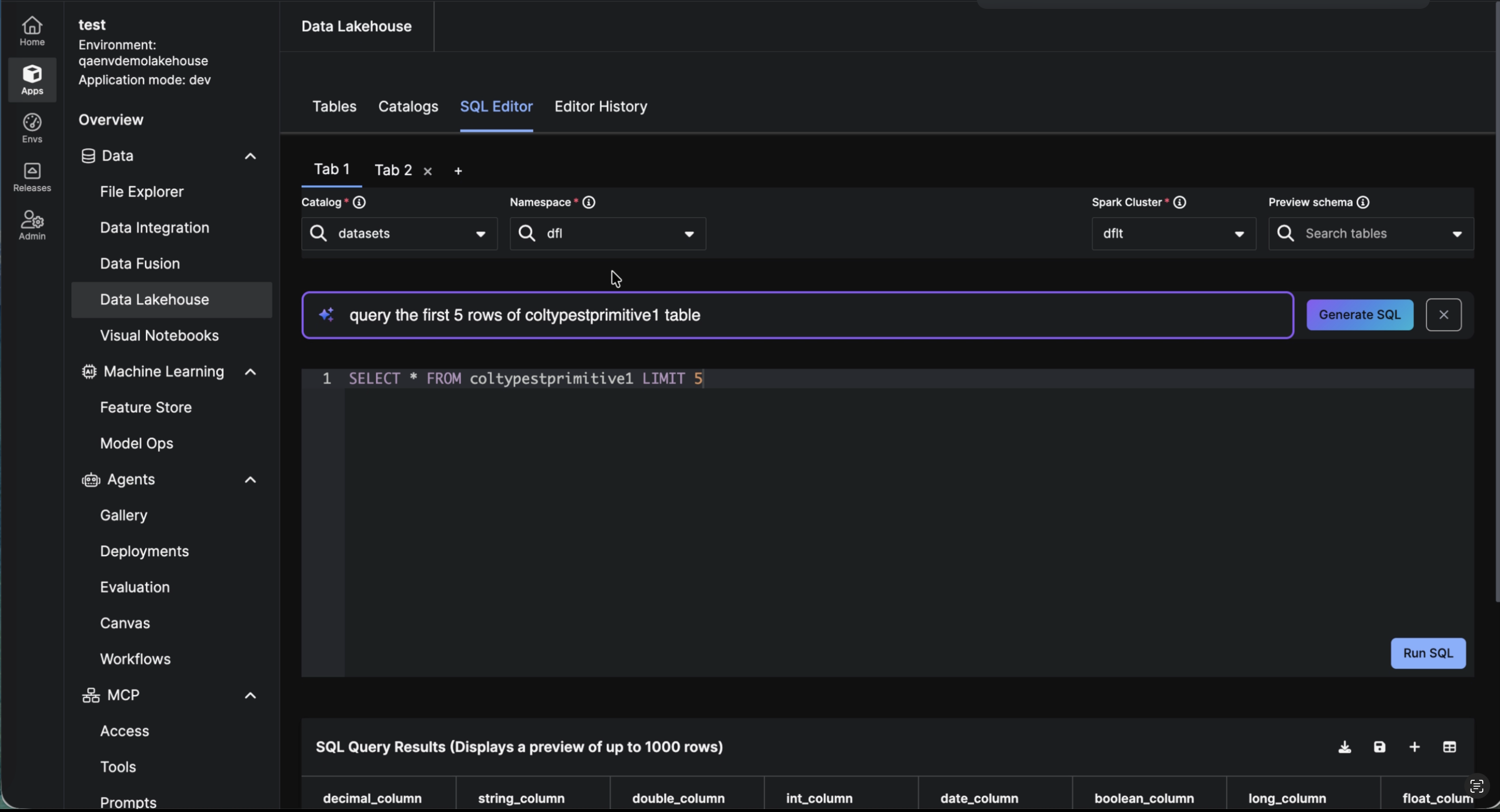
Version 8.10 introduces multi‑tab SQL editing with centralized execution history. This release adds table‑level branching with isolated writes, schema evolution, native snapshot versioning, tagging, time travel, and rollback. Data Lake Table Sharing and the C3 Spark Catalog further enable secure cross‑application access to Iceberg tables.
Multiple Tabs & Swappable Spark Clusters The SQL Editor supports multiple tabs, each maintaining its own query text, dataset context, and execution history. Each tab displays the active Spark cluster and allows seamless switching between clusters, limited to those accessible to the user or application. Editor History captures the cluster used for each run, ensuring full traceability.
 |
| SQL Editor in Data Lakehouse |
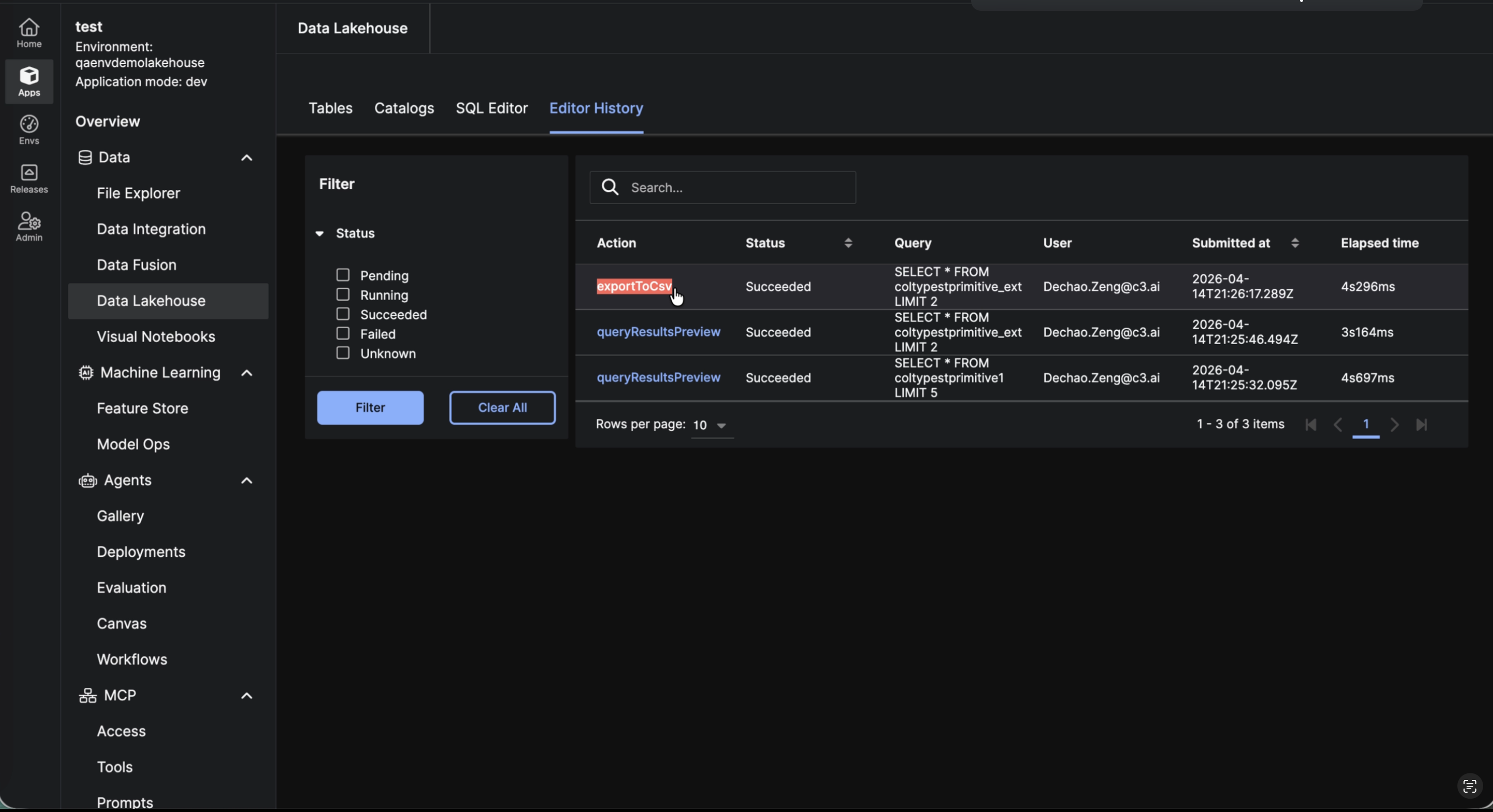
Editor History A dedicated Editor History tab in the Data Lakehouse UI provides a searchable, paginated log of all SQL Editor executions. Each entry shows the action, status (Pending, Running, Succeeded, Failed, Unknown), query text, user, submission timestamp, and elapsed time, giving full visibility into who ran what and when, directly from the Studio interface.
 |
| Editor History in Data Lakehouse |
Branching Data Lake tables now support Table-Level Branching. Every table has a main branch by default. All read and write APIs accept an optional branch parameter (default: "main").
- Branch isolation: Data written to a branch is fully isolated from the main branch. Branches are auto-created on the first write, no provisioning required.
- Primary keys: Define one or more columns as primary keys at table creation time using
CreateTableSpec.primaryKeys([...]).
Note: Float, double, and optional fields cannot be used as primary keys.
- Schema isolation: Use
changeSchemaon a non-main branch to evolve a table's schema independently. Schema changes on a branch do not affectmainor any other branch. - Branch-aware read APIs:
readAsTuples,readArrowIterator, andreadPartitionsall support the branch parameter, making it straightforward to read from any branch without changing existing workflows. - Branch metadata: Use
DataLake.Catalog.TableSpecwithwithBranch()andwithIncludeSnapshots(True)to inspect branch-specific snapshot history and schema.
Table Sharing Data Lake Table Sharing allows users to share tables across applications and access DataLake tables through the C3 Spark Catalog.
- Share Iceberg tables across applications: The owner of an application can grant another application read-only access via
C3.app().allowAccess(...)and Role definitions. Access is table-level and per application, all users in the consumer application share the same access level. - Register an external catalog: Use
DataLake.Catalog.Config.ExternalAppto list and read tables in another application's catalog from the current application. Note: write operations are not supported on external catalogs. - C3 Spark Catalog: Use the unified C3 Spark catalog so Spark can discover and query DataLake tables directly. Tables are referenced with identifiers like
catalog.namespace.tableName.
Tagging & Versioning Data Lake tables automatically create snapshots on every write, maintaining a complete, versioned history of table state for reproducibility, auditing, and rollback.
- Snapshot history: Inspect all snapshots and associated metadata using
snapshotHistory(), enabling full visibility into table evolution. - Time travel: Query a table as it existed at a specific point in time using the
asOfparameter, ensuring consistent, point-in-time analysis. - Tagging: Assign human-readable labels to snapshots using
tagSnapshot, resolve them withsnapshotByTag, list viatags, and remove withremoveTag. Multiple tags can be associated with a single table to represent logical states (e.g., “gold”, “prod”). - Versioned reads: Access specific table versions using snapshot IDs, timestamps, or tags, enabling reproducible pipelines and consistent downstream consumption.
- Rollback: Restore a table to a previous state using
rollbackToSnapshot(), simplifying recovery from errors and enabling safe experimentation.
Spark Execution
Previously, debugging Spark jobs was slow and inefficient due to limited visibility into job status, errors, and resource utilization. There was also a weak correlation between user actions (SQL queries, Jupyter notebooks) and the underlying Spark executions. Cluster health and utilization were not clearly surfaced in the UI.
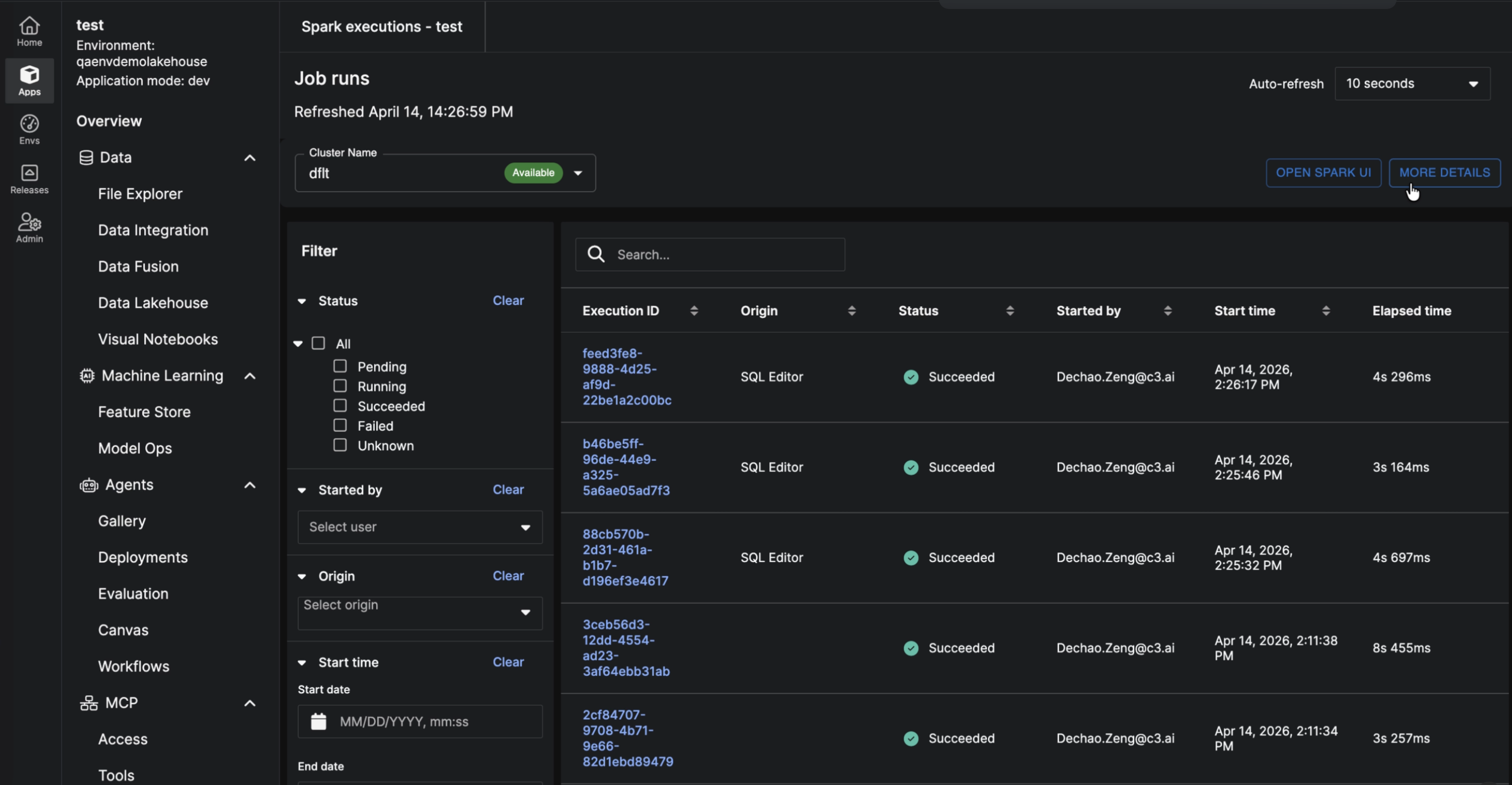
This release introduces comprehensive Spark Execution Monitoring capabilities that provide end-to-end visibility into Spark workloads across all execution paths on the C3 Agentic AI Platform. Users can now seamlessly track query progress, inspect execution details, correlate workloads to user actions, and proactively troubleshoot performance issues directly within the platform.
 |
| Spark Execution |
Enable Spark execution logging: Create a Data.SparkSession with enableLogging=true to capture execution details. All runs are recorded on the SparkExecution type for centralized tracking and analysis. Inspect runs in C3 AI Studio (Spark Executions Page): Track query progress, review execution details, and troubleshoot issues in real time. Unified traceability across execution paths: SQL Editor runs are logged the same way as Jupyter and Console executions, providing a single, end-to-end traceability view, regardless of how Spark is invoked.
Release Management
C3 AI Release Management is the C3 Agentic AI Platform native continuous integrations (CI) system. It allows developers to run tests and deploy artifacts that can be used to deploy applications.
Release Management Service Throughput Monitoring
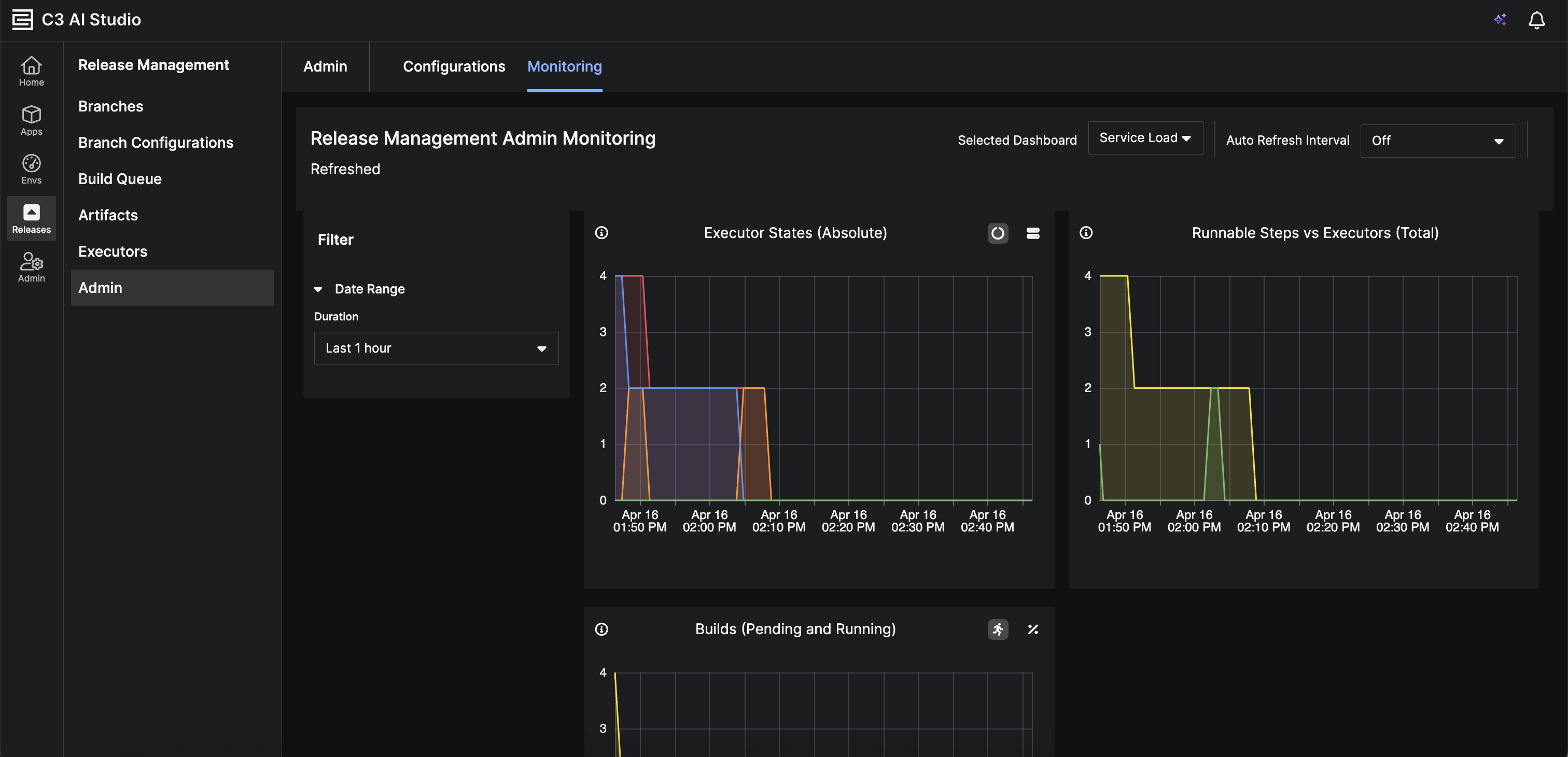
Administrators can now view Release Management service throughput metrics directly in the Admin > Monitoring section. This provides real-time visibility into service performance and request capacity.
 |
| Release Management Service Throughput |
Enhanced Build Pipeline Monitoring
Version 8.10 now includes a new chart option in the sticky panel. Navigate to Build > Pipeline > Step > Bottom Sheet. This provides real-time visibility into executor resource consumption during step execution.
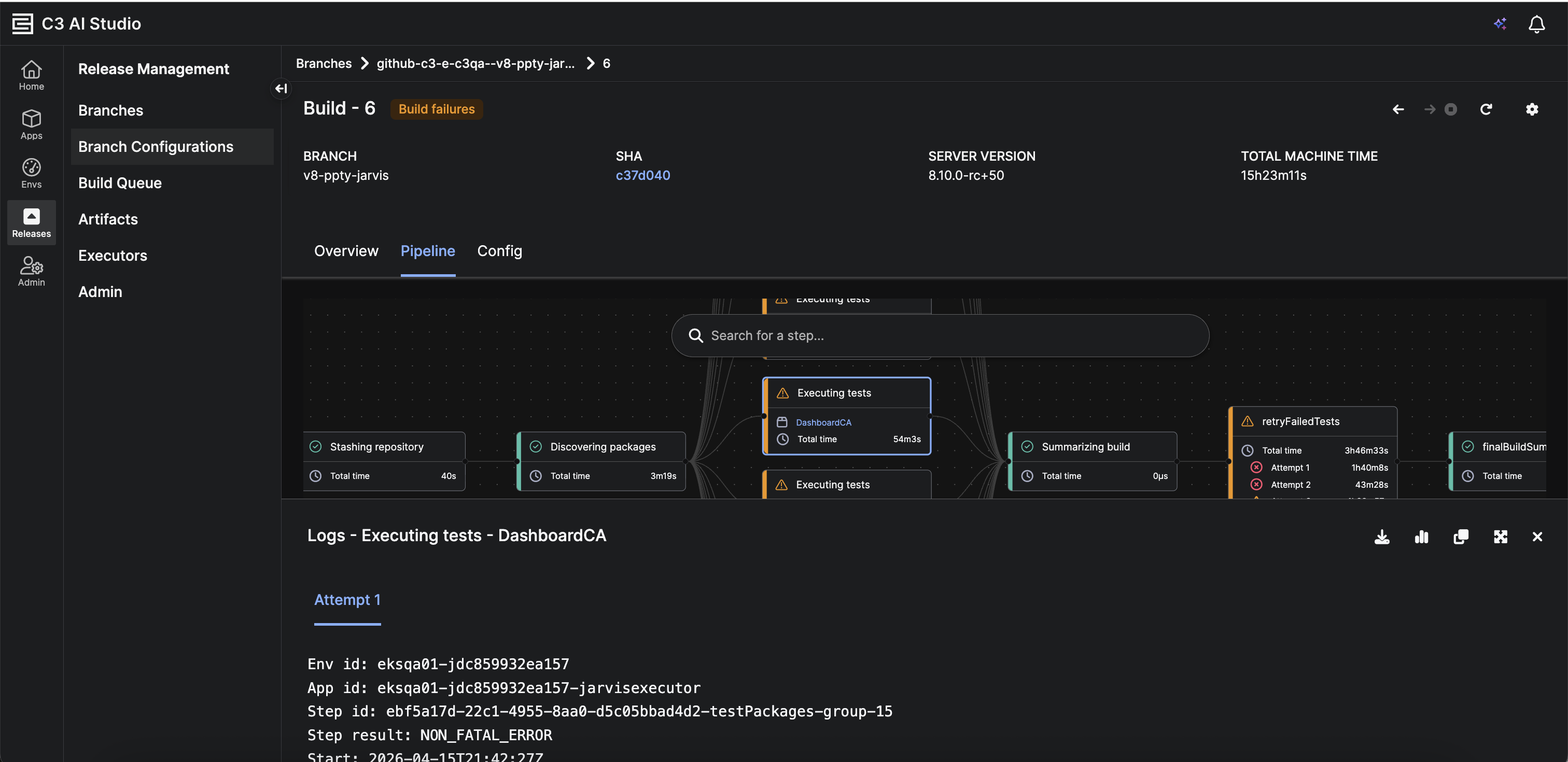 |
| Enhanced Build Pipeline |
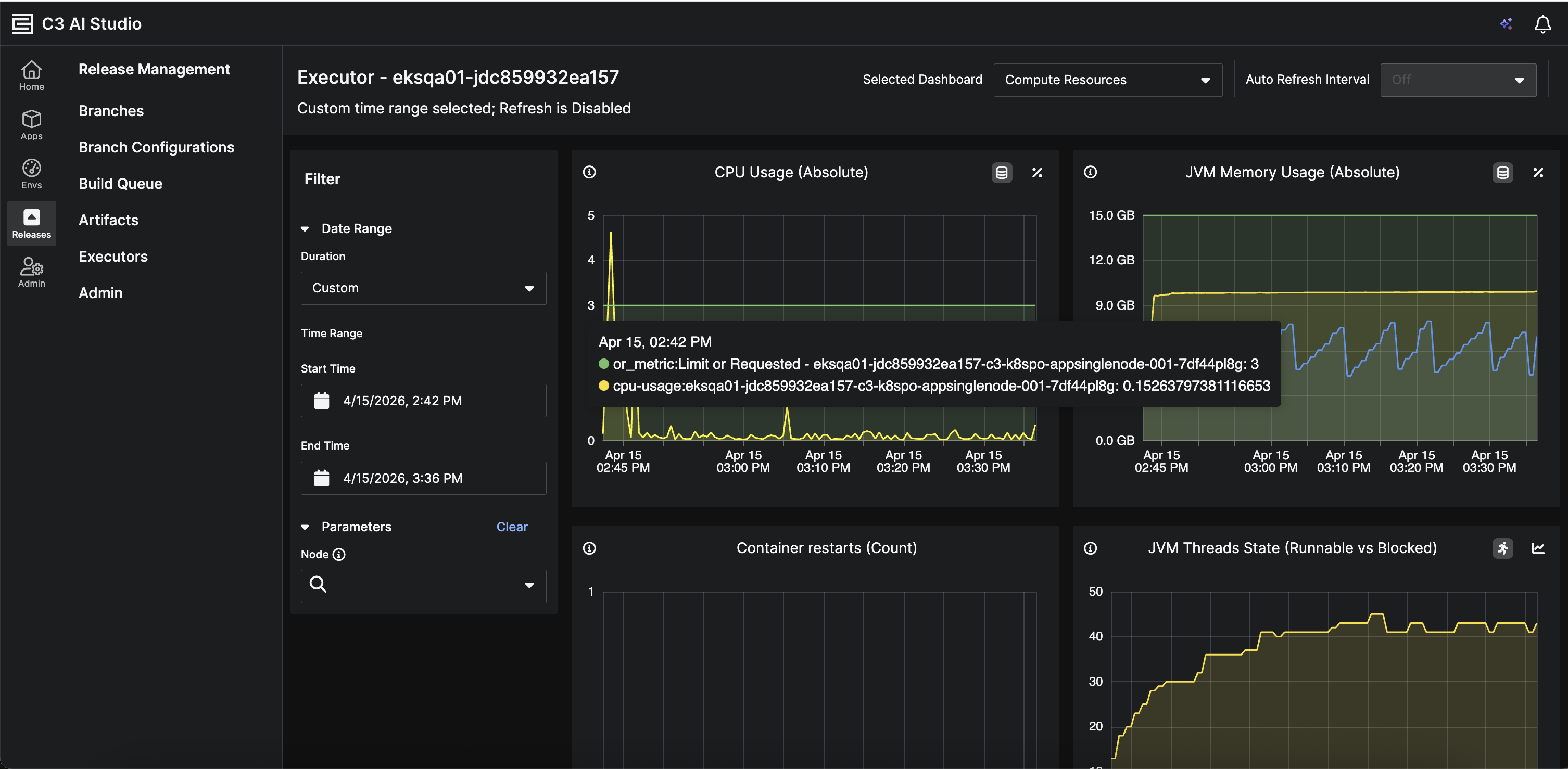 |
| Enhanced Build Pipeline: Chart Option on Sticky Panel |
Step Execution Logs
New logs are displayed during step execution. Navigate to Build > Pipeline > Step > Bottom Sheet. This enables teams to monitor progress and troubleshoot issues in real time without waiting for step completion.
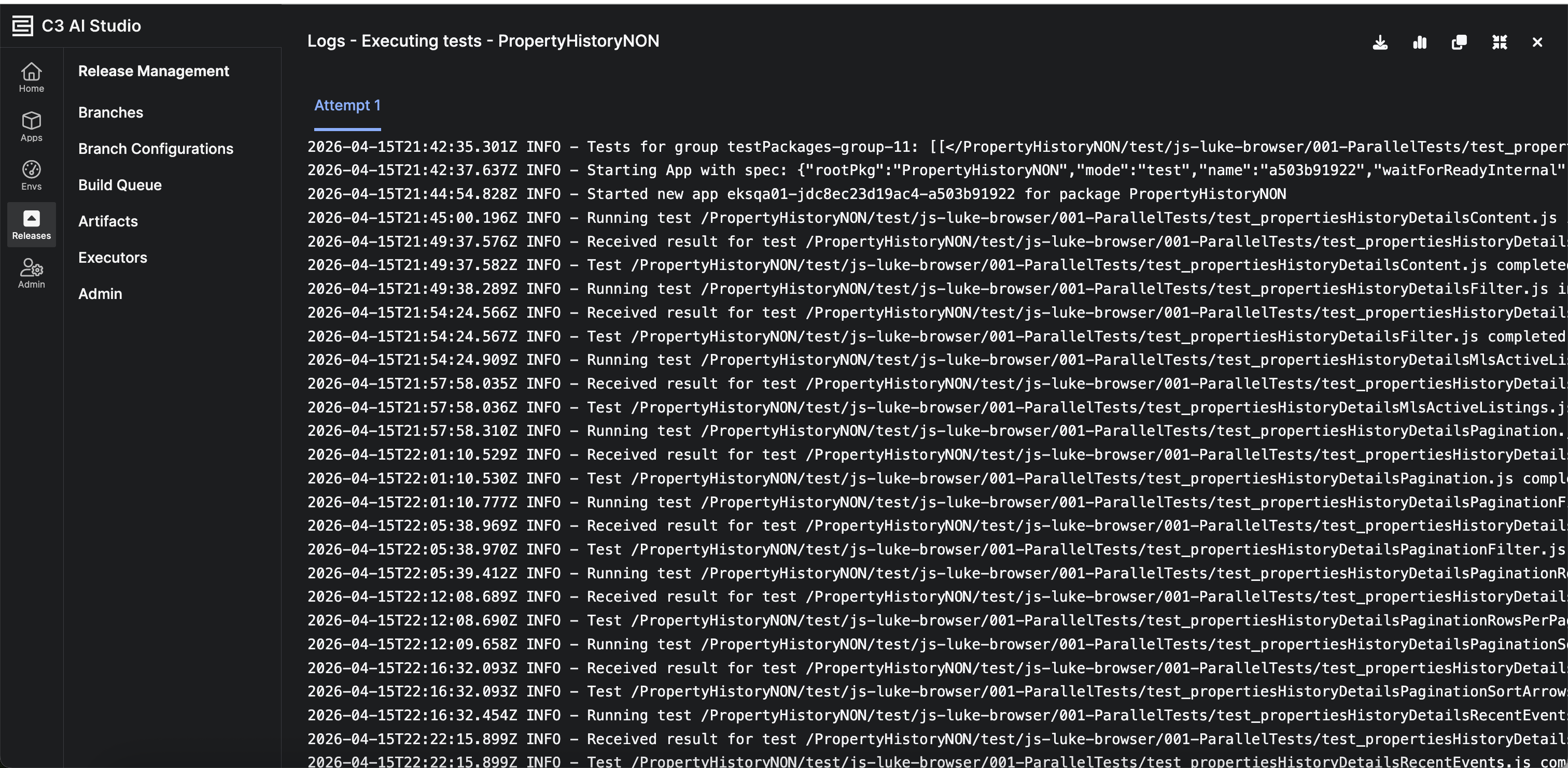 |
| Step Execution Logs |
Branch Group Cloning
Release Management now supports cloning branch groups. This allows teams to quickly replicate environment configurations and streamline the setup of new deployment workflows.
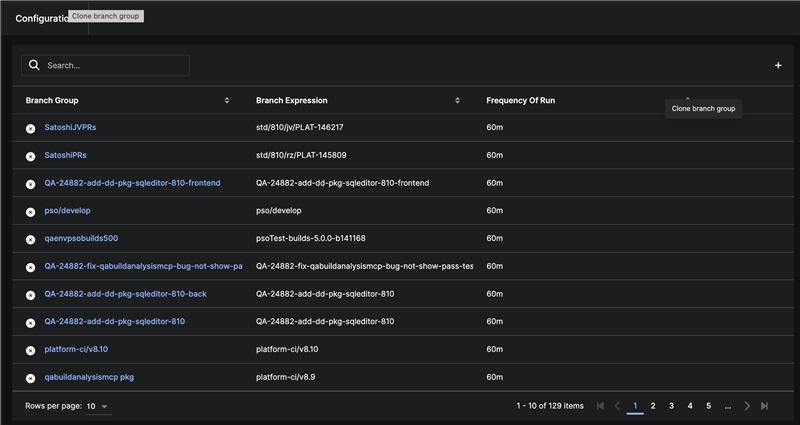 |
| Cloning Branch Groups |
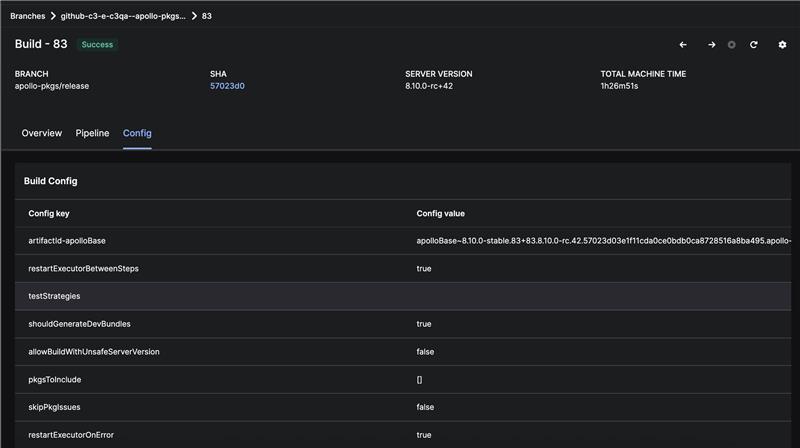
Persistent Build Configurations
Build configurations are now fully preserved after a build is complete. This behavior has improved consistency and ability to analyze build behavior after it is complete.
 |
| Fully Preserved Build Configuration |
C3 Generative AI
The C3 Agentic AI Platform includes pre-configured and advanced embedders and large language models (LLMs). C3 Generative AI orchestrates AI Agents to retrieve data, analyze information, surface insights, and take actions in high-value enterprise use cases that require accurate and reliable performance.
C3 AI Model Context Protocol (MCP)
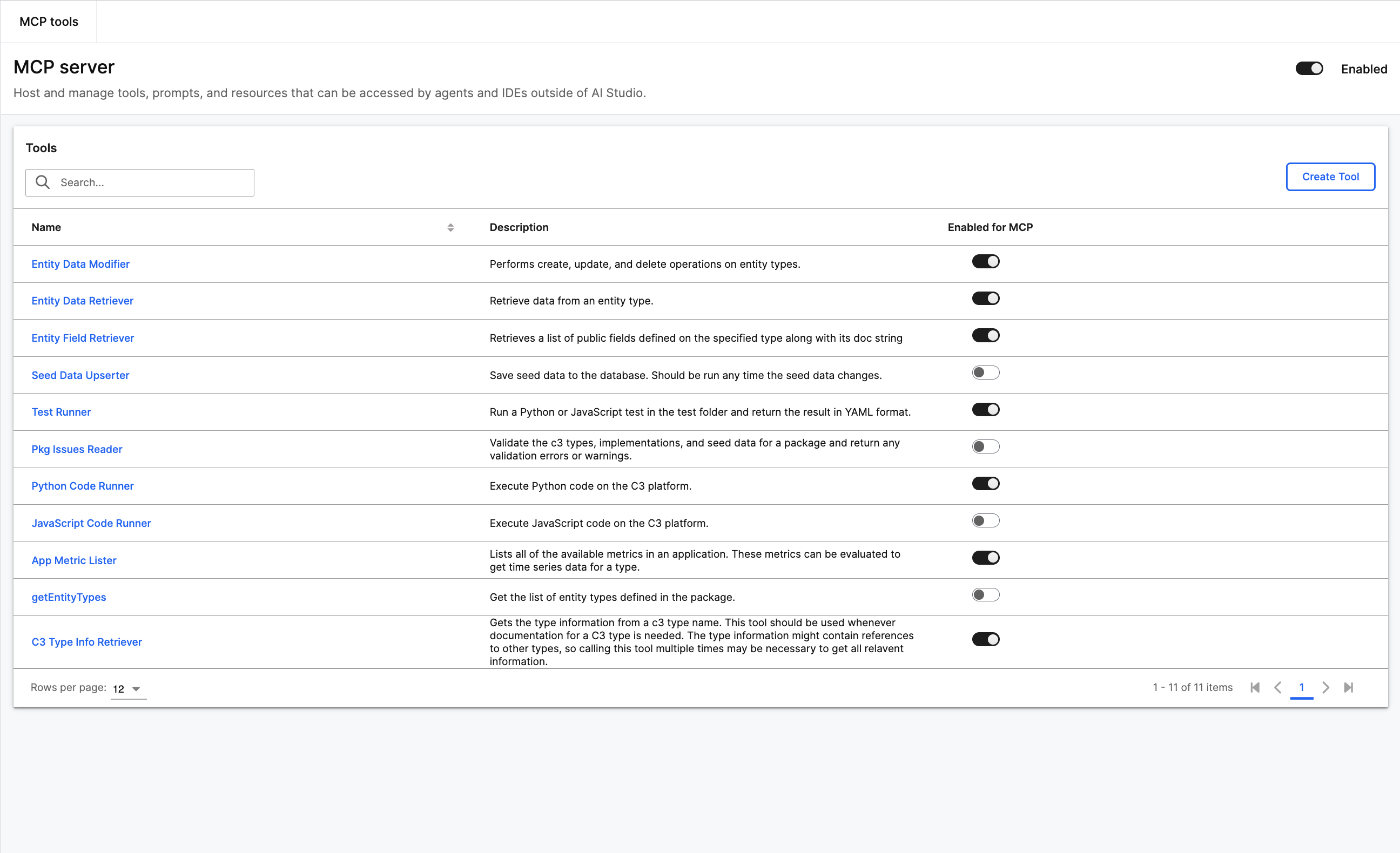
Starting in 8.10, all applications will have MCP Server capabilities and a user experience that allows administrators to monitor and control the server via studio. This allows users to create connections to IDEs like Cursor and VS Code.
Specific UI pages include:
- Access: Individual users can create new tokens to connect to the server and revoke old tokens. Administrators can view all currently active users and revoke individual users.
- Tools: Users can view tools currently active in their server. Administrators can enable/disable tools and create new tools.
- Prompts: Users can view their prompts currently active in the server. Administrators can enable/disable prompts and create new prompts.
- Monitor: Users can view execution history of all of their tool and prompt calls. Administrators can view all tool and prompts calls.
 |
| MCP Server |
Model Hub
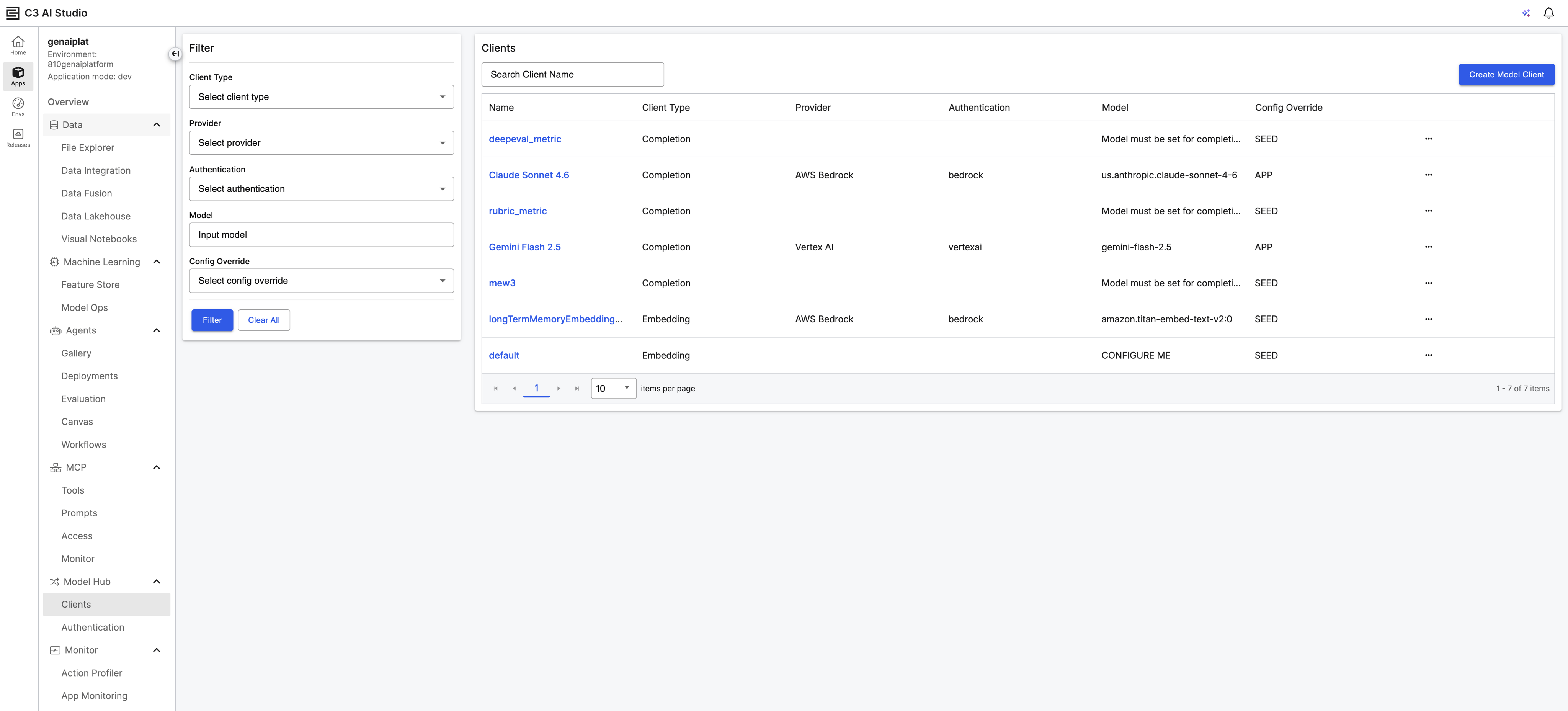
Model Hub is a visual interface in C3 AI Studio for configuring, managing, and testing connections to external large language model (LLM) and embedder services. Users can set up model clients for models hosted on Azure AI Foundry, AWS Bedrock , GCP Vertex AI, and OpenAI directly from the UI. This replaces the need to configure LLM clients programmatically, enabling faster setup of the model infrastructure that powers agents and generative AI workflows.
 |
| Model Hub UI |
Authentication Management Model Hub centralizes credential management for external model providers. Users may create and manage authentication objects that store API keys, endpoints, and provider-specific connection details.
- Multi-Provider Support: Configure authentication for Azure OpenAI, Azure AI, AWS Bedrock, Google Vertex AI, and OpenAI out of the box.
- Custom Provider Support: For users with custom endpoints and authentication mechanisms, you may also configure these directly in the UI.
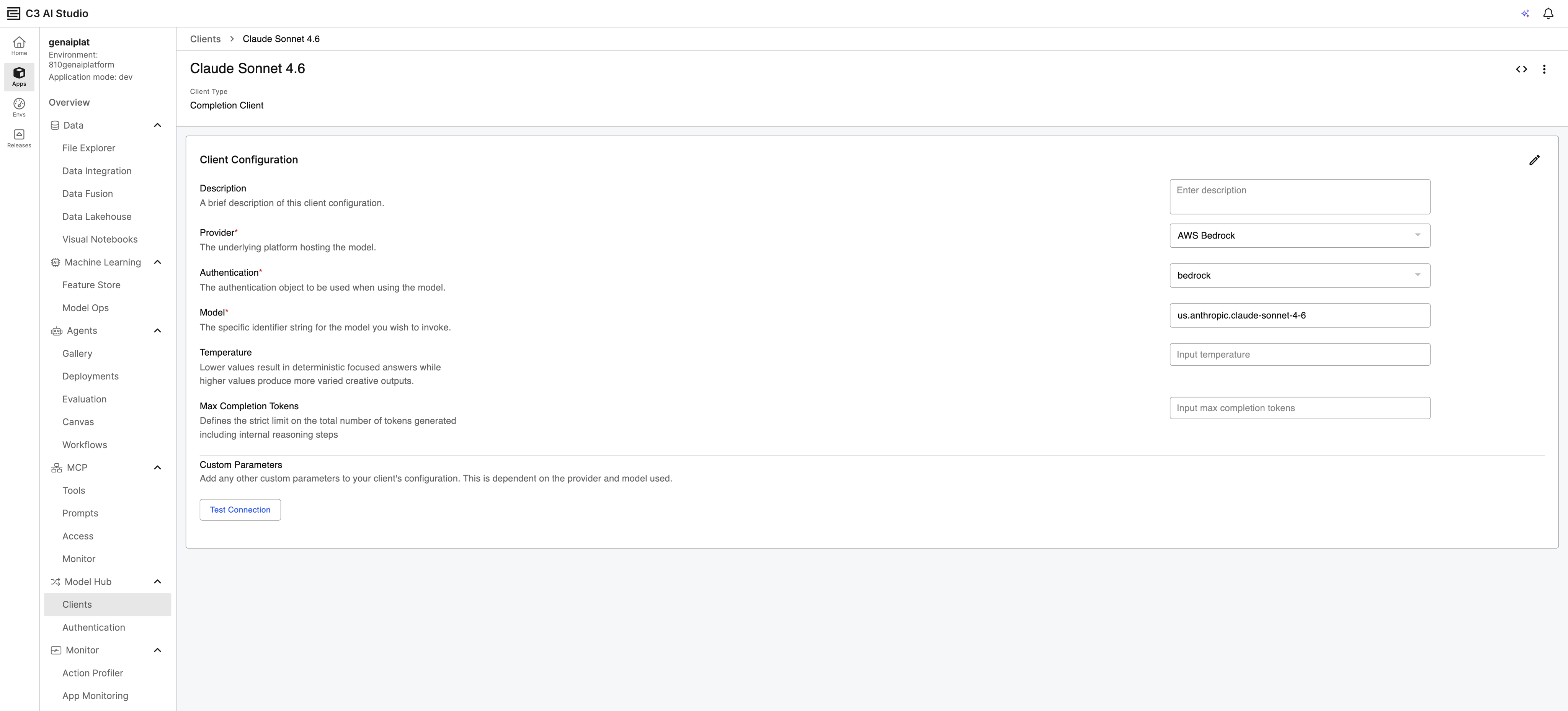
Model Client Configuration Create and manage model clients that combine authentication and model settings into reusable interfaces for your agents.
Client Types: Supports three client types
- Completion Clients (Chat Completions API)
- Response Clients (OpenAI Responses API)
- Embedding Clients (vector embedding generation).
Configurable Parameters: Adjust temperature, max completion tokens, as well as any custom parameters. Saved values act as defaults that can be overridden at runtime.
Built-In Test: Validate model client connectivity directly from the client details page. Failed responses include error logs for troubleshooting.
Code Snippet Generation: Generate ready-to-use Python and JavaScript snippets from any model client details page for quick integration into your applications.
 |
| Model Hub Client Configuration |
See the following for more information on LLMs and Embedders:
- Set Up LLMs and Embedders Via UI
- Set Up LLMs and Embedders Programmatically
- Default LLMs and Embedders
C3 AI UI Stack
C3 AI UI Framework and C3 AI Component Library make it faster to develop, test, and deploy the front end of your AI-enabled application.
Agentic Dashboard
Enables application users to generate rich, interactive BI dashboards from natural language questions. Application users can now describe individual dashboard sockets in plain language and receive interactive visualizations in seconds. For example, a user can ask: "Show inventory by facility for the last quarter" — and the platform's AI Dashboard agent generates the appropriate widget, with live data, ready to be composed into a dashboard.
Agentic Dashboards run directly against the customer's unified C3 AI application data model, ensuring results are always live and consistent with enterprise data. Dashboards support configurable layouts and can be exported to PDF, bridging the gap between real-time analytics and executive reporting.
Key Capabilities
- Natural language generation of individual dashboard sockets for business analysts, operators, and executives
- Interactive widgets with dynamic filtering by date, category, and other dimensions
- Live query execution against the C3 AI unified application data model
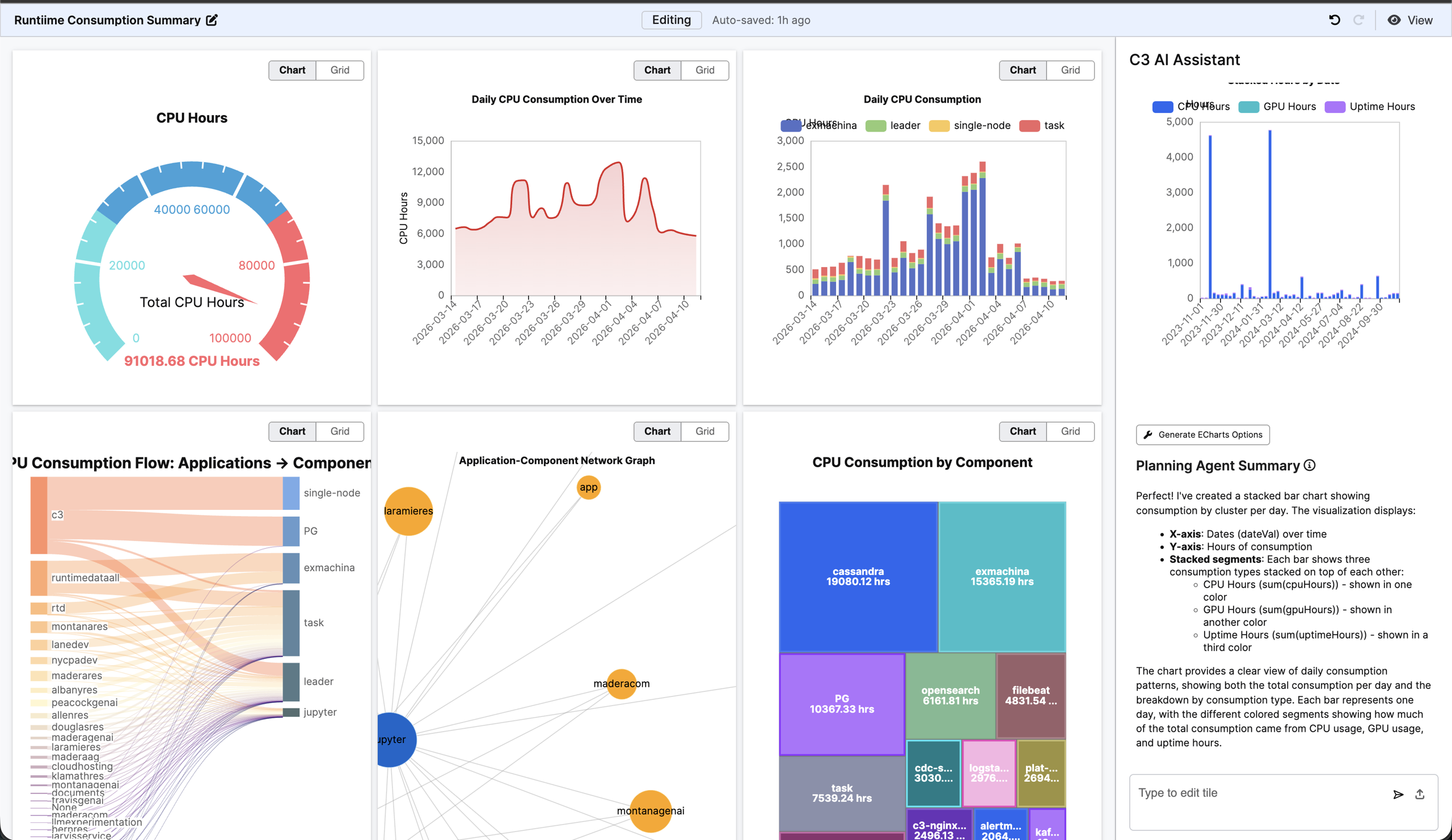 |
| Agentic Dashboard UI |
C3 AI Data Science and Machine Learning
The C3 Agentic AI Platform integrates leading technologies favored by data science teams into the C3 AI experience to enable teams to develop, deploy, and operate machine learning (ML) models at scale.
Eval & Fetch Performance Improvements
Transferring C3 Obj and Obj collection data to Python pandas DataFrames is now faster and powered by Apache Arrow serialization. FetchResult also now supports a native to_pandas() function, eliminating the need for the slower fetch().toData().to_pandas() chain.
Performance Gains eval().to_pandas(): Obj fields (100K rows, 4 columns):
| Client Type | 8.9 | 8.10 | Improvement |
|---|---|---|---|
| Py4j | 8m 34s | 8.41s | 61× |
| Py-client | 1m 28s | 7.21s | 12× |
fetch().to_pandas(): (100K rows, 11 columns):
| Client Type | 8.9 | 8.10 | Improvement |
|---|---|---|---|
| Py4j | 10m 13s | 3.93s | 156× |
| Py-client | 9m 46s | 7.35s | 80× |
Breaking Change
Obj field output format has changed. In 8.9, eval().to_pandas() and fetch().toData().to_pandas() produced different formats. eval().to_pandas() returned C3 Obj references or boxed values.
In 8.10, both methods now consistently convert C3 Obj instances to Python dictionaries. Users relying on the previous C3 reference format MUST update their code.
C3 AI Feature Store
Removal Notice
Lambda feature(s) have now been formally removed after being deprecated in 8.8. Please use lambda Feature.Set instead.
C3 AI Infrastructure
The C3 Agentic AI Platform offers robust data integration, storage, and processing capabilities. It enables the integration of diverse data from various sources such as object storage, databases, data warehouses, data lakes, streaming systems, business applications, and operational systems. The following new capabilities and improvements were added for version 8.10.
DateTime Format Customization with @ser Annotation
This release adds support for the @ser(dateTimeFormat="...") annotation and allows developers to define custom DateTime serialization and deserialization formats. The DateTime Format Annotation (Ann.Ser) allows for consistent and accurate dateTime handling regardless of source format.
Key Features
- Schema and Serialization Alignment: Single annotation controls both Type schema and runtime serialization behavior.
- Consistent Read/Write: Declared format applies uniformly across data ingestion and export workflows.
- Microsecond Precision: This version includes enhanced default behavior for microsecond-level precision.
- Precision Control: Specify exact precision levels (seconds, milliseconds, or microseconds) to match source data or storage requirements.
- Bidirectional Consistency: Single annotation influences both serialization (write) and deserialization (read) operations.
- Non-ISO Layouts: Handle external data using non-ISO date formats such as US date format MM/dd/yyyy and European date format dd.MM.yyyy.
- ISO-Style Defaults: Without the annotation, the platform default style follows the ISO 8601-style rules based on field type.
Microsoft Fabric OneLake as an Azure File System
Microsoft Fabric OneLake provides a unified data lake architecture that integrates seamlessly with Azure storage APIs. The C3 AI Platform leverages this compatibility by using AzureFileSystem to connect directly to OneLake workspaces and Lakehouses. This integration enables data engineers to access Fabric-managed data without requiring separate connectors or custom integration logic, simplifying hybrid cloud and multi-cloud data architectures.
Key Features
Azure AD Authentication
- Client Secret Authentication: Configure Azure application registration with service principal credentials.
- Workload Identity (for Azure Clusters): Passwordless authentication using Azure Managed Identity.
File System Operations
- Mount OneLake Paths: Use
FileSystem.azure().setMount(...)to mount OneLake paths (typically under Files/). - Standard File Operations: Perform
listFiles,makeFile,writeString,readString, and nested path operations. - Subfolder Navigation: List and traverse directory structures with standard
AzureFileSystembehavior.
- Mount OneLake Paths: Use
Connect to Microsoft Fabric Using Azure AD Authentication
This release introduces native support on how to Connect to Microsoft Fabric Using Azure AD Authentication. This integration enables secure, modern authentication patterns that eliminate the need for traditional SQL logins while providing enterprise-grade identity and access management.
Azure AD Authentication Methods
- Service Principal Authentication: Configure JDBC credentials with client ID and secret for application-based authentication using the Azure AD Service Principal.
- Managed Identity Authentication: Enable passwordless authentication with Azure Managed Identity.
C3 AI Package Store
Version 8.10 introduces a new C3 Package resolution algorithm which transverses the dependency graph in depth first search fashion. This allows the Package Store to provide more descriptive error messages where there is a conflict with dependency package versions.
The system will select the latest patch when possible. A warning will appear (specifically a Pkg.Warning) when a package dependency is declared with a version format that does not match the SemanticMajor.Minor format.
The following is an example package dependency resolution error message:
================ Dependency Resolution Errors ================

⚠️  Incompatible packages detected
-------------------------------------
 • baseToolkit (required versions: 12.1, 8.9)

   Most direct conflicting requirements:
     Path enforcing baseToolkit@12.1:
       ↳ reliabilityQuickstart@21.0.1 -> reliability@21.0.1 -> assetOnboarding@21.0.2 -> uiConfigurability@14.0.14-stable.35+35.8.8.13.407.93bc4416ddb5564dafc8d1f119cfb366c11dd0e6.support.v14.0.uid.4f48e436-rsc -> baseToolkit requires baseToolkit@12.1
     Path enforcing baseToolkit@8.9:
       ↳ reliabilityQuickstart@21.0.1 -> reliability@21.0.1 -> assetOnboarding@21.0.2 -> reliabilityCapability@21.0.1 -> reliabilityAssetCase@21.0.1 -> reliabilityMl@21.0.2 -> dataValidation@15.0.2-stable.21+21.8.9.0.35.3c3431b4bf8bf17b3b6cc986ab3025bdf91a84e1.support.v15.0.uid.7c8d170e-rsc -> baseToolkit requires baseToolkit@8.9

   All paths by version:
     Version 12.1 required by (4 paths):
       ↳ reliabilityQuickstart@21.0.1 -> reliability@21.0.1 -> assetOnboarding@21.0.2 -> uiConfigurability@14.0.14-stable.35+35.8.8.13.407.93bc4416ddb5564dafc8d1f119cfb366c11dd0e6.support.v14.0.uid.4f48e436-rsc -> baseToolkit requires baseToolkit@12.1
       ↳ reliabilityQuickstart@21.0.1 -> reliability@21.0.1 -> assetOnboarding@21.0.2 -> uiConfigurability@14.0.14-stable.35+35.8.8.13.407.93bc4416ddb5564dafc8d1f119cfb366c11dd0e6.support.v14.0.uid.4f48e436-rsc -> baseCss@14.0.14-stable.35+35.8.8.13.407.93bc4416ddb5564dafc8d1f119cfb366c11dd0e6.support.v14.0.uid.4f48e436-rsc -> baseToolkit requires baseToolkit@12.1
       ↳ reliabilityQuickstart@21.0.1 -> reliability@21.0.1 -> assetOnboarding@21.0.2 -> reliabilityCapability@21.0.1 -> reliabilityAssetCase@21.0.1 -> reliabilityMl@21.0.2 -> baseToolkit requires baseToolkit@12.1
       ↳ reliabilityQuickstart@21.0.1 -> reliability@21.0.1 -> assetOnboarding@21.0.2 -> reliabilityCapability@21.0.1 -> reliabilityAssetCase@21.0.1 -> stateMachineWorkflow@14.0.14-stable.35+35.8.8.13.407.93bc4416ddb5564dafc8d1f119cfb366c11dd0e6.support.v14.0.uid.4f48e436-rsc -> baseToolkit requires baseToolkit@12.1

     Version 8.9 required by (1 paths):
       ↳ reliabilityQuickstart@21.0.1 -> reliability@21.0.1 -> assetOnboarding@21.0.2 -> reliabilityCapability@21.0.1 -> reliabilityAssetCase@21.0.1 -> reliabilityMl@21.0.2 -> dataValidation@15.0.2-stable.21+21.8.9.0.35.3c3431b4bf8bf17b3b6cc986ab3025bdf91a84e1.support.v15.0.uid.7c8d170e-rsc -> baseToolkit requires baseToolkit@8.9


Dependency analysis overview
----------------------------
 • reliability                     versions=21.0  status=✅
 • testtools                       versions=8.10  status=✅
 • assetOnboarding                 versions=21.0  status=✅
 • jarvis                          versions=8.10  status=✅
 • documentationCompiler           versions=8.10  status=✅
 • units                           versions=8.10  status=✅
 • baseCodeAnalyzer                versions=12.1  status=✅
 • uiConfigurability               versions=14.0  status=✅
 • baseCanonicalTester             versions=12.1  status=✅
 • reliabilityCapability           versions=21.0  status=✅
 • uiInfrastructure                versions=8.10  status=✅
 • cssLibrary                      versions=8.10  status=✅
 • baseToolkit                     versions=12.1, 8.9  status=❌ (incompatible)
 • codeAnalyzerLlmEndpoint         versions=12.1  status=✅
 • reliabilityMl                   versions=21.0  status=✅
 • uiBundler                       versions=8.10  status=✅
 • baseCss                         versions=14.0  status=✅
 • uiMicrobench                    versions=8.10  status=✅
 • reliabilityQuickstart           versions=21.0  status=✅
 • reliabilityAssetCase            versions=21.0  status=✅
 • uiComponentLibraryReact         versions=8.8  status=✅
 • hierarchy                       versions=8.10  status=✅
 • uiSdlReact                      versions=8.10  status=✅
 • dataValidation                  versions=15.0  status=✅
 • uiPrimitives                    versions=8.10  status=✅
 • jarvisBaseToolkit               versions=12.1  status=✅
 • stateMachineWorkflow            versions=14.0  status=✅
 • uiComponentLibrary              versions=8.10  status=✅
 • uiInfrastructureReact           versions=8.10  status=✅
 • esPackageContainer              versions=8.10  status=✅
 • docgen                          versions=12.1  status=✅
 • baseCustomizationAnalyzer       versions=12.1  status=✅
C3 AI Platform Cloud Infrastructure
Version 8.10 includes the following updates to the cloud infrastructure of the C3 Agentic AI Platform:
IPV6 support
C3 AI Platform 8.10 adds IPv6 support for platform deployments and related services. Deployments can be configured in dual-stack mode, supporting both IPv4 and IPv6 networks to meet enterprise infrastructure requirements and accommodate customers operating in IPv6-only or mixed network environments.
Config Publishing
C3 AI Platform 8.10 introduces config publishing, closing the gap between AI Studio authoring and application source control. Configuration instances created or modified in AI Studio tools (such as SourceCollection.Config and others) can now be written directly to the application's source control repository. This eliminates the manual workflows and environment drift that previously complicated deployment to QA and production. Config publishing supports two modes depending on the development environment. When a VS Code workspace is connected, configs are written automatically to the local repository with no change to the developer's existing workflow. When VS Code is not connected, configs can be published via GitHub. In both cases, configs are written to /config/<type name>/ as individual JSON files, consistent with the application's expected seed directory structure.
Key Capabilities
- Publish any C3
configtype created or modified in AI Studio to source control. - Automatic local writes when a VS Code workspace is connected.
- GitHub-based publishing for non-VS Code environments.
- Output follows existing repo conventions, requiring no structural changes to the application.
Security Improvements
C3 AI Platform 8.10 strengthens enterprise authentication with expanded identity provider support and enhanced OAuth capabilities. This release adds OIDC UserInfo endpoint compatibility, AWS Cognito support, and OAuth client improvements including PKCE flow and token expiry tracking for more secure integrations.
OIDC UserInfo endpoint
C3 AI Platform 8.10 adds support for the OIDC UserInfo endpoint, enabling the platform to retrieve user claims from identity providers that surface attributes via the UserInfo endpoint rather than embedding them directly in the ID token. This broadens compatibility with OIDC-compliant IdPs and supports more flexible enterprise identity configurations.
AWS Cognito Identity Provider Support
C3 AI Platform 8.10 adds AWS Cognito as a supported identity provider (IdP), expanding authentication options for customers deploying on AWS infrastructure. Organizations can now configure Cognito for user authentication and authorization, enabling seamless integration with existing AWS identity management workflows.
OAuth Client Improvements
C3 AI Platform 8.10 introduces enhanced OAuth Client Capability, providing applications teams with a standardized way to connect to external OAuth authorization servers and request tokens.
Key Improvements:
- Auth Client C3 Types: New OAuthClient and supporting types provide a first-class, reusable way to configure and initiate OAuth token requests against any compliant authorization server.
- PKCE Flow Support: The OAuth client now supports Proof Key for Code Exchange (PKCE), enabling more secure flows for public clients.
- Flexible Auth Header Configuration: Token HTTP requests can now be configured with different auth header styles (e.g., Basic vs. Bearer), improving compatibility with third-party providers.
- Namespaced OAuth Types: Existing OAuth types have been moved into a consistent namespace (e.g. OAuth.Application, OAuth.Application.Config). Backward compatibility for OAuthApplication and related types is maintained.
- Token Expiry Tracking: OAuth access token responses now include expires_in, so callers can manage token refresh proactively.
C3 AI Console
C3 AI Platform 8.10 introduces significant enhancements to the Console, including a reorganized menu structure, an improved notebook save model, and new productivity features.
Reorganized Menu Structure
The Console menu has been restructured for improved usability with a new View menu added alongside the existing Tools and Links menus:
View
- Open Notebook
- Upload Notebook
- New Notebook
- Layout
- Load Layout
- Save Layout
- Reset Layout
Tools
- Execute
- Aliases
- Load File
- Options
- Help
Links (unchanged)
Notebook Save Model
The Console now treats notebooks as persistent files, similar to JupyterLab or VS Code, with each notebook retaining its own identity in a separate tab.
Key Changes:
- Multi-tab Support: Opening or uploading a notebook creates a new tab rather than replacing the current notebook content.
- Persistent State: Notebook state is preserved in browser local storage, including unsaved changes.
- File-based Identity: Notebook tabs are uniquely identified by their storage location and file path.
- Single Instance Per File: Each saved notebook can only be opened once, preventing duplicate tabs for the same file.
- Relocated Actions: Open and Upload actions have moved from the notebook toolbar to the View menu, ensuring actions within a notebook only affect that specific notebook.
Additional Enhancements
- Undo Support: Cell deletion and rearrangement operations can now be undone.
- Custom Tab Layouts: Save and load custom tab layouts to preserve your workspace configuration.
- Improved Type Listener: More reliable error reporting and issue detection.
- Unsaved Changes Protection: Closing a notebook tab with unsaved changes prompts for confirmation to prevent accidental data loss.
Backward Incompatibility
The following 8.10 behavior changes may affect existing customer code, configurations, or deployments. Each item lists the current workaround and the fix status. Customers upgrading from 8.9 should review this section before deploying.
Default agent for Genai.Agent.Dynamic.Persistable no longer accessible
In 8.9, customer code could fetch a default GenAI agent via Genai.Agent.Dynamic.Persistable.forId("default"). In 8.10, the default instance is removed and the call no longer returns a usable agent. The Type itself remains in 8.10 for backward compatibility. A deprecation notice was provided in the 8.9 genAiSearch change log.
- Impact: Customer code, notebooks, or scripts that call
Genai.Agent.Dynamic.Persistable.forId("default")will not receive an agent. - Workaround: Migrate code to use
GenaiCore.Agent(orGenai.Agent.Dynamic.Core). Existing customer data is migrated automatically by the platform schema-upgrade framework on cluster upgrade. - Fix: Intentional change — migration is required. The Type is fully removed in 8.12.
- Reference: See the genAiSearch 8.10 change log for the full list of related Type removals.
py-query_orchestrator Python runtime removed
The py-query_orchestrator Python runtime and Jupyter kernel previously shipped with the genAiBase package are no longer available in 8.10. Code, tests, or notebooks that selected this runtime will not have an execution environment.
- Impact: Jupyter notebooks pinned to the
py-query_orchestratorkernel, and service code or test suites pinned to this runtime, will not run. - Workaround: Reconfigure affected code to use a supported Python runtime (for example,
py-c3agentsorpy-data_312). Contact the C3 AI Operations team for migration guidance. - Fix: Removal is intentional — replacement runtime is the path forward.
Additional GenAI Type removals and replacements — including legacy agents (Genai.Agent.QueryOrchestrator, Genai.ChatBot), the Genai.UnstructuredQuery.Engine, legacy agent tools, translation features, the legacy Agents and LLM UI pages, and Projects — see the genAiSearch 8.10 change log, Breaking changes section for the full list.
We Value Your Feedback
Your input is crucial to our continuous improvement. If you encounter any issues or have suggestions for further enhancements, please reach out:
Provide feedback on specific topics in our new Documentation Site.
Questions? Post them in the Community Category for version 8 course support.
Want to speak with a C3 AI Academy instructor directly? Book time with them for support on the Help Center.