8.12 Release Notes for the C3 Agentic AI Platform
Discover what is new in C3 Agentic AI Platform 8.12 release. The following release notes describe new features and enhancements introduced in this release of C3 Agentic AI Platform.
C3 Agentic AI Platform
The C3 Agentic AI Platform 8.12 release delivers significant updates and enhancements for how you build and operate applications, run agent workflows, and connect and process data. This release reflects continued investment in C3 AI Studio, C3 Generative AI, and data integration, helping organizations operate their AI applications with greater confidence and efficiency.
C3 AI Studio
C3 AI Studio accelerates AI application development, deployment, release management, and operations by offering a visual interface to the C3 Agentic AI Platform.
File Explorer
File Explorer in C3 AI Studio now lets you organize files on an application's storage mounts from a directory tree and a file list. You can create directories, upload files, and copy, move, delete, or download one item or a selection.
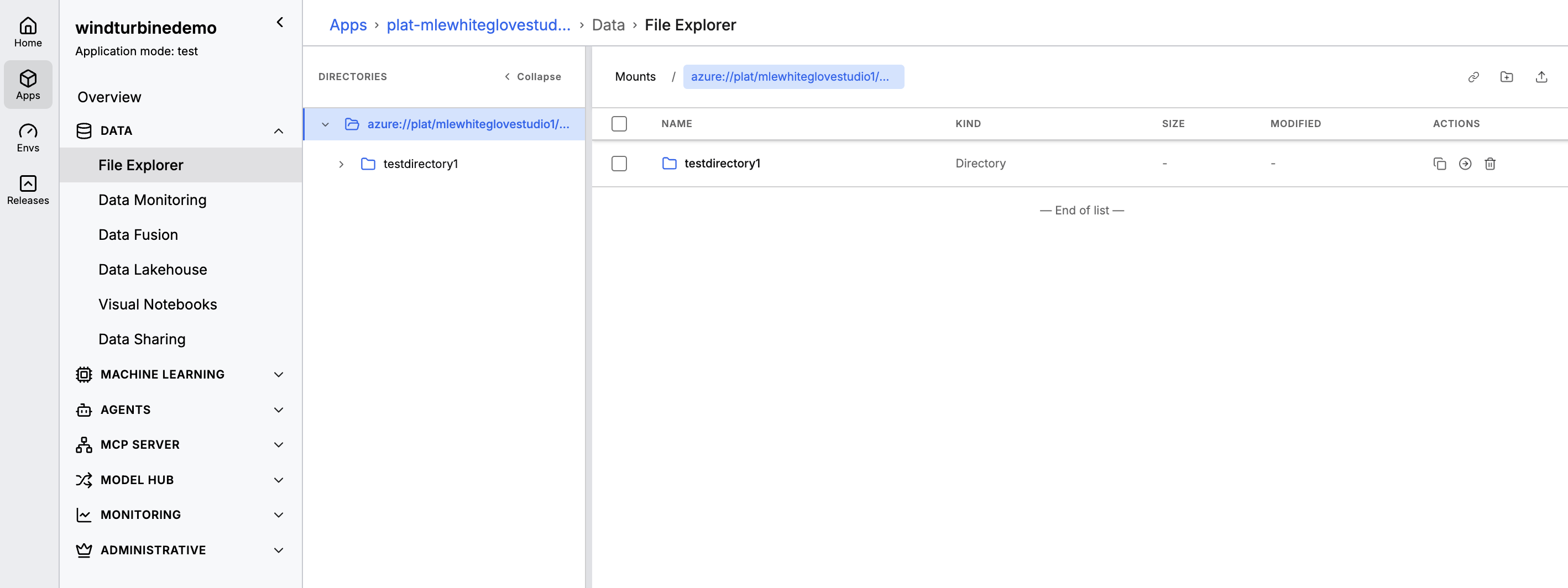 |
| File Explorer directory tree and file list |
Browse a mount: Open a mount to see its folders beside a file list with name, kind, size, and last modified time.
Create and upload: Create a directory in the current location, or upload files by browsing or by dragging them in.
Select several items: Select items in the list, then copy, move, delete, or download them together.
Preview in Studio: Preview PDF, JPG, PNG, source-code, and common text files without downloading them.
Copy and move: Copy or move files and directories to another location in the same mount or in a different mount.
Compute Usage and Budgets
Version 8.12 adds Compute Usage and Budgets in C3 AI Studio. Administrators can see CPU and GPU consumption for the clusters, environments, and applications they are allowed to view, and set an hourly ceiling that raises an alert before the limit is reached.
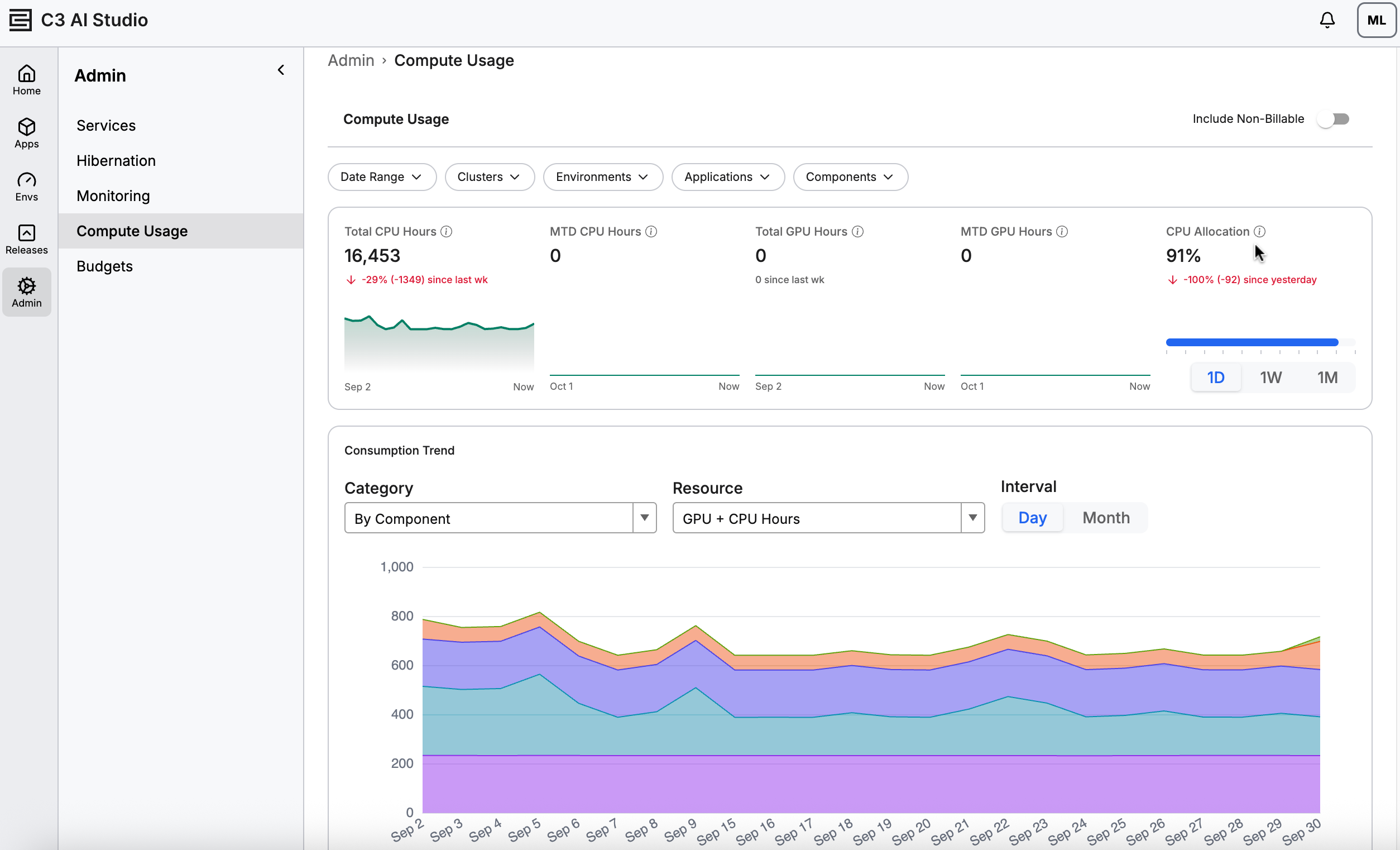 |
| Compute Usage in C3 AI Studio |
Key capabilities include:
One filtered view: Date range, cluster, environment, application, and component filters apply together to the summary tiles, the trend chart, and the table.
Summary and trend: Tiles show total and month-to-date CPU and GPU hours. The trend chart groups hours by component, environment, or application, by day or by month.
Export: Download the current table as a CSV file.
Budgets: Set a daily, monthly, quarterly, or annual budget for a cluster, environment, or application. Warning and critical thresholds can email a notification list. You can change the ceiling, thresholds, and notifications, or turn the budget off without deleting it.
Credentials
The C3 platform can now act as an OAuth 2.0 authorization server. Admins and developers can register OAuth applications in AI Studio and use standard OAuth flows to call platform APIs and agents, replacing shared long-lived keys and borrowed user credentials. See Credentials in C3 AI Studio for more information.
What’s new
Application registration: Create, edit, disable and delete OAuth applications in AI Studio or through the API. Each application gets a client ID and, for confidential clients, a one-time client secret that is stored only as a hash.
Standard flows: Authorization code with PKCE, client credentials, and refresh tokens (with rotation and reuse detection). Any stock OAuth 2.0 library can connect using the discovery document alone.
Consent screen: Users review the scopes an application requests and approve or deny them.
Least-privilege scopes: A token’s permissions are capped by the granted scopes, the application’s role, and (for user tokens) the user’s own permissions.
Fast revocation: Revoke a single user’s grant or an entire application. Revoked and disabled tokens are rejected within 60 seconds.
Token generation in AI Studio: Admins can generate short-lived tokens for testing and automation. The token is shown once and audited, and no one can mint a token as another user.
Visibility and audit: See each application’s status, scopes, role, secret metadata, user grants and last use. Registration, token issuance, refresh, revocation, secret changes and failed authentications are all logged as audit events.
Discovery and keys: Each cluster publishes one issuer with standard metadata (RFC 8414), a JWKS endpoint, and a revocation endpoint (RFC 7009).
C3 Generative AI
C3 Generative AI provides pre-configured embedders and large language models, and orchestrates agents to retrieve data, surface insights, and take actions.
Agentic Workflows
Version 8.12 updates Agentic Workflows so you author a workflow with the C3 Code agent and run the published workflow from C3 AI Studio. You describe the process to the agent, which builds and publishes the workflow. In Studio, open Agents and then Workflows to see each published workflow and start a run from its canvas.
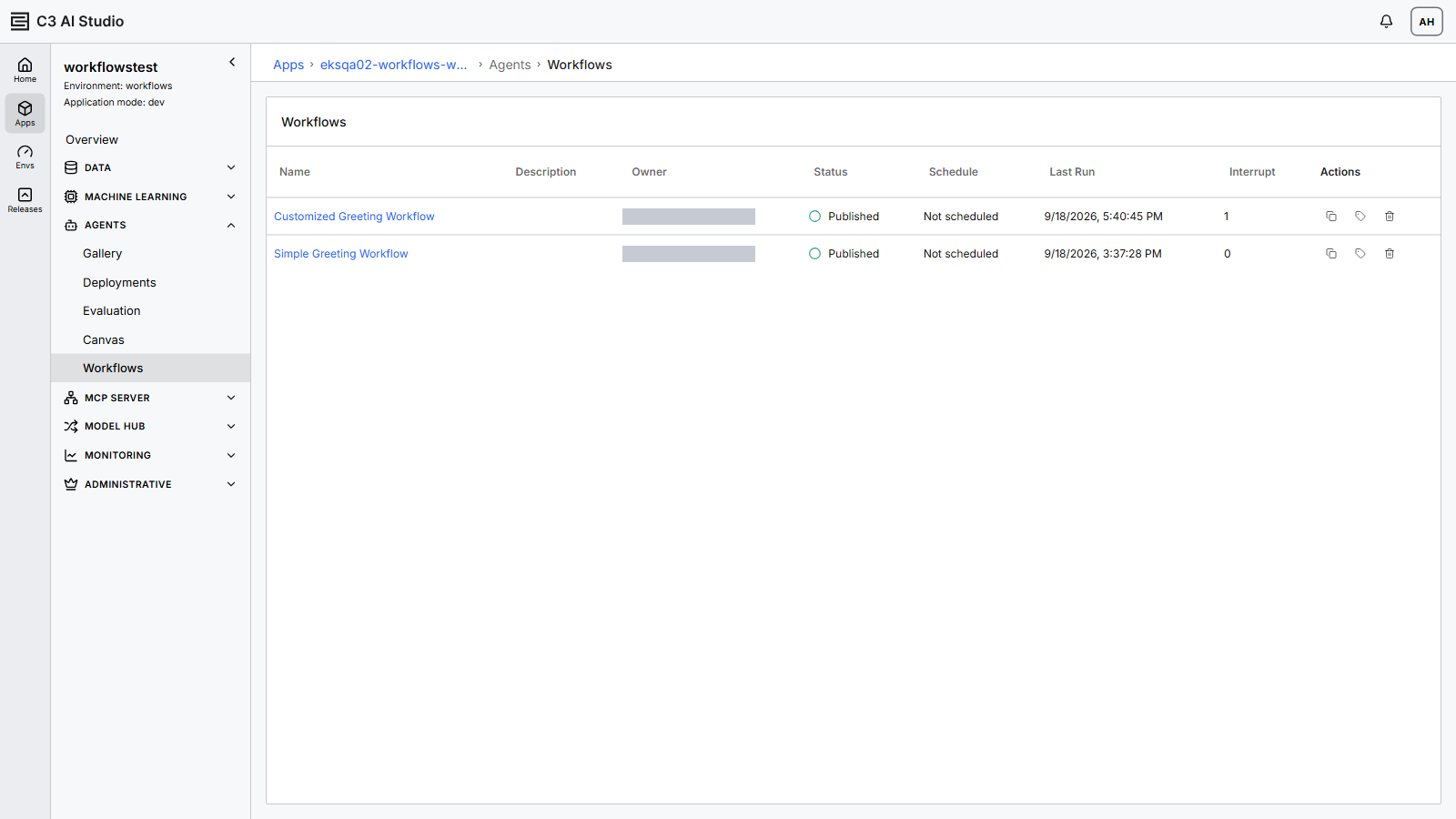 |
| Agent Workflows list in C3 AI Studio |
Author in C3 Code: Describe the process to the C3 Code agent. The agent builds the workflow and publishes it. You can also build a workflow in code from Jupyter.
List published workflows: The Workflows list shows whether a workflow is published, any recurring schedule, and when it last ran.
Run from the canvas: Open a workflow to see its steps, then start a run. Run stays unavailable until you have WorkflowViewer access.
See the following for more information on Agentic Workflows:
Data Fusion
Data Fusion streamlines the integration and management of data sources within the C3 Agentic AI Platform. This tool empowers you to set up connectors, configure pipelines, and integrate data through UI elements. Use Data Fusion to simplify the connection and configuration of external data sources for ingestion into the C3 Agentic AI Platform.
Document AI for Document Processing
Version 8.12 introduces Document AI document processing in Data Fusion. It turns unstructured documents into searchable passages, metadata, and structured business entities. Document AI processing requires the Doc AI service to be deployed for the environment, and the source file system must support presigned URLs. Processing runs asynchronously and writes the results back to the application. The existing unstructured data integration pipeline remains available for current pipelines.
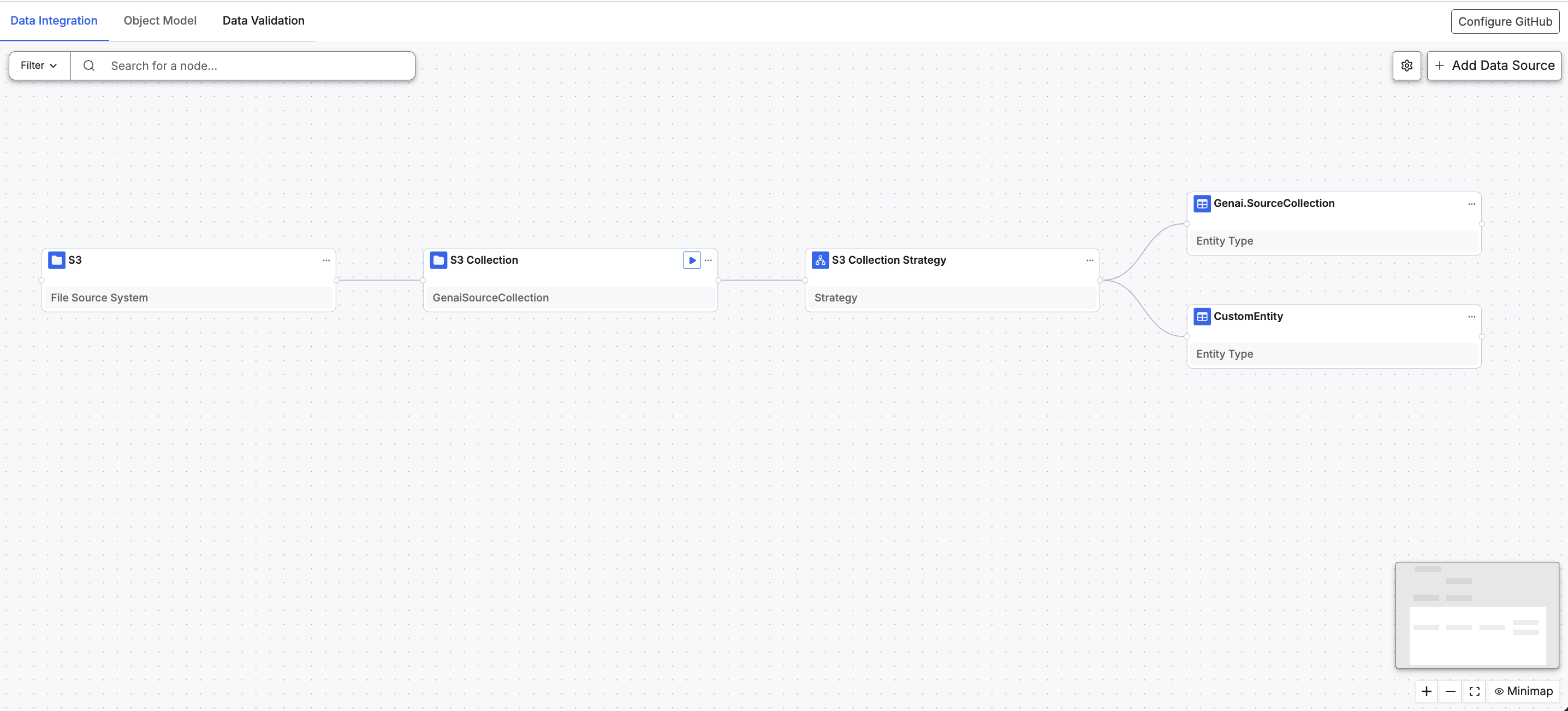 |
| Document AI workflow on the Data Fusion canvas |
Key capabilities include:
Ingestion strategies: Use passage-level extraction to split documents into searchable passages, or document-level extraction to describe each document at a roughly constant cost. You can also provide a custom strategy.
Tags, entities, and embeddings: Extract metadata tags and business entities, detect document hierarchy, and optionally generate embeddings for semantic retrieval.
Supported documents: Process PDF, Word, PowerPoint, Excel, text, and image files up to 1 GB, including scanned documents.
See the following for more information on Document AI document processing in Data Fusion:
- Unstructured Document Processing using Document AI in Data Fusion
- Create a Document Processing Pipeline in Data Fusion
- Understand Document Processing Outputs in Data Fusion
Data Lakehouse
The following Data Lakehouse capabilities and improvements were added in version 8.12:
External Catalogs
Version 8.12 extends external catalogs in the Data Lakehouse to JDBC databases, such as PostgreSQL, SQL Server, and MySQL, and to AWS Glue. An external catalog is a live connection to an external system, so you can list and query its tables without copying them into the platform.
Key capabilities include:
JDBC databases: Load tables into Spark, optionally with a partition read spec for parallel reads. Pandas and tuple reads are not supported for JDBC catalog tables. Use connection details, or an external SQL source already configured in Data Fusion.
AWS Glue: Read Iceberg tables from the AWS Glue Data Catalog while the data stays in Amazon S3. You can also read those tables into pandas or as platform tuples.
Snowflake: Read Snowflake tables into pandas, and also list Snowflake namespaces. Tuple reads remain supported. Creating tables and appending or overwriting from CSV remain supported.
Snapshot reads from a Data Lakehouse table
Version 8.12 adds snapshot-based change data capture when a managed Data Lakehouse table is a Data Integration source. Set useChangelogCdc on the DataLakeSourceCollection. The first run loads the current table and stores a snapshot checkpoint. Later runs read the Iceberg changelog from that checkpoint.
Users who do not have a broader role, such as C3.AppAdmin, need the C3.DisclosureRequestor role to register and read managed, JDBC, and Snowflake catalogs. The role does not grant DataLake.Catalog.Iceberg.Glue or DataLake.Catalog.Config.Iceberg.Glue. Use a broader role to register an AWS Glue catalog.
C3 AI Data Integration, Data Processing, Data Storage, and File System
The C3 Agentic AI Platform offers robust data integration, storage, and processing capabilities. It enables the integration of diverse data from various sources such as object storage, databases, data warehouses, data lakes, streaming systems, business applications, and operational systems.
Custom Connector Framework
Version 8.12 introduces the Custom Connector Framework. Developers can connect the platform to external systems that the built-in SQL, file, and cloud-message connectors do not cover, including SaaS REST APIs and proprietary protocols. One connector implementation can serve live queries, Data Integration ingestion, and write-back, and the connector logic can be written in JavaScript or Python. See Implement a Custom Connector.
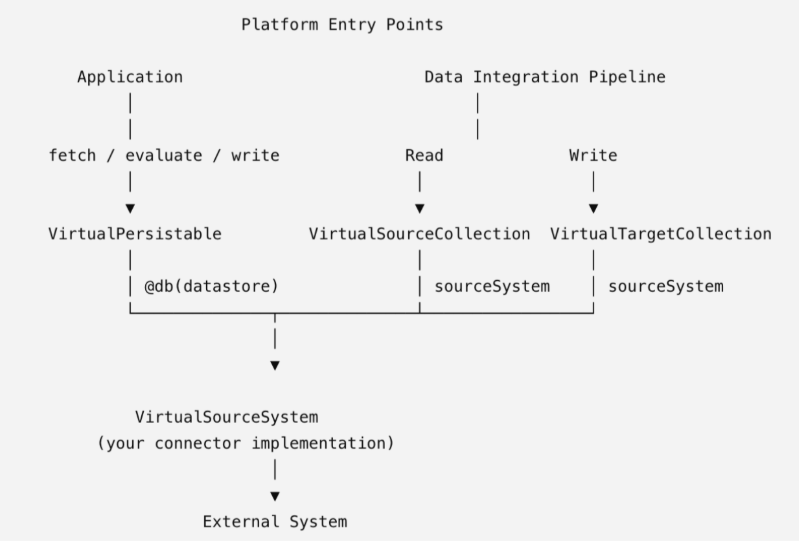 |
| Custom Connector Framework |
Key capabilities include:
Live queries: Retrieve records from the external system on demand, without running a Data Integration pipeline. See Implement a Custom Connector.
REST-based connectors: Build connectors by describing the API (how requests are built, where records appear in the response, how to page) instead of writing HTTP code. The platform handles execution, authentication, pagination, timeouts, and retries. Authentication supports a static Authorization header or OAuth 2.0 client credentials with a signed JWT assertion. ee Implement a REST-Based Connector.
Credentials per instance: Secrets are stored on the connector instance, not in the implementation, so the same connector can use different credentials in each environment. See Custom Connector Credentials.
External names and schemas: External table and field names, and the schema used for live queries versus ingestion, can differ from the C3 types.
Incremental ingestion: Collections can reread everything, follow a platform-managed watermark, or follow an external cursor or delta token. Checkpoints advance only after a successful run, so failed runs resume cleanly. Some records may be delivered more than once, so target loads should be idempotent. See Expose a Connector to Data Integration.
Parallel reads: Split a read into independent batches that run across the cluster. Failed batches are retried automatically (configurable up to five attempts). See Configure CDC and Parallel Processing.
File staging: Stage batches as files before loading, so a failed load can be retried without rereading the source.
Write-back: Applications can create, update, and remove records in the external system, and pipelines can load transformed records to it or to another connector. See Implement Write-Back for a Custom Connector.
Data Suppport for Microsoft Excel
Version 8.12 introduces read-only Excel ingestion in Data Integration. The platform loads .xlsx workbooks through the same file pipeline as other formats. Workbooks are streamed, so large files do not have to fit in memory. Legacy .xls, .xlsm, and .xlsb files are not supported.
Key capabilities include:
Sheets: Process every sheet by default, or limit the collection to named sheets. Each record keeps its sheet name, and a transform can send a sheet to its own target.
Schema and direct reads: Infer the source type from a sample workbook, or inspect and load a workbook without a source collection.
Cell values: An empty cell is read as null. Formulas are not recalculated during import. The value saved in the workbook is used. A formula with no saved value, or with an error result, is read as empty.
Backward Incompatibility
The following 8.12 behavior changes may affect existing customer code, configurations, or deployments. Each item lists the current workaround and the fix status. Customers upgrading from 8.11 should review this section before deploying.
Type system: FieldType.ordinal() uses one namespace for data fields and constants
In 8.11 and earlier, data fields and constants (enum values and inner-type constants) used independent 0-based ordinal numberings. A constant's ordinal could therefore collide with an unrelated data-field position and, through generic field-value access, surface the wrong value. In 8.12, data fields retain their existing ordinals and constants follow them in declaration order, creating one collision-free namespace. The TypeMeta.constantOrdinals API is removed.
Only constant-field ordinals change; data-field ordinals are unaffected.
Impact: Code that expected a constant's ordinal to start at zero now receives the number of data fields plus the constant's declaration-order index. Any use of the removed
TypeMeta.constantOrdinalsno longer resolves.Workaround: Use
FieldType.ordinal()when a unique field ordering is needed. UseTypeMeta.dataFieldTypes()and their ordinals for positionally-stored fields.Fix: Intentional change. A unified namespace prevents constant ordinals from aliasing data-field storage slots while preserving constant declaration order.
Reference: FieldType.ordinal documents the unified ordering.
Data Lakehouse: DataLake.Table is a mix-in
In 8.12, DataLake.Table is an abstract mix-in. It defines the shared table contract and is not a persisted entity.
Impact: Code that fetches or persists
DataLake.Tabledirectly no longer resolves.Workaround: Use the concrete table type for the catalog. For a managed Iceberg table, use
DataLake.Table.Managed.Iceberg.Fix: Intentional change. Persistence stays on the concrete entity types. The mix-in is marked
@beta.
We Value Your Feedback
Your input is crucial to our continuous improvement. If you encounter any issues or have suggestions for further enhancements, please reach out:
Provide feedback on specific topics in our new Documentation Site.
Questions? Post them in the Community Category for version 8 course support.
Want to speak with a C3 AI Academy instructor directly? Book time with them for support on the Help Center.