C3 Intelligence Overview
C3 Intelligence, a module of C3 Code, is the multi-agent data science environment on the C3 Agentic AI Platform. Describe an analysis in plain language. A team of specialized AI agents then profiles the data, builds the models, optimizes the decisions, and returns the results as interactive dashboards. The whole analysis happens in one conversation, from raw data to a decision, with no notebook to set up.
C3 Intelligence is available in C3 Code, the agentic app builder within the C3 Agentic AI Platform. To open C3 Intelligence, select Intelligence in the C3 Code navigation menu, and it opens inside C3 Code. The menu shows Intelligence after an administrator sets up C3 Intelligence for your deployment.
What you can do with C3 Intelligence
C3 Intelligence covers the stages of a data science project, from understanding raw data to choosing the best plan. In one conversation, you can:
- Work with data in your C3 applications: connect a C3 application and ask about its records in plain words, with read-only access and no export or upload.
- Analyze data: profile data files, find how they connect, rank what matters, and test whether a difference is real or due to chance.
- Build machine learning models: train and compare prediction models, and check how reliable they are. Forecast time-series readings with CHARM, a C3 AI model pre-trained on time-series data.
- Answer questions from documents: build a knowledge base from your documents, get answers with citations to the source pages, and find where documents contradict each other.
- Find similar past events: build a searchable library of past sensor events from your data, find the events that resemble a new one, and classify faults.
- Optimize decisions: turn a decision, such as a maintenance schedule, into an optimization model and find the lowest-cost plan that meets your rules.
- Generate code and reports: combine the results of the other agents into a report or run any task that no specialist covers.
- Reuse the analysis: save a finished analysis as an intelligent workflow, a step-by-step procedure that the agents rerun on new data.
How C3 Intelligence works
C3 Intelligence gives each stage of the work to an agent built for that stage, instead of asking one general-purpose coding agent to do everything. An agent here is an AI assistant that writes, runs, and checks real code for its stage. The orchestrator, the C3 Intelligence agent in the app, reads each request, sends it to the matching agent, and relays the results. You never need to pick an agent yourself.
| Agent | Stage of the work | What it does |
|---|---|---|
| DI Engine | Understand and query data | The data intelligence (DI) agent. Profiles data files, finds how they connect, runs statistical tests, and answers questions about the data. |
| ML Agent | Predict from data | Proposes a modeling plan, then trains, compares, and explains prediction models. It uses CHARM to forecast readings and find anomalies with no training on your data. |
| RAG Agent | Answer from documents | Builds a knowledge base, a searchable store of your documents. It answers with retrieval-augmented generation (RAG): it finds the passages that answer a question, then writes the answer with citations. |
| RAI Engine | Interpret sensor history | The retrieval-augmented interpretability (RAI) agent. Searches a library of past events, which the agents can build from your data, for the events that resemble a new one. Classifies faults and explains each match. |
| Alchemist | Decide on the best plan | The decision support agent. Turns a decision into an optimization model and finds the lowest-cost plan that meets your rules. |
| Coding Agent | Everything else | Writes and runs general code, such as a report that combines the results of the other agents. |
Each agent works in its own sandbox, an isolated computing environment, so several agents can run at the same time in one conversation. The orchestrator moves files between the agents for you.
How a conversation works
A conversation is the chat where an analysis happens. Each request moves through the same steps, and every step stays visible:
- You type the task and attach the data it needs.
- Before lengthy or costly work, the orchestrator or the agent shows a plan.
- You approve the plan, or type a change to it.
- The agent returns a summary, tables, and an interactive dashboard in the chat.
- You select one of the suggested next steps, or type a new request.
The agents state the assumptions they made, ask when a request is ambiguous, and ask before they use any stored credentials. A finished reply ends with the suggested next steps and the result as a dashboard card:
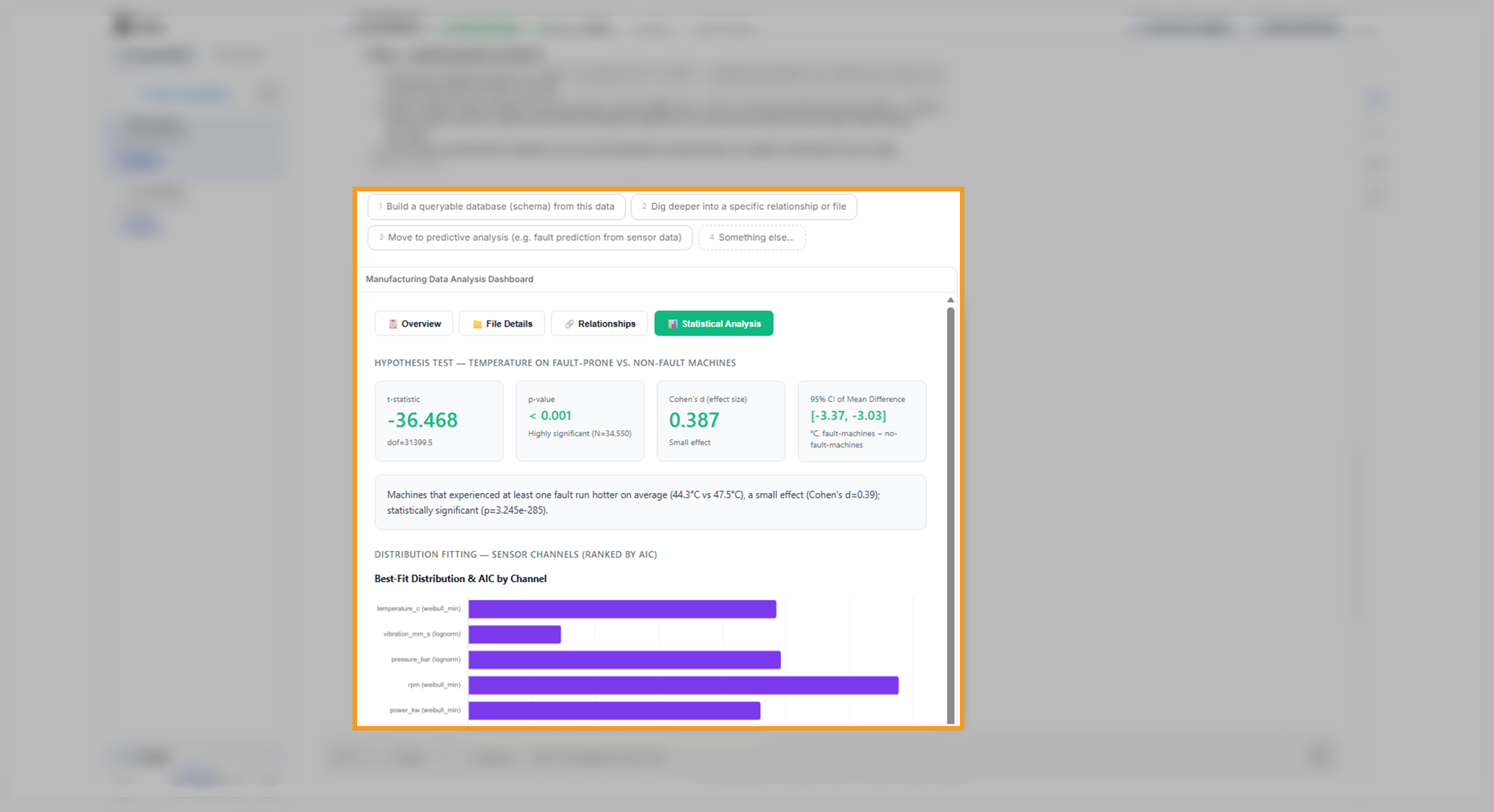
C3 Intelligence saves each conversation as a snapshot, so you can stop a conversation and later revive it, which rebuilds the conversation from that snapshot. To learn how plans, logs, result cards, saving, and reviving work, see Conversation Features.
Examples from the guide
Every tutorial in this guide uses one example, Smart Factory: a factory that wants to understand its machine breakdowns and plan maintenance. Each example here shows a request from the tutorials and one result it produced.
Profile the factory's data
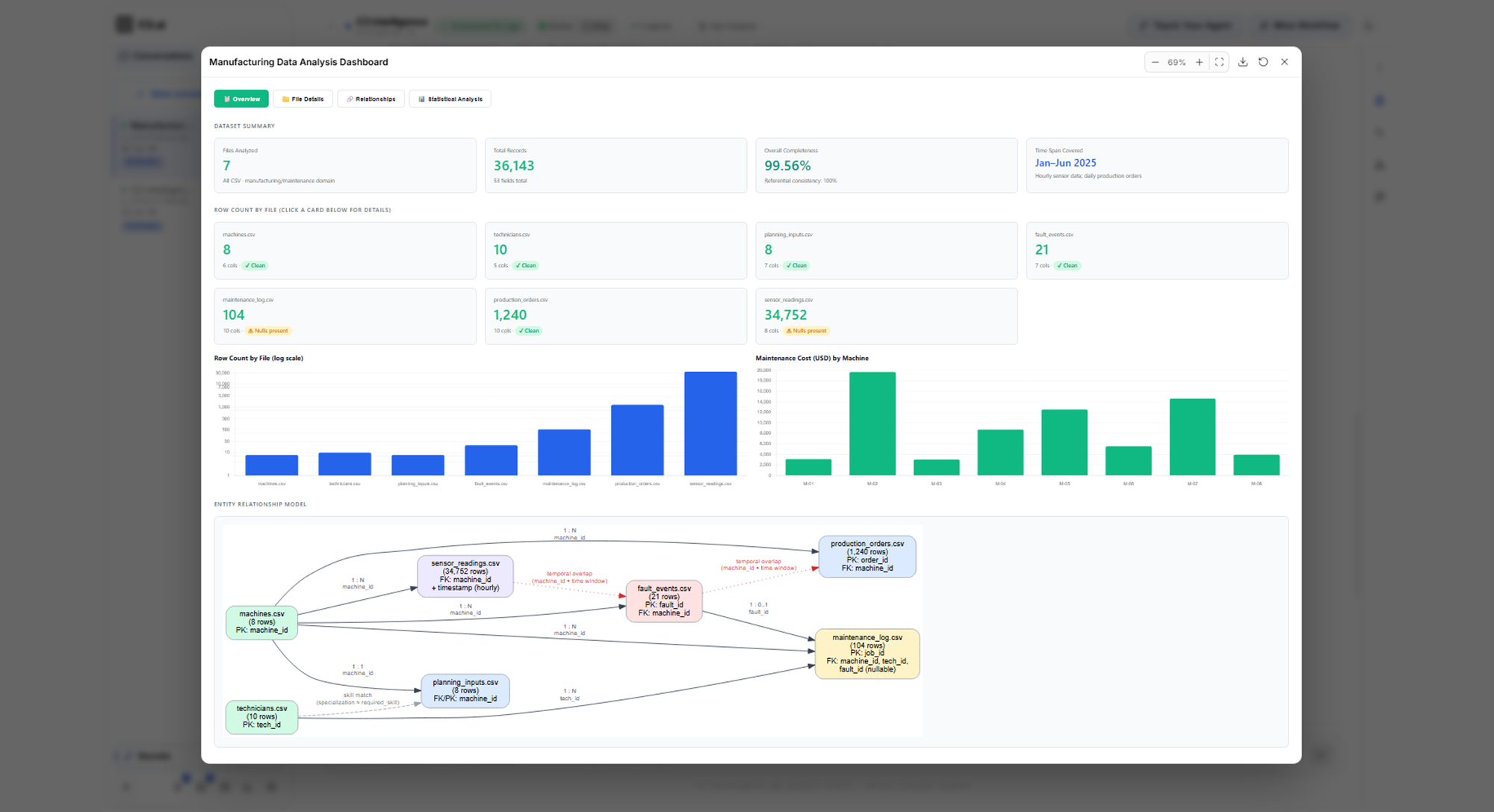
On Analyze Data, the first request attaches the seven Smart Factory data files and asks for a profile:
Review these seven files. For each one, describe what it contains, how complete the data is, and the time period it covers. Then explain how the files relate to each other.
The DI Engine profiled the seven files and linked them through shared machine and technician IDs. Its dashboard shows dataset totals and a diagram of the linked files:
Predict breakdowns
On Build ML Models, this request asks for a prediction, a plan to approve first, and a measure of reliability:
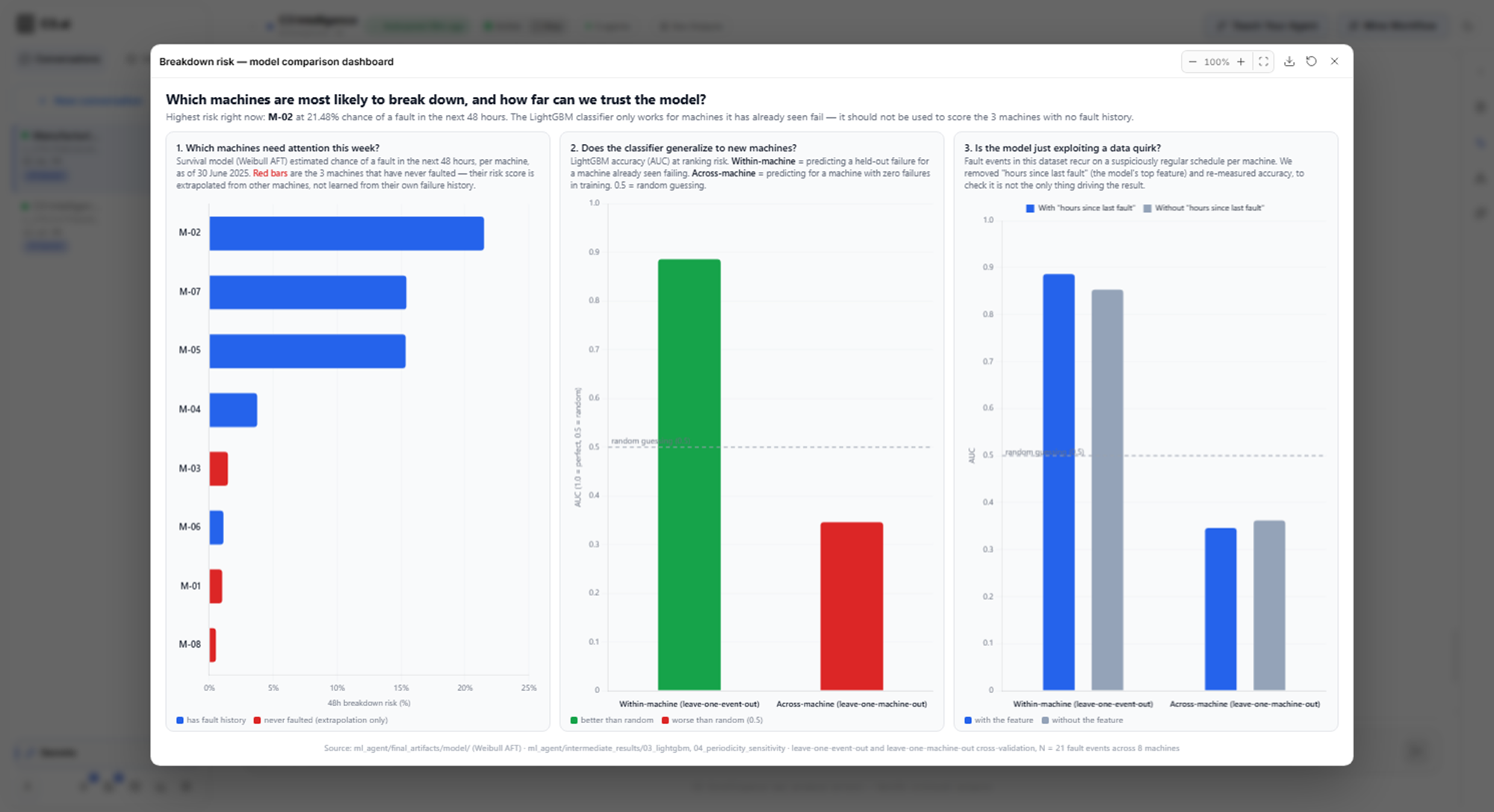
Predict which machines are likely to break down in the next 48 hours. Compare a few approaches, show me your plan before you start, and tell me how reliable the final predictions are.
The ML Agent compared three approaches, stated how far to trust the predictions, and returned a dashboard with the breakdown risk of every machine:
Forecast sensor readings
Also on Build ML Models, this request asks for a seven-day forecast for one machine:
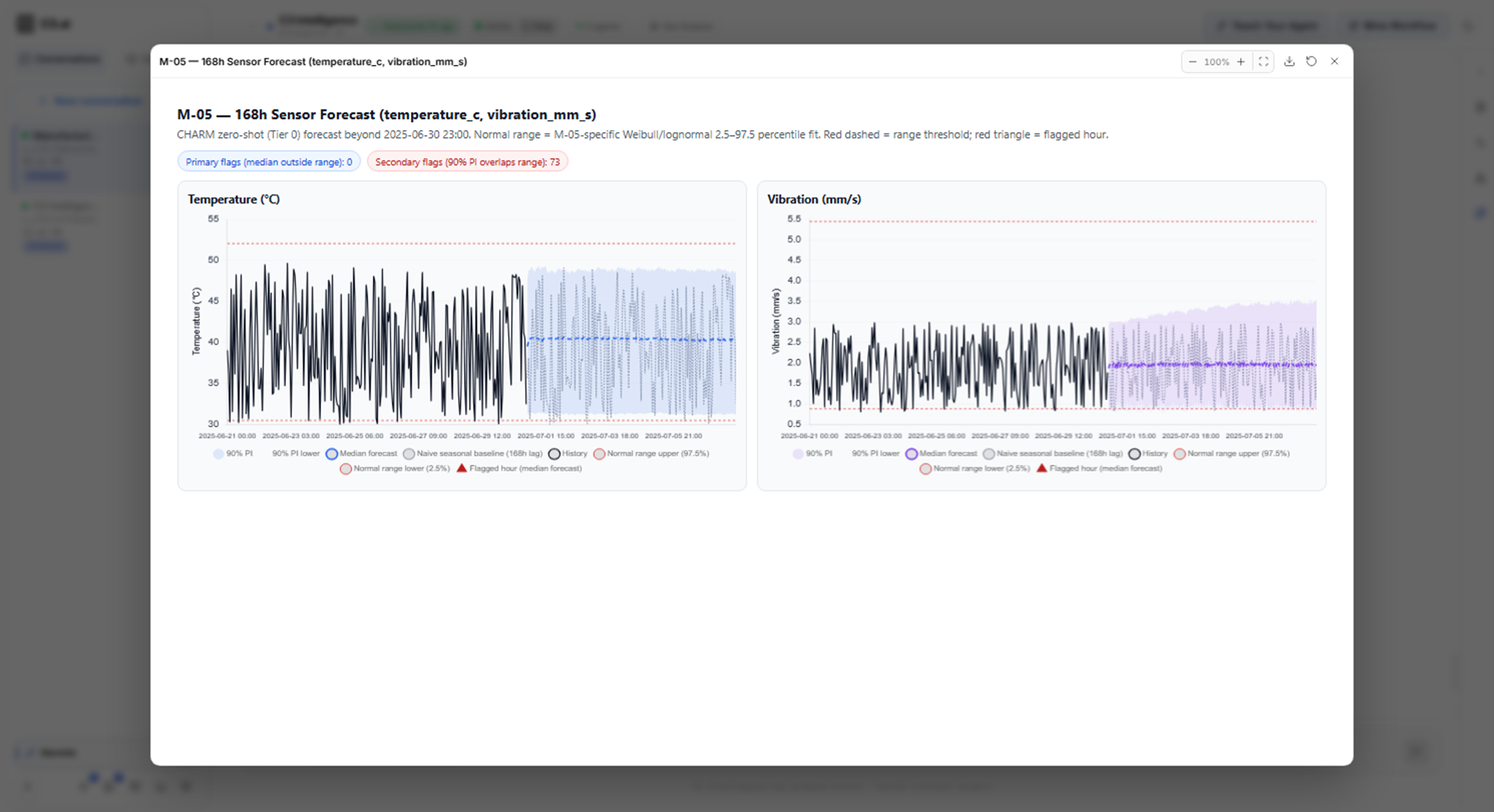
Forecast the vibration and temperature readings for machine M-05 over the next seven days, and point out any readings likely to move outside their normal range.
The ML Agent used CHARM to forecast both readings with a range of likely values, and compared the forecast with each reading's normal range:
Answer questions from documents
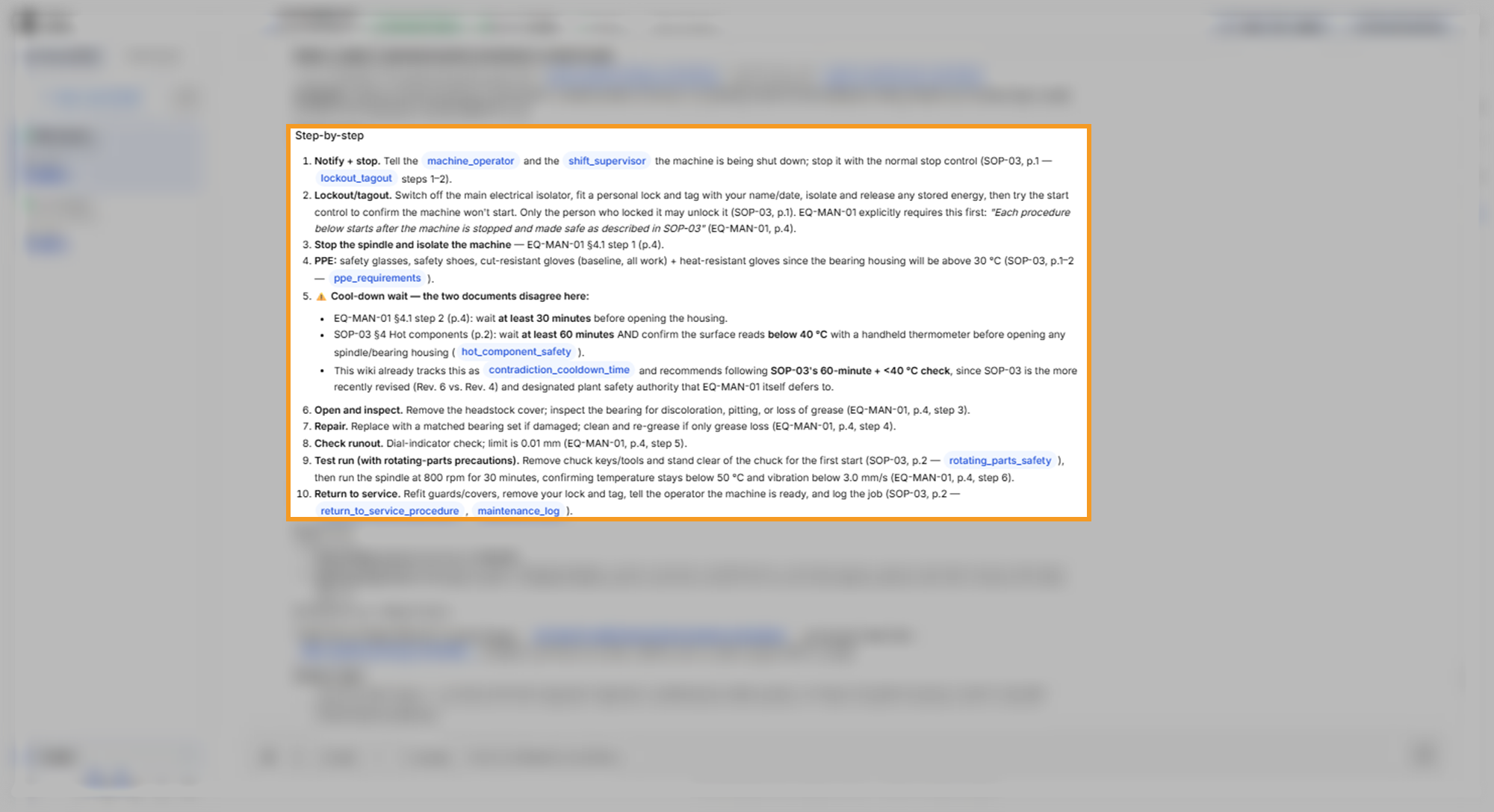
On Build a RAG Knowledge Base, the RAG Agent first builds a knowledge base from three sample documents: a manual, a safety procedure, and a maintenance protocol. This request then asks it a question:
Using the knowledge base, explain what a technician should do when a lathe's bearing overheats and how long the repair takes. Cite the document for each step.
The RAG Agent answered with numbered steps, cited the document and page for each one, and flagged a step where two documents disagree:
Plan maintenance at the lowest cost
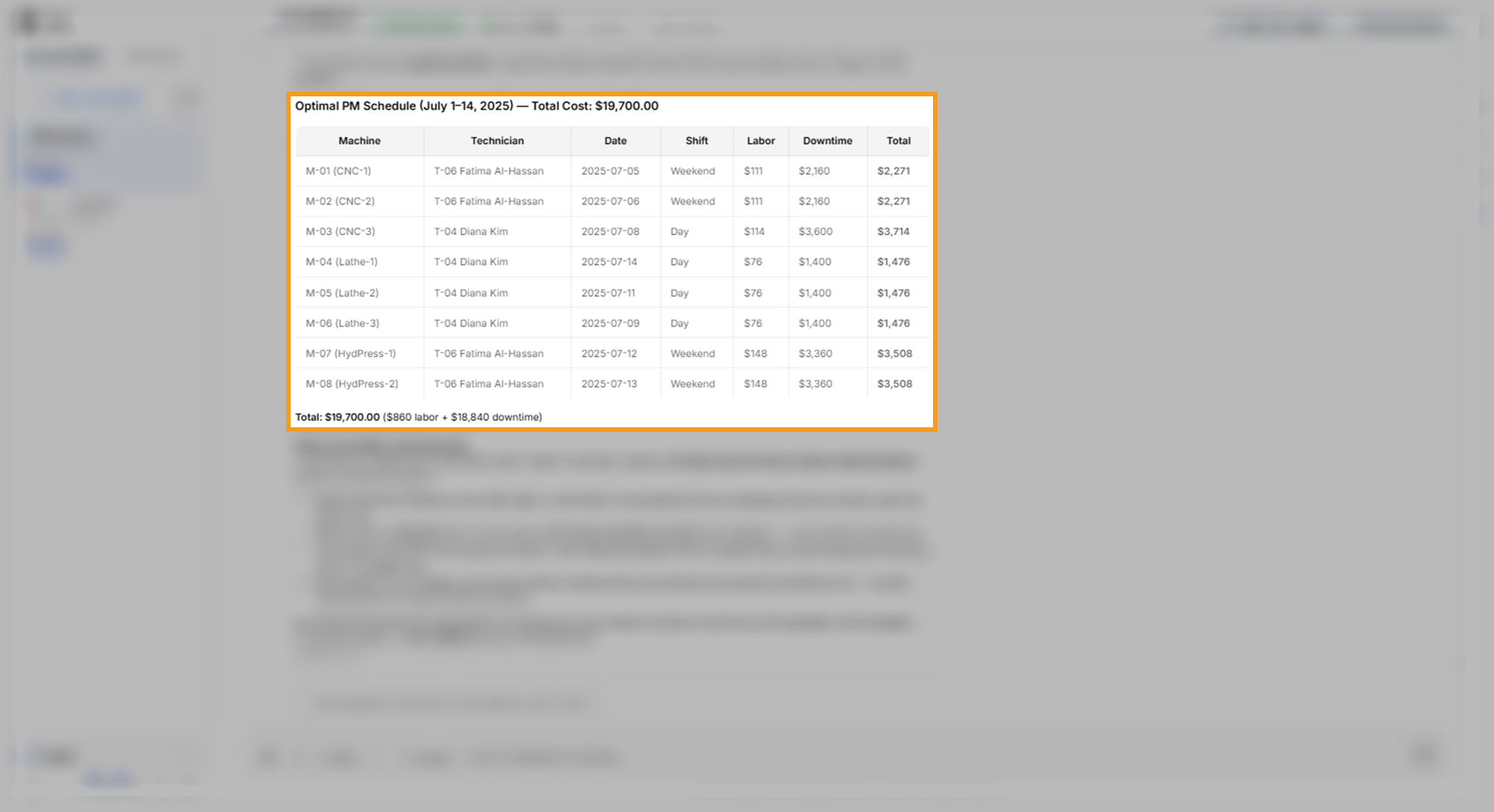
On Optimize Decisions, this request asks for a two-week maintenance schedule:
Plan preventive maintenance for every machine over the two weeks starting July 1, 2025, at the lowest total cost. Assign each job to a technician with the right skills and an available shift.
The Alchemist built an optimization model of the schedule, solved it, and listed each job with its technician, date, and cost:
Combine the results into a report
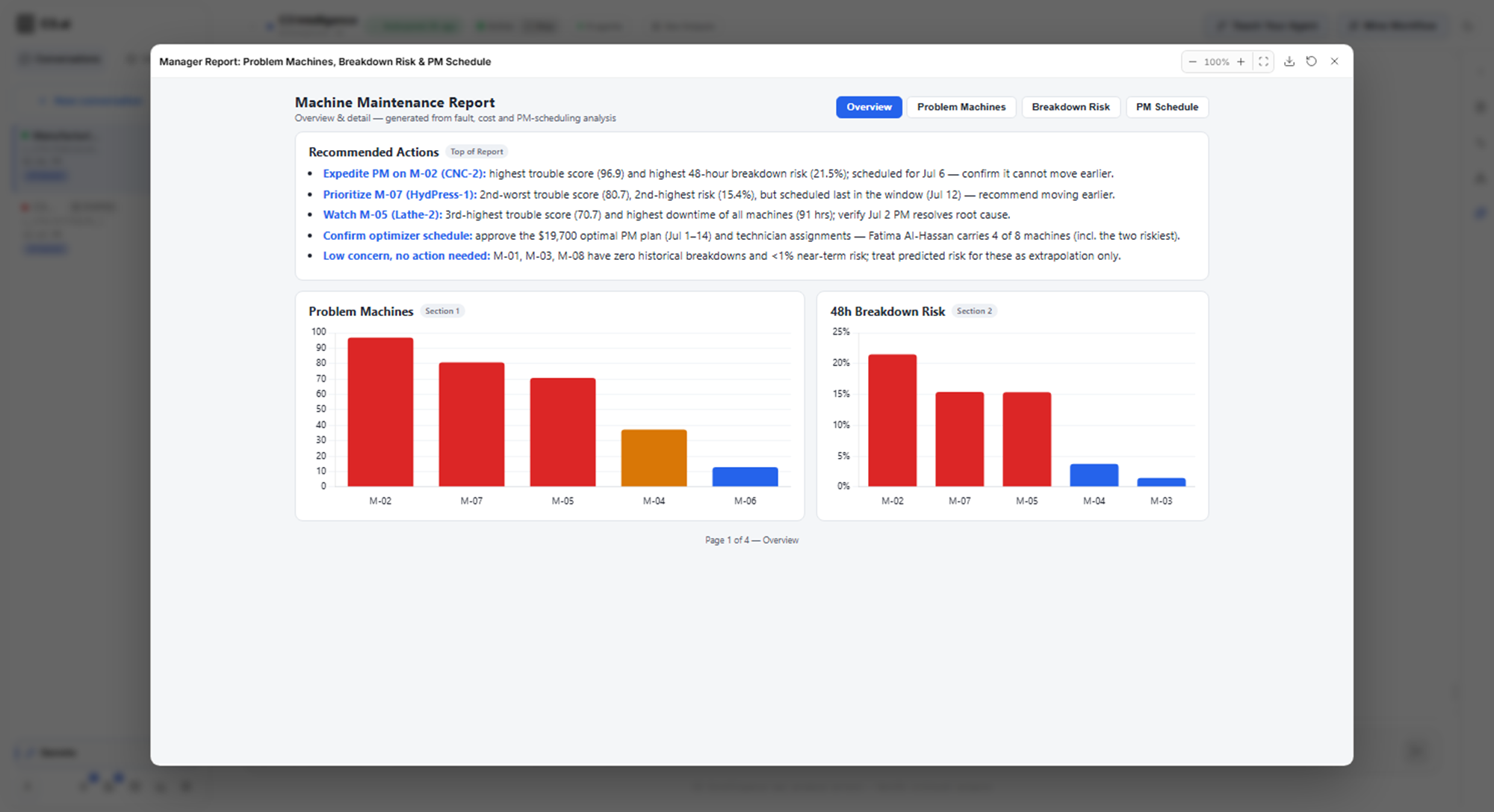
On Generate Code, this request combines the earlier results for a manager:
Create one report for my manager that covers the problem machines, the breakdown predictions, and the maintenance schedule. Include a chart for each section and a short list of recommended actions at the top.
The Coding Agent gathered the results of the other agents into one report with a chart for each section:
Turn the analysis into a workflow
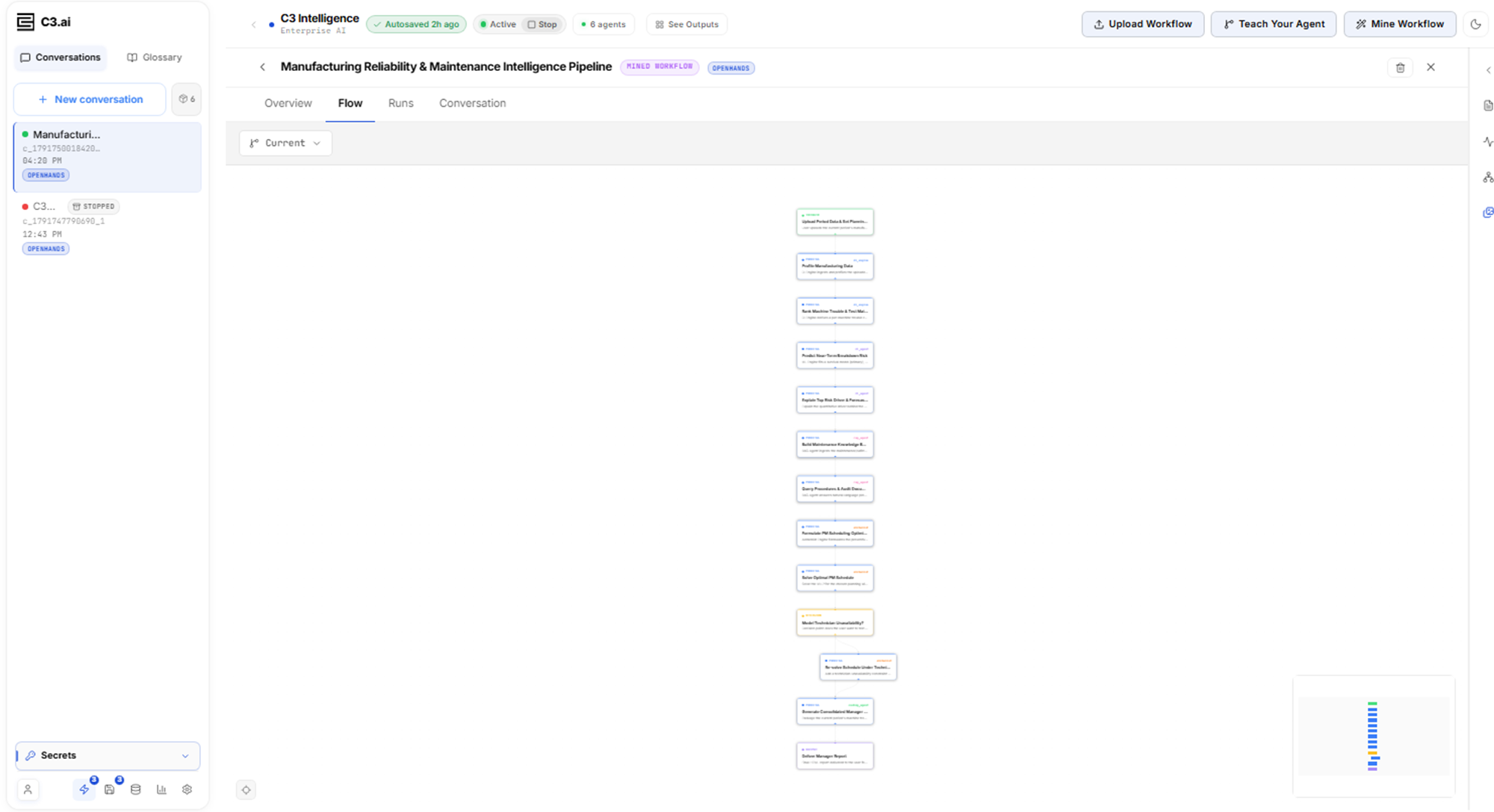
On Run and Mine a Workflow, you select Mine Workflow in the conversation header. The Workflow Builder, the agent that drafts workflows, turns the finished conversation into a draft. This message to the builder makes the draft work on new data:
Make this workflow reusable for next month's data. Don't fix the file names, dates, or results, and let me choose the start date and the planning period.
The finished workflow has thirteen steps. Its Flow tab shows them in order, including a decision step that branches to an optional re-solve step:
Who uses C3 Intelligence
C3 Intelligence is built for people who understand a business problem, whether or not they write code:
- Technical subject-matter experts: drive the analysis in plain language, bring their knowledge of the business to every step, and see how the agents reached each answer.
- Data scientists: hand data preparation and routine code to the agents and make the judgment calls, with the agents' scripts available to inspect.
- Business leaders: get data science results in days instead of months, based on the organization's own data.
Where to start
Start with the sample data and your first request, then work with each agent:
- Generate the Sample Data: create the Smart Factory files that the tutorials use.
- Get Started with C3 Intelligence: run your first request, from a new conversation to a dashboard.
- Conversation Features: look up how conversations, agents, results, saving, and reviving behave.
- Credentials and Connectors: set up the accounts and data sources the agents use.
- Connectors Reference: connect one of your C3 applications, in the C3 Application section, or look up any other connector type.
- Analyze Data, Build ML Models, Build a RAG Knowledge Base, Find Similarities with Time Series Data, Optimize Decisions, and Generate Code: work with each agent.
- Create Intelligent Workflows: turn a finished analysis into a workflow you can run again, or teach one step by step.
- My Usage: see how many tokens your conversations have used.