8.11 Release Notes for the C3 Agentic AI Platform
Discover what is new in C3 Agentic AI Platform 8.11 release. The following release notes describe new features and enhancements introduced in this release of C3 Agentic AI Platform.
C3 Agentic AI Platform
The C3 Agentic AI Platform 8.11 release delivers significant updates and enhancements across the user interface (UI), Code Editor, Observability, and Core Infrastructure, with a strong focus on improving scalability, stability, and overall performance. This release reflects continued investment in foundational improvements that enhance system robustness, optimize workload execution, and elevate the user experience—helping organizations operate their AI applications with greater confidence and efficiency.
C3 AI Studio
C3 AI Studio accelerates AI application development, release management deployment, and operations by offering a visual interface to the C3 Agentic AI Platform.
Action Profiler
The Action Profiler has been rebuilt on React, replacing the legacy UI framework. Existing profiling functionality is unchanged. The Action Profiler is now available under Monitoring in C3 AI Studio.
Interactive Histogram: A new histogram visualizes action counts over time. Users can inspect a bar's timestamp and action count, click and drag to select a time range that automatically updates the date filters and refreshes results, adjust interval granularity (auto, second, minute, hour, or day), and toggle histogram visibility.
Redesigned Filter Panel: A streamlined filter panel at the top of the page provides additional horizontal workspace for reviewing profiler results.
Agent Lifecycle Management
This release introduces significant enhancements to Agent Lifecycle Management with expanded UI-driven configuration, tooling, evaluation, and reusable skills.
Agent Skills UI
This release introduces a dedicated Agent Skills experience in C3 AI Studio for browsing, inspecting, and managing skills available in an application. Administrators can curate the catalog of skills that agents in the application may use, while agent developers can quickly understand what each skill provides before attaching it to an agent.
Skills Gallery: Browse and search all skills installed in the application. Each entry surfaces the skill name, description, category, source package, and version.
Skill Detail View: Inspect the full skill definition, including the instructions that will be injected at runtime, declared dependencies, and any executable scripts bundled with the skill.
Install from Package: Administrators can install additional skills from dependency packages directly through the UI, without needing to redeploy the application.
Dynamic Agent
Agents now support server-side workspaces for isolated execution. Workspaces help agents preserve intermediate files and execution context. Each agent session can operate in a dedicated workspace that manages file state and tool execution context across multi-step tasks. Dynamic agents receive a workspace automatically at runtime.
Skills
C3 Agents now support skills. Attach skills to agents to provide task-specific instructions, reference materials, and executable scripts at runtime. Skills encapsulate repeatable workflows in self-contained packages, enabling agents to produce consistent outputs across environments.
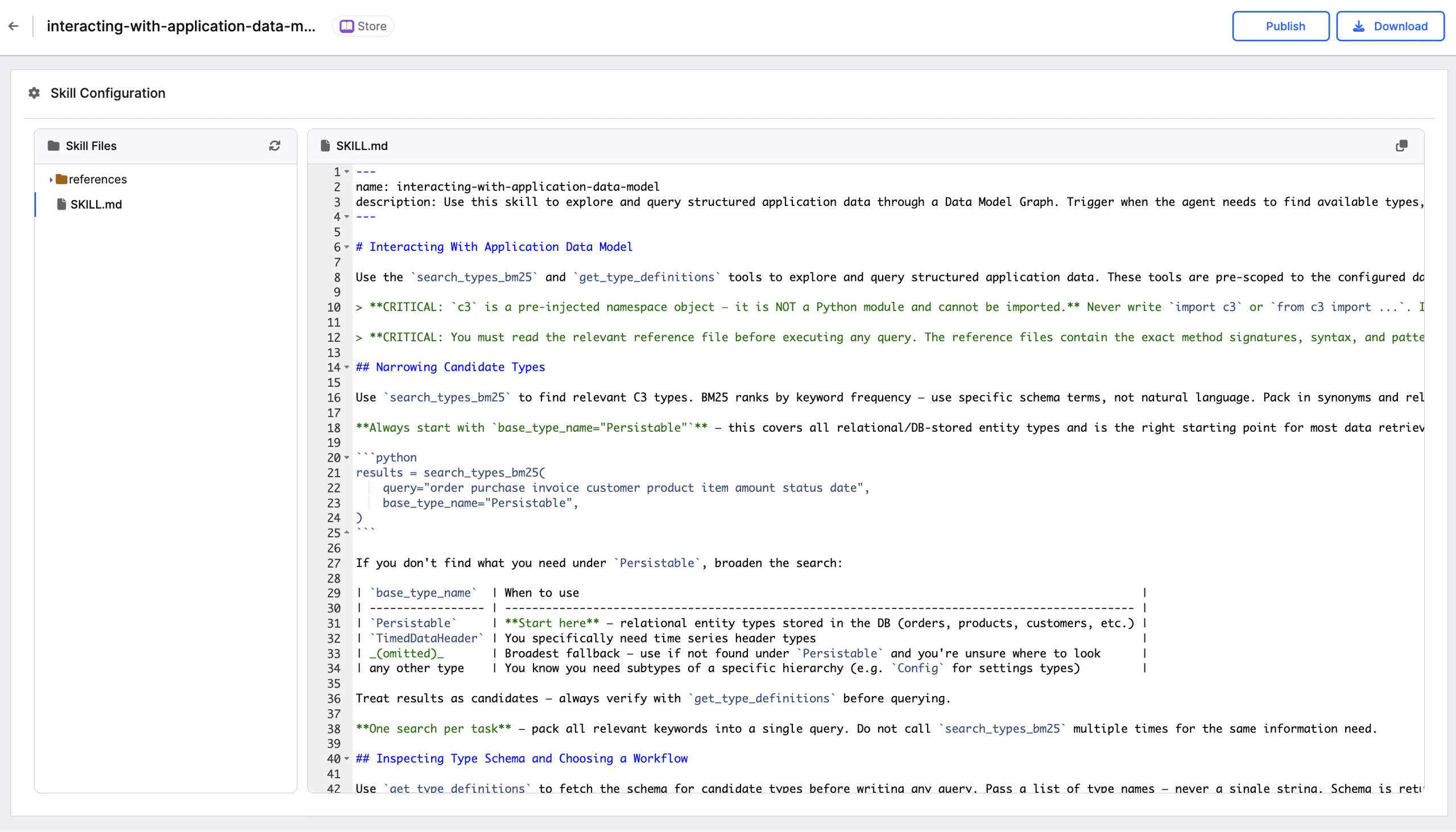 |
| Agent Skills |
Agent Workbench Skills Section
The Agent Workbench now includes a dedicated Skills tab. Developers can configure the skills available to an agent alongside its tools, prompts, and other settings—all without leaving the workbench.
- Skills Tab: A new Skills tab in the Agent Workbench lists the skills currently attached to the agent and lets developers attach additional skills from the application's skill catalog.
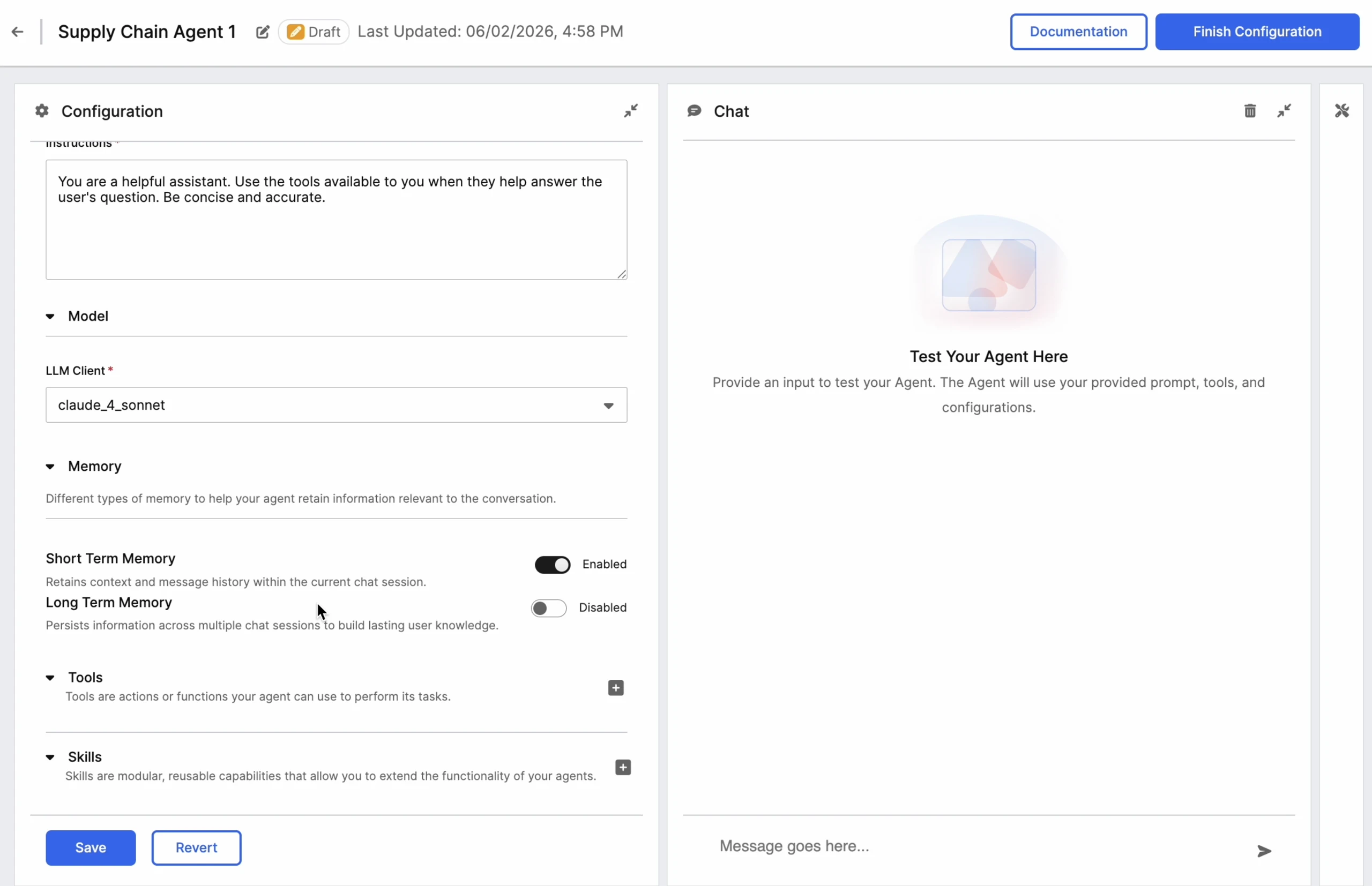 |
| Skills Tab |
Data Fusion
Data Fusion streamlines the integration and management of data sources within the C3 Agentic AI Platform. This tool empowers you to set up connectors, configure pipelines, and integrate data through UI elements. Use Data Fusion to simplify the connection and configuration of external data sources for ingestion into the C3 Agentic AI Platform.
Object Model Explorer
Release 8.11 introduces the Object Model Explorer in Data Fusion. This is a new interface for discovering, inspecting, and visualizing an application's C3 object types in C3 AI Studio.
Landing page: Browse every object type in a card grid or sortable list, with search and filtering by package, field, relationship, and object counts, model metrics (type and package totals), and per-user favorites. Active filters persist in the URL for sharing.
Type detail side panel: Select a type card or ERD node to review its Overview, Fields, Methods, and Relations in place, then jump to the detail page, ERD diagram, data preview, or entity editor.
Type detail page: Explore a type's full structure (fields, calc fields, methods, relations, inheritance, and metadata) and browse its instances in a configurable data grid with column selection and search.
AI-generated charts and dashboards: Describe a chart in natural language ("Show a pie chart of objects by status") to generate an interactive visualization; type- and object-level dashboards are auto-generated, and charts can be regenerated, refreshed, or reconfigured. Available when the environment is configured with LLM capabilities.
Unstructured Data Integration (UDI)
Release 8.11 introduces Unstructured Data Integration (UDI). This is a node-based Data Fusion pipeline for ingesting and processing unstructured content such as documents and text, alongside the existing Structured Data Integration (SDI). A UDI pipeline parses source documents and moves them through configurable stages into your application data model either as structured entities or as vectorized content for search and Retrieval-Augmented Generation (RAG).
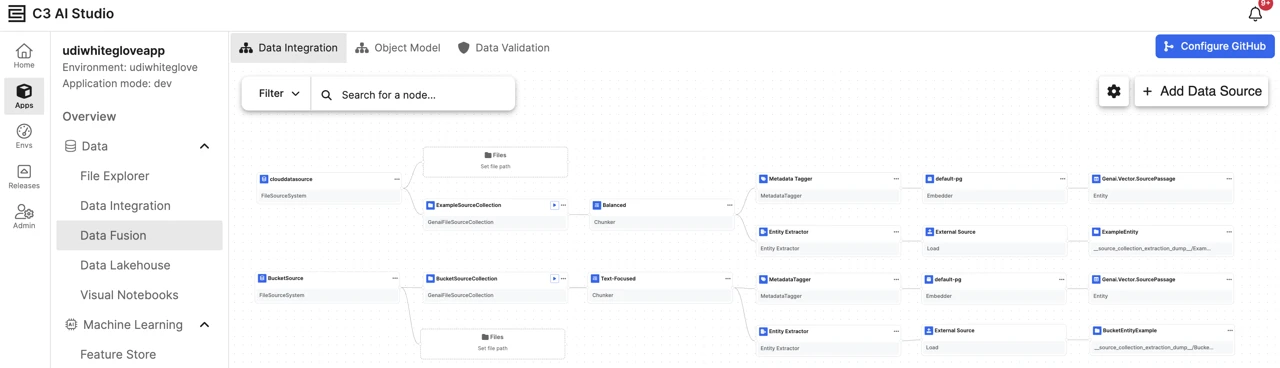 |
| UDI Pipeline Components |
Node-based authoring on the canvas: Build a pipeline as connected nodes that span a document lifecycle. The required nodes are the source collection, Chunker, Embedder, and a target vector entity. You can add an optional Metadata Tagger and Entity Extractor to enrich each chunk, and a Load Destination to route extracted entities into your application data model or an external file destination. See Unstructured Data Pipeline Architecture and Create an Unstructured Source Collection for more information.
Chunker presets: Configure the Chunker from a guided panel using one of three presets (Balanced, Text-Focused, or Table-Focused) that automatically adjust content extraction, chunking, and layout-detection settings for your document types.
Entity extraction step: Extract structured entities from document chunks using an LLM and a schema you define. This optional step runs in parallel with metadata tagging.
Load destination: You can Configure the Load Destination of your choice. When a pipeline includes an Entity Extractor, a dedicated Load Destination step routes the extracted entity records to the application data model (as a new or existing Type) or to an external file connector.
Run, monitor, and save: Execute the pipeline and monitor pipeline execution on all or selected files. You can sync the source collection before a run, track live job status and per-file processing state with column filters, and save the configurations for reuse.
DataLake as a Data Source
Data Fusion now supports C3 DataLake as a data source. Pipelines can ingest data directly from DataLake catalog tables. The connector requires no authentication setup because the data is platform managed. It is available under Internal/Platform Connectors and supports table preview where enabled. See Understanding Source System and Configure the Source System and Source Collection for more information.
Connector Configuration Wizard
Release 8.11 adds the following capabilities to the Data Fusion Connector Configuration Wizard:
Auto Map Fields: Populate connector fields automatically by pasting a JSON configuration object or a JDBC connection string. Select Merge to combine the pasted values with existing fields or select Override to replace them.
File Systems: For file source systems, a dedicated step separates system-generated and user-generated file system connections, with the option to reuse an existing connection or configure a new one.
Staged setup with review: The wizard organizes connector setup into distinct stages—connection/destination settings, authentication, and a dedicated Review & Test step. Fields are grouped and confirmed before saving.
Non-blocking save: Save & Test validates authentication, network connectivity, and source system access. Save & Close saves without validating. If validation fails, the connector is still saved and the wizard stays open for correction.
Change Data Capture (CDC) in Data Fusion
Release 8.11 extends Data Fusion CDC for SQL source collections with the following enhancements:
CDC without staging: CDC can now run directly against supported SQL sources via the Virtual Table workflow, eliminating the intermediate staging layer to lower storage and operational overhead. Staging-based CDC remains supported for workflows requiring replay, auditability, or data reuse.
Full sync for small tables: CDC now offers a full sync mode that reloads the entire table on each run, alongside incremental sync. Full sync is limited to small tables—the platform checks table size (default 100,000 rows, configurable) at configuration and on every run, erroring if a table exceeds the threshold.
Cross Application Data Sharing
Release 8.11 introduces a C3 AI Studio experience for Cross Application Data Sharing, backed by the new Db.Domain.Access workflow. Applications in the same cluster can now publish, discover, and manage shared data domains (Db.Domain) through the UI instead of console commands. Existing Db.Domain / allowAccess(...) configurations remain supported and require no migration.
Key capabilities:
Publish: Provider applications register data domains that expose selected types and packages for discovery by other applications.
Discover and subscribe: Consumer applications browse available domains, request access, and subscribe. At runtime, shared-type requests are routed to the provider application.
Access control: Providers approve access requests at the application level, granting Read Only or Read & Write access. Approval requires the App Admin role or higher.
Subscription management: Consumer applications manage their subscriptions in C3 AI Studio. The platform prevents subscriptions that use the same types or packages.
See the following for more information:
- Data Sharing with Db.Domain
- Cross Application Data Sharing in Studio
- Configure Provider Domain
- Discover and Subscribe to Domains
- Monitor Subscriptions and Compatibility
- Runtime Behavior and Access Considerations
C3 AI Data Lakehouse
The following capabilities and improvements were added in version 8.11:
Documentation and Help Icon Integration
The Data Lakehouse experience now provides quick access to supported DataLake APIs and relevant documentation directly from the UI.
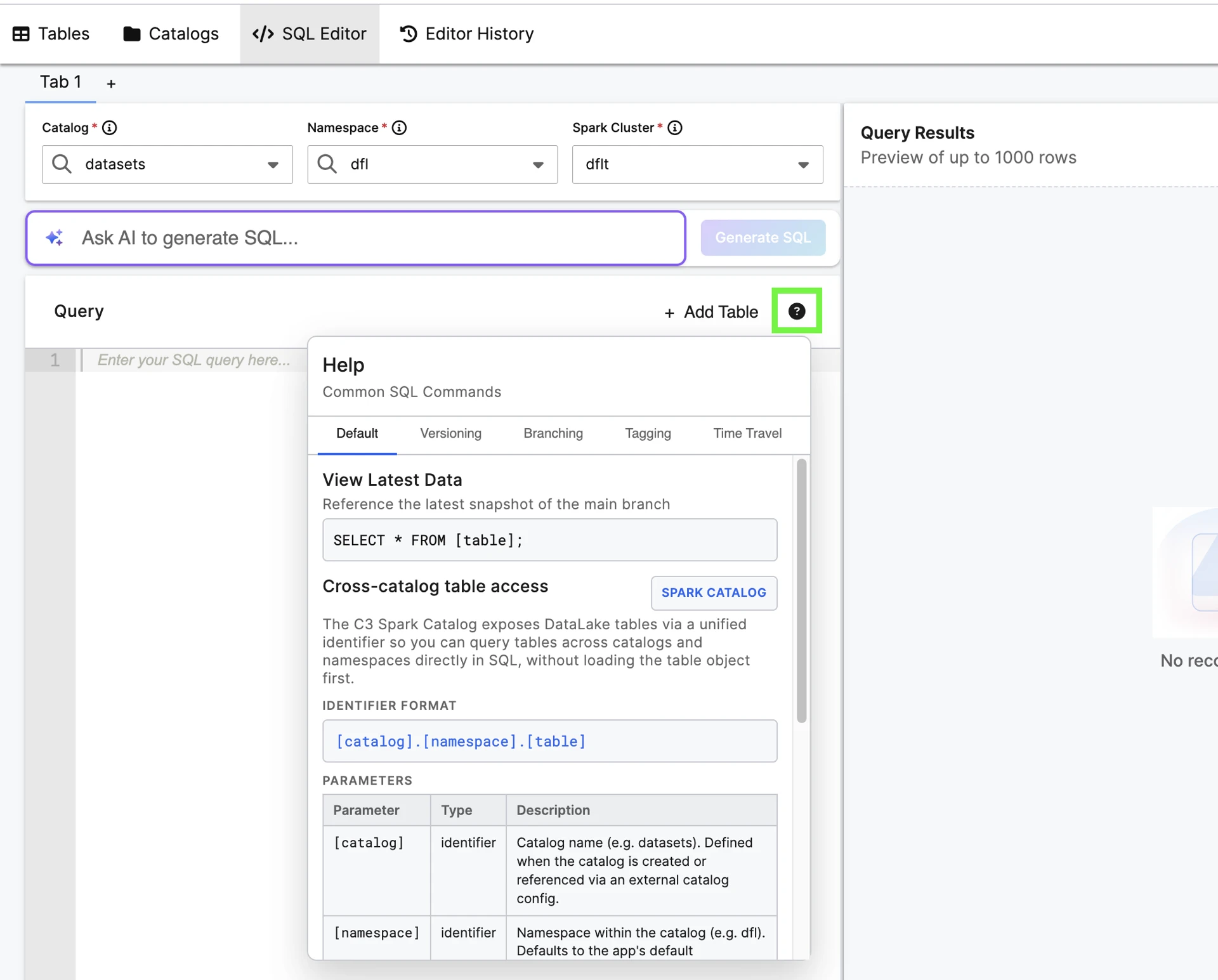 |
| Help Icon in Data Lakehouse UI |
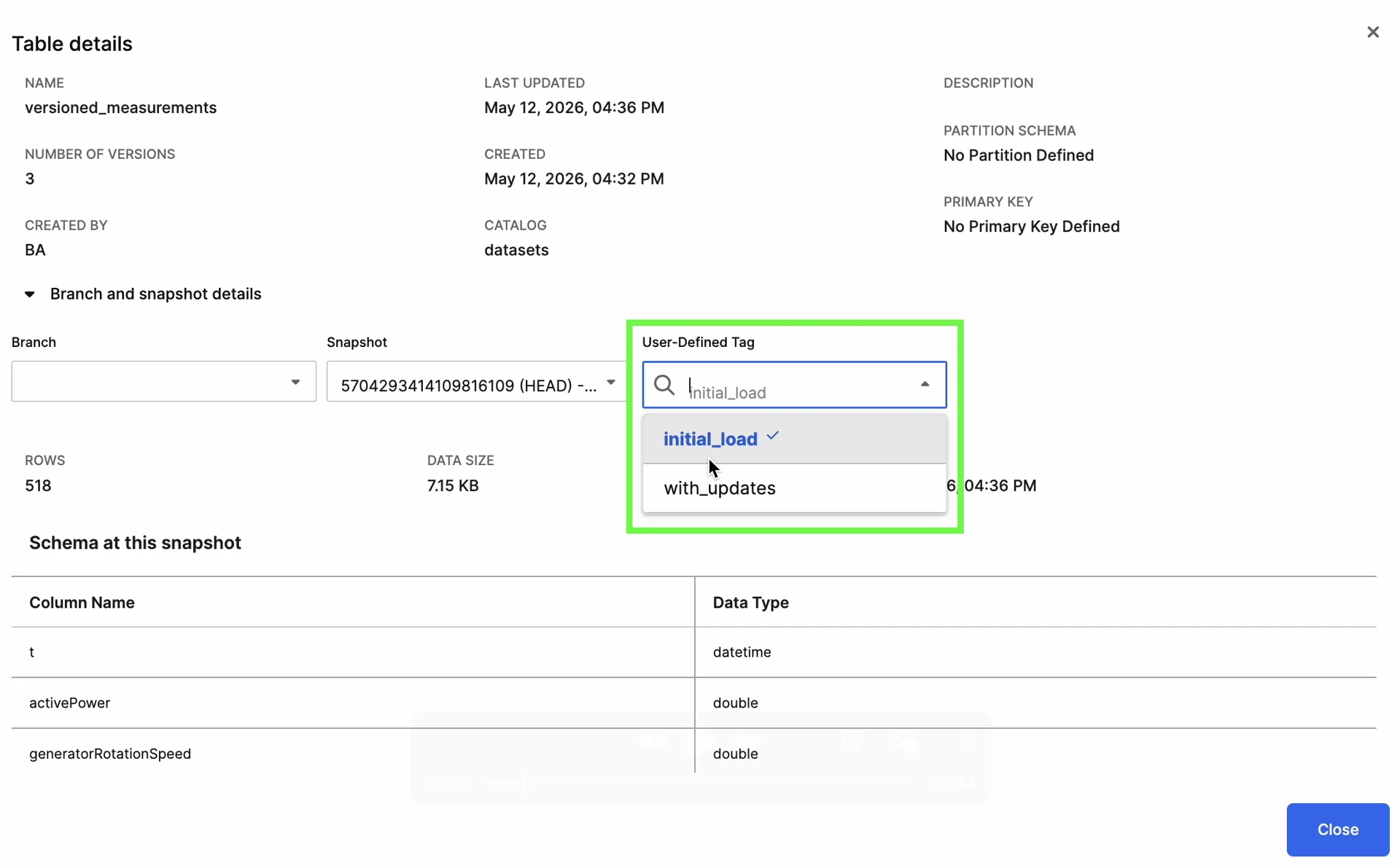
Human-Readable Snapshot Tagging
Users can now apply human-readable tags to snapshots, making it easier to identify, reference, and navigate important versions of data.
 |
| Snapshot User-Defined Tags |
External Catalog Support
Data Lakehouse now supports Snowflake external catalogs. You can register a Snowflake catalog to browse and query Snowflake-managed Iceberg tables directly from the Lakehouse.
Historical Data Querying and Time Travel
Users can now query historical versions of data through snapshot and branch-based navigation, enabling time travel workflows directly within the Lakehouse experience.
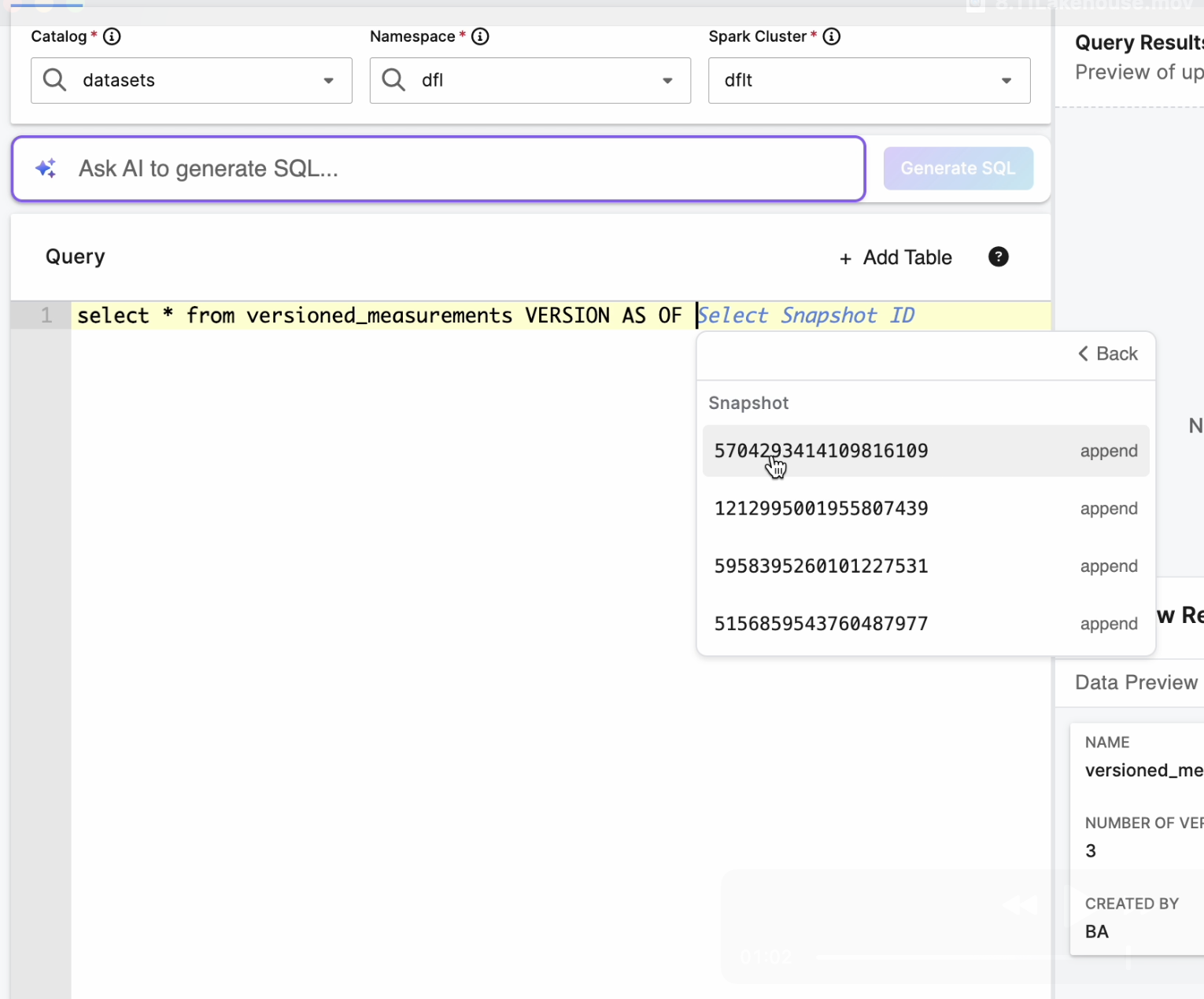
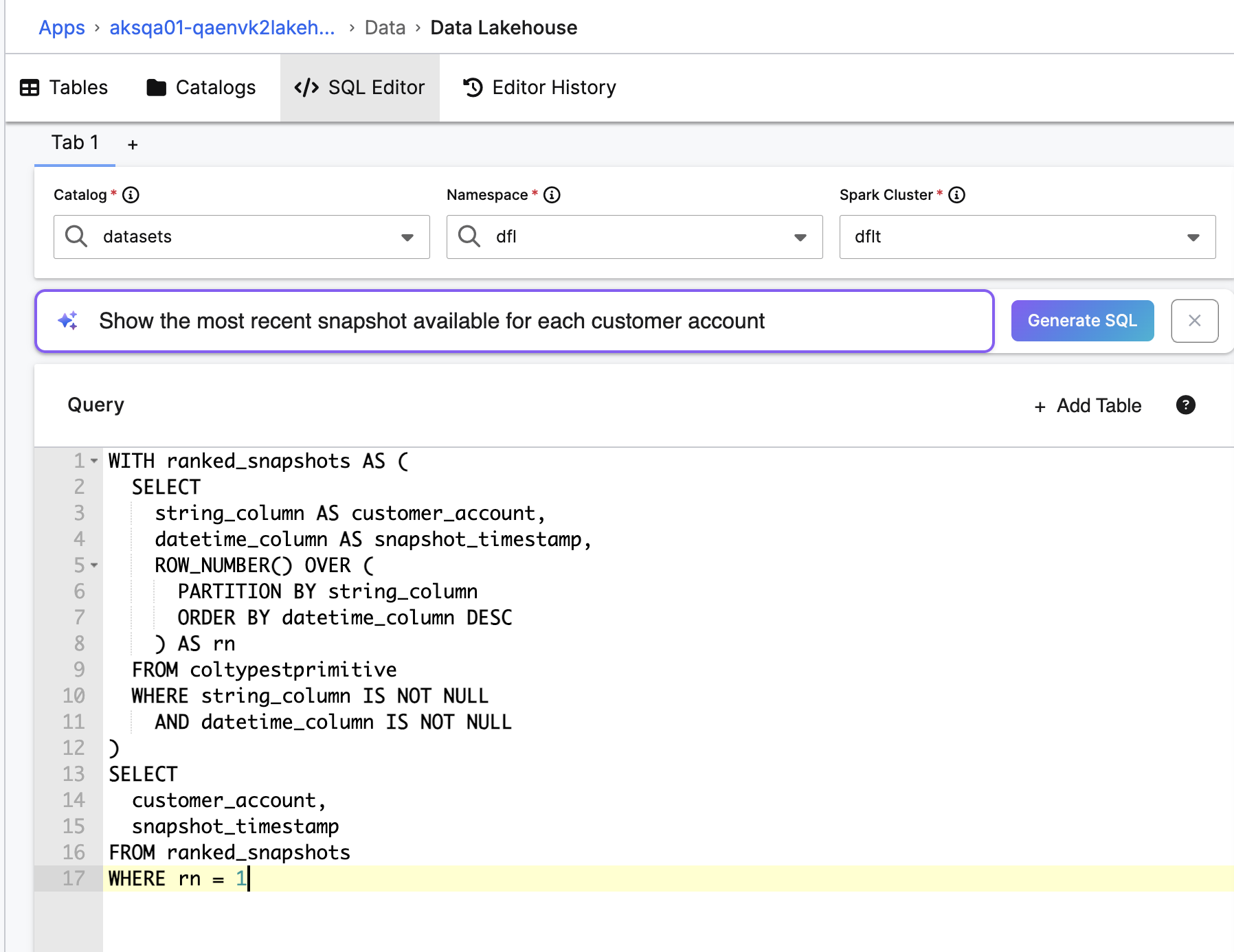
Context-Aware SQL Suggestions
The SQL experience now provides context-aware suggestions for catalogs, tables, branches, snapshots, and related Lakehouse entities.
 |
| Auto-Complete Suggestion |
 |
| Natural Language Query |
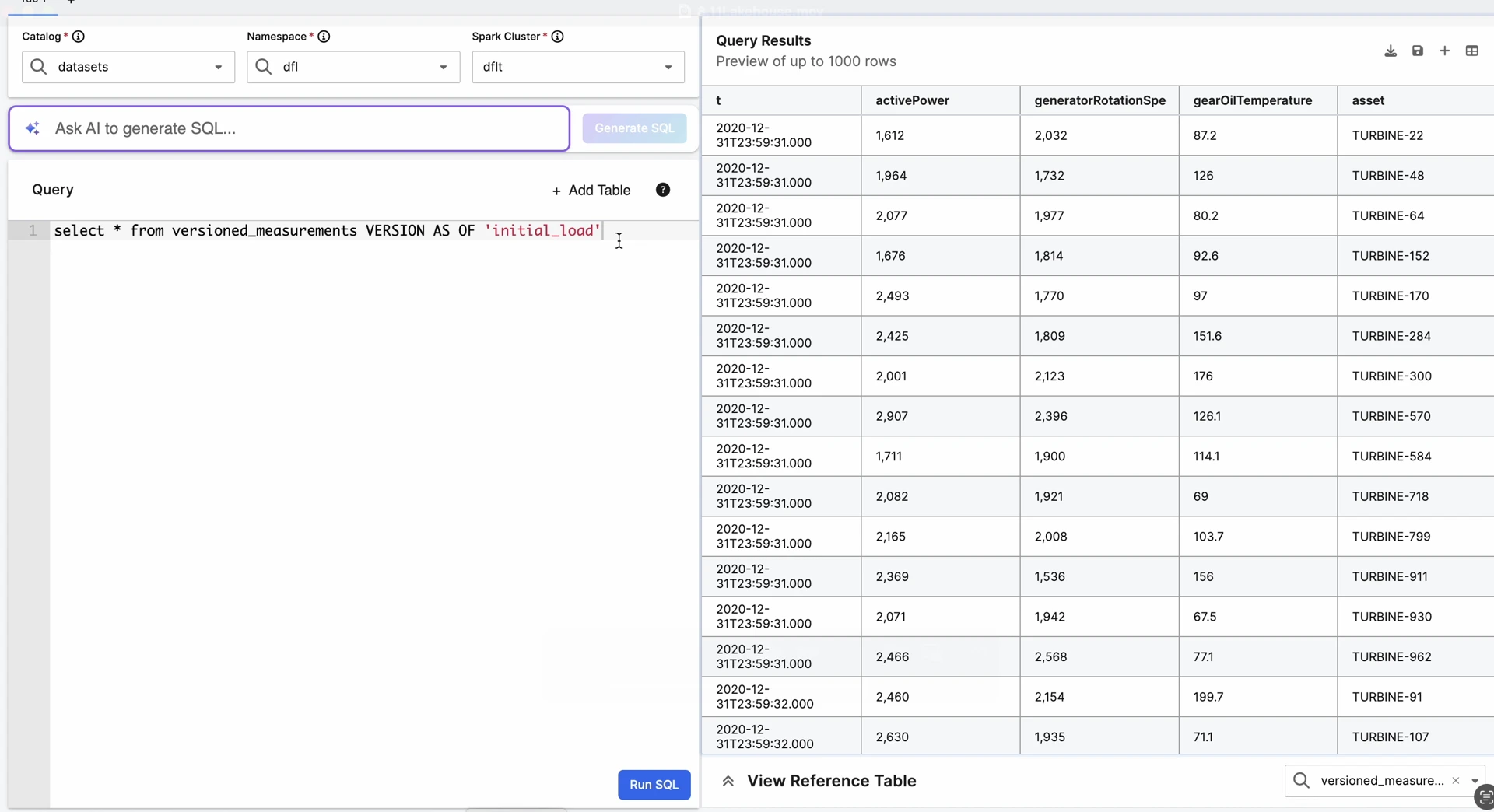
Side-by-Side Reference Table and Query Results View
Users can now view reference table details and query results side by side, making it easier to inspect data and validate query output.
 |
| Query Results and Reference Table Views |
Snapshot History and Reference Navigation
The UI now provides visibility into historical snapshots and tags, enabling easier navigation across data versions directly from the Lakehouse experience.
Use Lakehouse Tables in Data Fusion Pipelines
The Data Lakehouse is now both a source and a target for Data Fusion pipelines and is configurable from the canvas. See DataLake as a Data Source section for more information.
C3 AI Data Integration, Data Processing, Data Storage, and File System
The C3 Agentic AI Platform offers robust data integration, storage, and processing capabilities. It enables the integration of diverse data from various sources such as object storage, databases, data warehouses, data lakes, streaming systems, business applications, and operational systems.
Application-administrator datastore configuration
Manage non-secret datastore configuration as an application administrator: Users with the C3.AppAdmin role can now read and modify non-secret datastore configuration without requiring the C3.ClusterAdmin role. Secret values such as credentials, and applying changes at the cluster level, still require the C3.ClusterAdmin role. See Specify a KV Store for more information.
Connectors
The following new capabilities and improvements were added in version 8.11:
Faster sync with incremental updates
File connectors for OneDrive, SharePoint, and Google Drive now support incremental synchronization, syncing only what changed since the last run instead of re-scanning every file. Syncs that once took minutes now finish in seconds and deletions are detected automatically through each provider's native change feed.
To enable, set cdcOrder = "$native" on any FileSourceCollection backed by one of these connectors. The platform handles token lifecycle, automatic recovery from expired tokens, and distributed batch processing.
C3 AI Data Science and Machine Learning
The C3 Agentic AI Platform integrates leading technologies favored by data science teams into the C3 AI experience to enable teams to develop, deploy, and operate machine learning (ML) models at scale.
C3 Jupyter Service
The C3 Jupyter service now uses Chainguard images as its container base image, replacing the previous Red Hat UBI base.
Developer Hub
The C3 AI Developer Hub is a comprehensive set of tools, resources, and support systems designed to streamline the development, configuration, and maintenance of applications on the C3 Agentic AI Platform.
MCP Client
Application administrators on the new Model Context Protocol (MCP) client can connect a C3 application to any third-party or C3-hosted MCP server. Agent developers can use tools across all supported agent frameworks.
Server Connection Management: Create, validate, and manage outbound connections to MCP servers by URL. Each connection performs capability negotiation and health checks against the standard MCP protocol.
Authentication: Configure either service-level accounts (a single shared identity for all users of the application) or user-level accounts with Open Authorization (OAuth) flows for tools that act on behalf of an individual user.
Tool, Prompt, and Resource Discovery: Tools, prompts, and resources are discovered automatically on connection, and can be refreshed on demand. Each item's metadata (name, description, parameters or arguments) is cached for use by agents and the UI.
Error Handling: Authentication failures, tool-call failures, and tool definition changes surface as actionable errors, so agents can fail cleanly instead of hanging.
Multiple MCP Servers Per Application
The 8.11 release allows C3 applications to expose multiple MCP servers. You can curate specific use-case servers which expose only a controlled set of tools, prompts, and resources.
Default MCP Endpoint: Every application will still expose a default MCP server endpoint at an application-scoped URL
Tool and Prompt Catalogs: Tools and prompts registered in an application are available to be exposed on all servers for that application.
Per-App Access Control: Token management, user revocation, and tool/prompt enable/disable controls are scoped to the individual server. Application administrators have full control over each server.
Existing single-application deployments from 8.10 continue to work without changes. These applications will continue to use the Default MCP Endpoint.
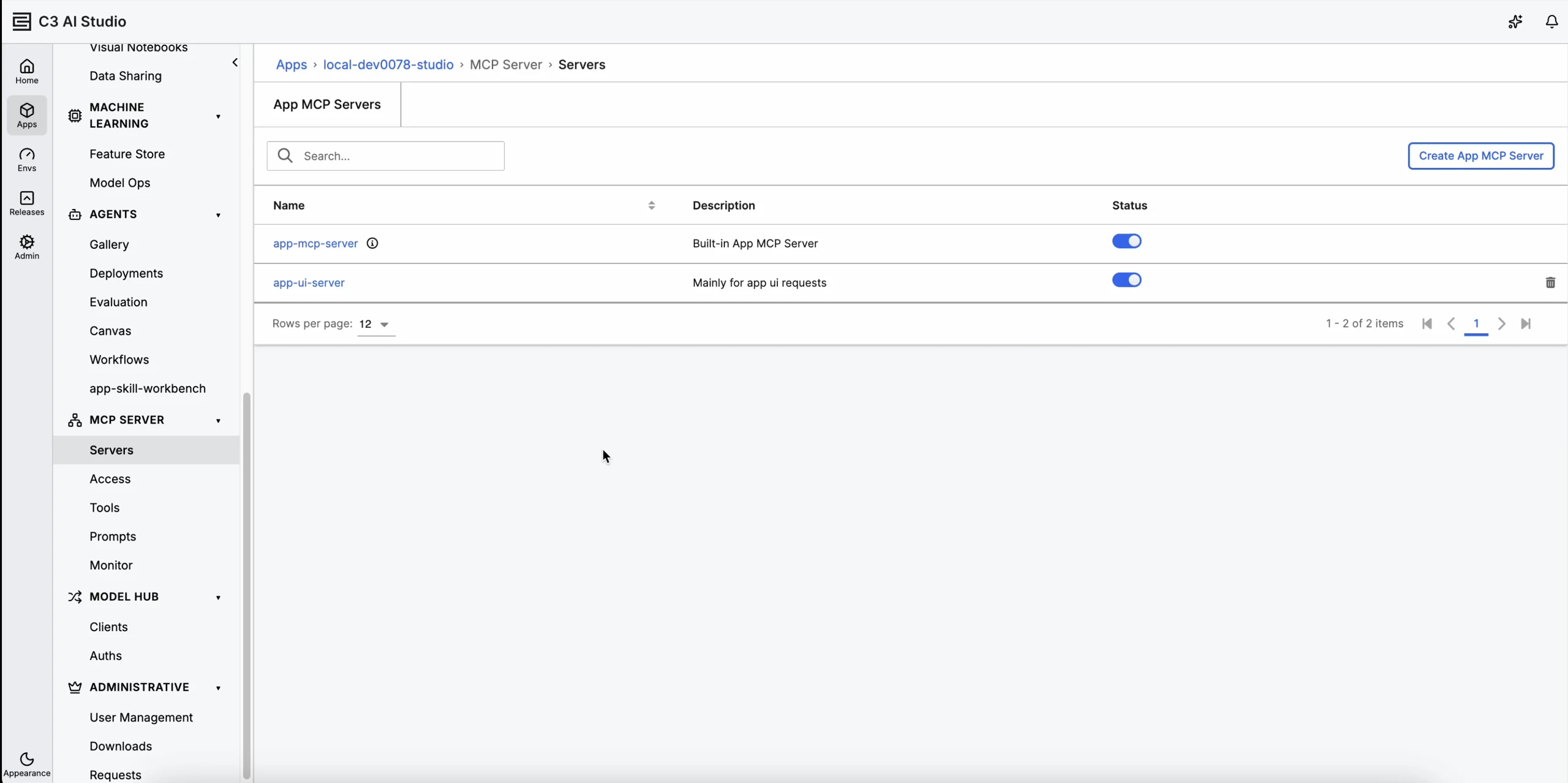 |
| MCP Servers for Multiple Applications |
UI Package Build and Test Steps
Application builds now run the install, build, and test steps for UI packages as distinct, labeled steps, with each step's results shown directly in the build output. Developers get clearer, per-phase visibility into how UI packages are built and tested during a build. See UI Package Structure for npm Applications for more information.
- Per-Phase Steps: Dependency installation, build, and test each run as a separate, labeled step, making it easy to see which phase is running and where a failure occurred.
- Inline Logs and Results: Each step captures its output, including standard output and error details, and saves it with the build for later review.
- Non-Blocking Test Results: Installation and build failures stop the UI package build, while unit test failures are reported without failing the overall build, so test outcomes stay visible without blocking delivery.
- Configurable Commands: Install, build, and test commands are configured per UI package, with standard npm defaults applied when none are specified.
C3 Agentic Security
Release 8.11 strengthens the security model for C3 Agents, ensuring they operate safely within enterprise access boundaries when acting on sensitive data.
Agent Role Handling
C3 Agents can now run under scoped, restrictive roles. Authorization enforces an agent's assigned permissions. An agent operates within its granted scope and never exceeds it.
Breaking Changes
The following 8.11 behavior changes may affect existing customer code, configurations, or deployments. Each item lists the current workaround and the fix status. Customers upgrading from 8.10 should review this section before deploying.
Fetch and evaluate: limit = 0 now returns zero rows
In 8.10 and earlier, an explicitly supplied limit of 0 on certain fetch and evaluate queries was treated as "no limit" and returned all matching rows. In 8.11, a limit of 0 is honored per SQL semantics and returns zero rows. To request "no limit", use a negative value (for example, -1). This is an intended bug fix.
This affects queries where a limit of 0 is explicitly supplied. A null or unset limit is unaffected and continues to use the platform default.
- Impact: Code that relied on
limit: 0meaning "all rows" now receives an empty result. A common trigger is a!intlimit field (for example, a paginationlimit), which defaults to0(notnull) when unset; a nil check such as_.isNil(0)returnsfalseand does not catch it, so0is passed to the query. - Workaround: Normalize the limit so that an explicit
0or unset value falls back to a real default (for example,limit || DEFAULT), only pass alimitwhen a bounded result is intended, or pass-1to request "no limit". - Fix: Intentional change — affected application code must be updated.
- Reference: The platform ships a
limit-zero-semanticsagent skill (available to coding assistants asc3-platform-limit-zero-semanticsunder.cursor/skills/and.claude/skills/) with detailed diagnosis and migration guidance.
Calc and feature expressions: boolean == null now evaluates to false
In 8.10 and earlier, comparing a non-tri-state boolean field to null (for example, myFlag == null) in a stored-calc, read-calc, or feature expression returned true for an unset field, because the old expression engine read an unset boolean as null. In 8.11, calc and feature refresh use the new expression engine, which reads a non-tri-state boolean as its actual default value (false). As a result, myFlag == null now evaluates to false (and myFlag != null to true). This aligns calc-expression semantics with feature-expression semantics and is an intended bug fix.
A regular boolean field is never null — it always holds true or false. Only a tri-state ?boolean field can be null, and ?boolean == null is unaffected (it remains a real null check). This change applies to the calc/feature refresh path, not to filter/query-time evaluation.
- Impact: Calc or feature expressions that used
boolean == nullas a "not set" check now take the wrong branch, which can cause the calc to resolve tonull/0and silently break downstream KPIs, alerts, and aggregations that read it. - Workaround: Rewrite the expression to standard boolean semantics — an unset boolean is
false, so replaceflag == nullwithflag == false(or useflag != falsefor "not explicitly true"). Ifnullmust be a distinct state fromfalse, change the field to a tri-state?boolean. - Fix: Intentional change — affected application expressions must be updated.
- Reference: The platform ships a
calc-null-boolean-semanticsagent skill (available to coding assistants asc3-platform-calc-null-boolean-semanticsunder.cursor/skills/and.claude/skills/) with detailed diagnosis, an expression analyzer, and migration recipes.
We Value Your Feedback
Your input is crucial to our continuous improvement. If you encounter any issues or have suggestions for further enhancements, please reach out:
Provide feedback on specific topics in our new Documentation Site.
Questions? Post them in the Community Category for version 8 course support.
Want to speak with a C3 AI Academy instructor directly? Book time with them for support on the Help Center.