8.9 Release Notes for the C3 Agentic AI Platform
Discover what is new in C3 Agentic AI Platform 8.9 release. The following release notes describe new features, and enhancements introduced in this release of C3 Agentic AI Platform.
C3 Agentic AI Platform
The C3 Agentic AI Platform 8.9 release delivers significant updates and enhancements across the user interface (UI), Code Editor, Observability, and Core Infrastructure, with a strong focus on improving scalability, stability, and overall performance. This release reflects continued investment in foundational improvements that enhance system robustness, optimize workload execution, and elevate the user experience—helping organizations operate their AI applications with greater confidence and efficiency.
C3 AI Studio
C3 AI Studio accelerates AI application development, deployment, release management, and operations by offering a visual interface to the C3 Agentic AI Platform.
Agent Lifecycle Management
This release introduces a new and intuitive user experience for managing agents and their tools. You can create new agents, manage and test existing agents, and deploy them completely in the UI. Agents are shared resources within your application and are accessible to others in your organization upon creation.
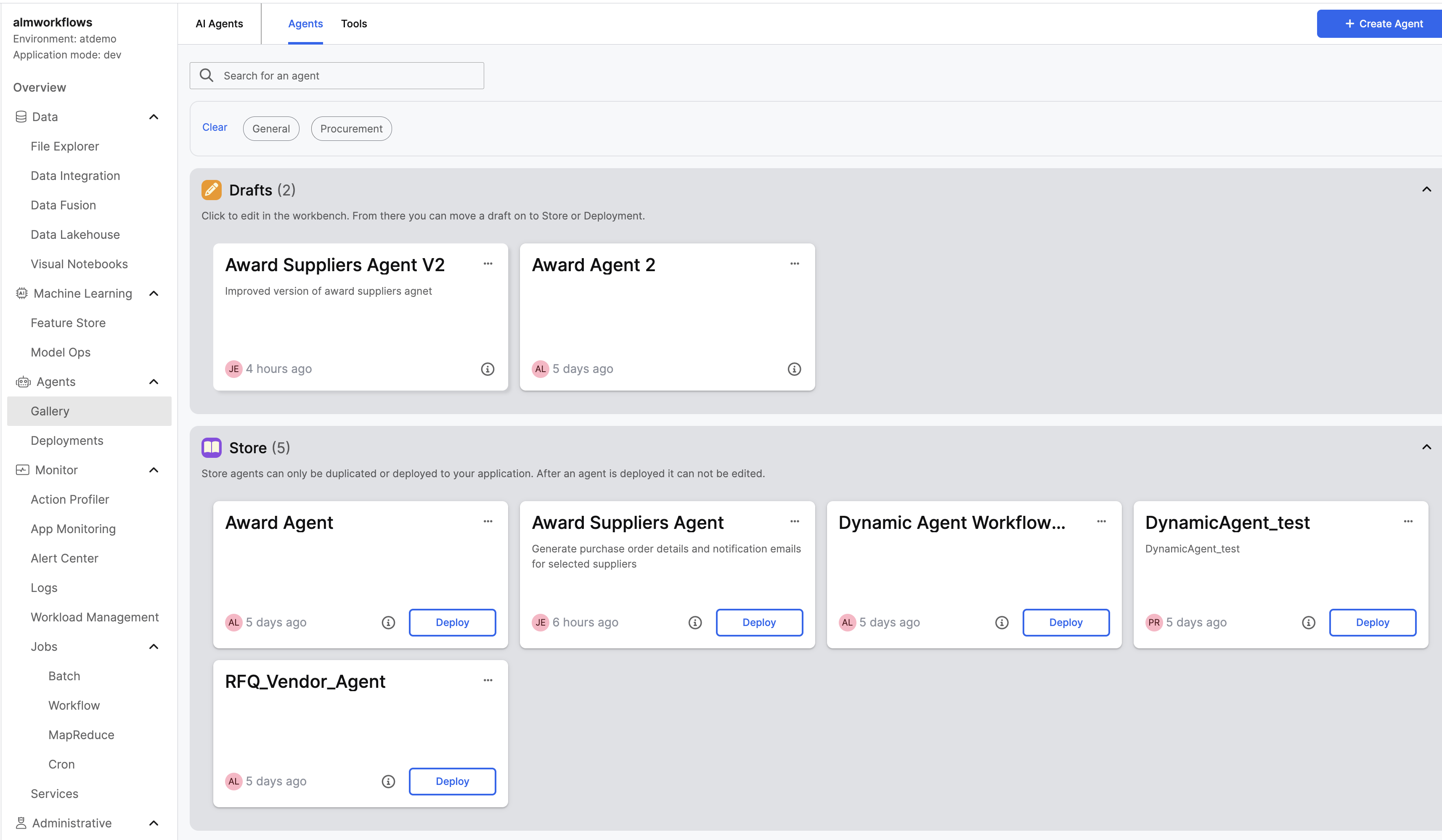 |
| Agent Gallery in C3 AI Studio |
Agent Gallery
The Agent Gallery is the main workspace for creating and managing agents. The Agent Gallery is composed of three sections:
Drafts: Shows agents that are in development. This enables safe editing and testing.
Store: Contains finished and validated agents that are ready for deployment and organizational use.
Templates: Provides pre-built starting points to accelerate agent development that can be copied and modified.
Agent Workbench
The Agent Workbench facilitates rapid agent configuration and testing.
Agent Configuration: Set an agent's prompt, tools, large language model (LLM), short-term memory, and other input parameters.
Real-Time Testing: The Preview Panel can instantly test an agent's responses as configurations change.
Tool Gallery
The Tool Gallery is the main workspace for creating and managing Agent Tools. The Tool Gallery is composed of two sections:
Drafts: Lists tools in development to enable safe editing and testing.
Store: Contains finished and validated tools that are ready for organizational use and can be added to Agents.
Tool Configuration Workbench
The Tool Workbench is a workspace for rapid tool creation and testing.
Tool Types: Create a Python Tool or a C3 Action Tool that agents can use.
- Python Tool: Custom logic and lightweight integrations.
- C3 Action Tool: Wrap and expose existing C3 Type methods.
Tool Configuration: Define a tool's functionality, input arguments, runtimes, and other parameters.
Real-Time Testing: Test tools by inputting arguments directly into a standalone test or by testing directly using an Agent.
Structured Query Tool
This release introduces a new Agent Tool designed to support running queries against structured data within the C3 platform. The structured query tool aims to enhance data accessibility and manipulation capabilities. It is available in the Tools Gallery within C3 AI Studio and can be added to any Agent.
Integration with Third-Party Agent Framework Tools
The interface supports tools from the third-party agent frameworks LangChain and LlamaIndex. You can bring over existing tools or select from various other available open-source tools.
Agent Deployment
Agent Deployments are ready to use end points with metrics that track the deployments usage, traces, and agents used.
Centralized Control: Manages resources and views status for all deployments in the Deployments page.
Usage Metrics: Tracks key performance indicators for the deployment such as Total Requests, Errors, Agent Latency, and Token Usage.
Observability: Provides advanced visibility into agent execution. You can view individual agent runs to identify performance bottlenecks or errors.
Direct Interaction: A Chat button is located next to any deployed agent and facilitates immediate testing and interaction through the Workbench interface.
Data Fusion
Data Fusion is now in Beta as part of our commitment to continuous improvement and delivering the best possible solution.
C3 AI Data Lakehouse, SQL Editor, and Spark
This release introduces a new Lakehouse SQL Editor and a wide set of improvements to Data Lakehouse workflows and Spark/SQL integration. The Lakehouse SQL editor makes it easier to explore data, manage tables, and run scalable analytics. See Data Lakehouse in C3 AI Studio for more information.
New Lakehouse SQL Editor: A new SQL workbench is available in AI Studio with catalog/namespace selection, result previews, pagination and row limits, CSV export, and the ability to create or append tables directly from query results.
Lakehouse table UX: Improves upload and schema editing flows for more consistent file-size messaging, reliable visibility of newly created tables, and richer table details including schema and partition information.
GenAI-assisted SQL: Generates SQL queries from natural language using AI to accelerate data exploration and analysis. The feature automatically appears when your environment is configured with LLM capabilities.
Spark and DataLake API: Improves reliability and performance for Spark clusters to support diverse data types and file formats. Complex data sources are easier to work with, and data handling is consistent across analytics workflows.
Execution Monitoring: Tracks the status of ongoing Spark jobs and provides past run history.
Key Features:
Structured Query Support: Runs complex queries on structured data to improve data analysis and reporting.
Integration with Existing Systems: Integrates seamlessly with existing C3 data systems to ensure compatibility and ease of use.
Release Management
C3 AI Release Management is the C3 Agentic AI Platform native continuous integrations (CI) system. It allows developers to run tests and deploy artifacts that can be used to deploy applications.
Artifacts Improvements:
Ability to view all artifacts that Studio has access to, including expired artifacts.
Ability to delete artifacts immediately.
Artifacts will not be removed from Studio if they are in use, even if they are expired.
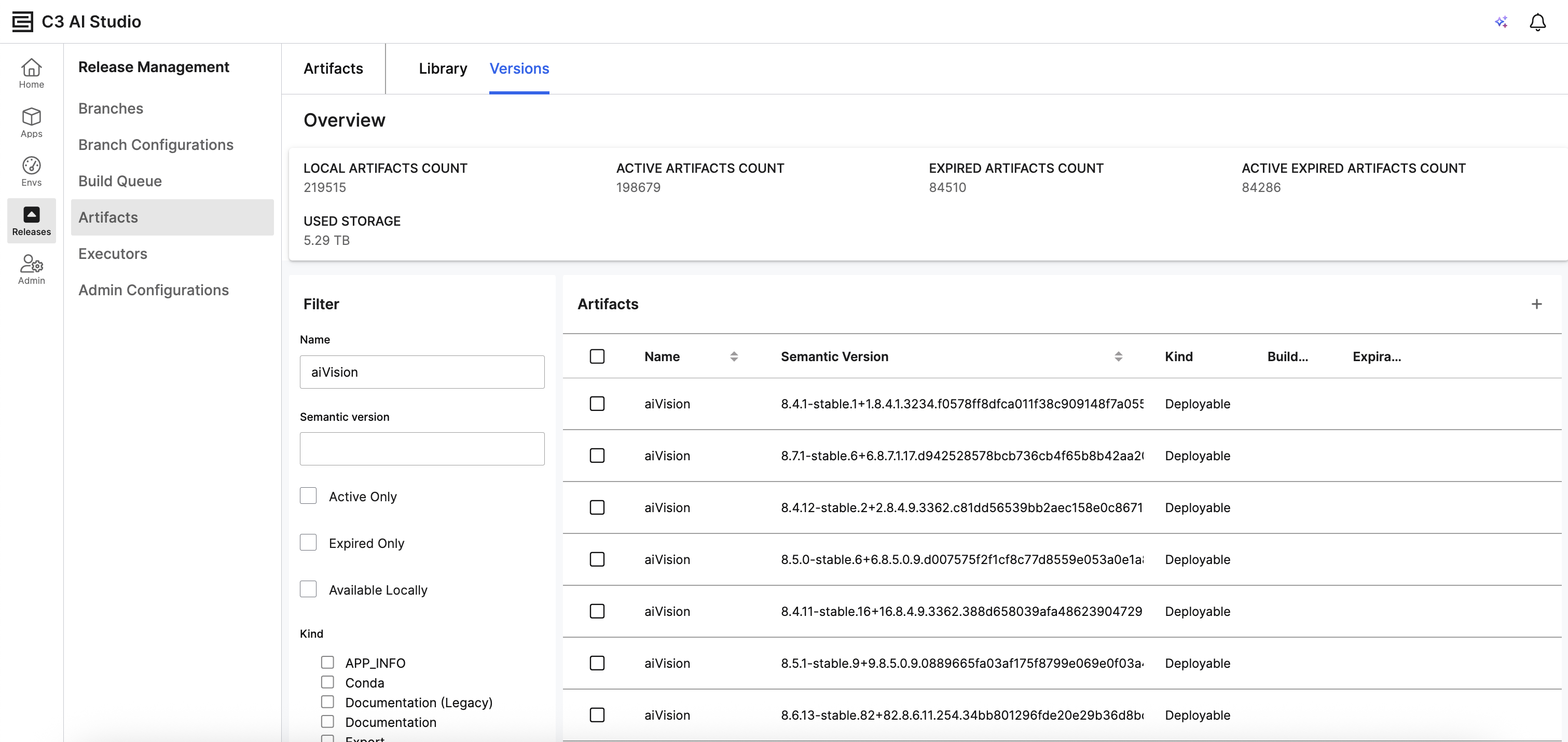 |
| Artifacts in C3 AI Studio |
Cron Job Administration
The new Cron Jobs Dashboard provides a centralized interface to monitor and manage all your scheduled jobs in one place.
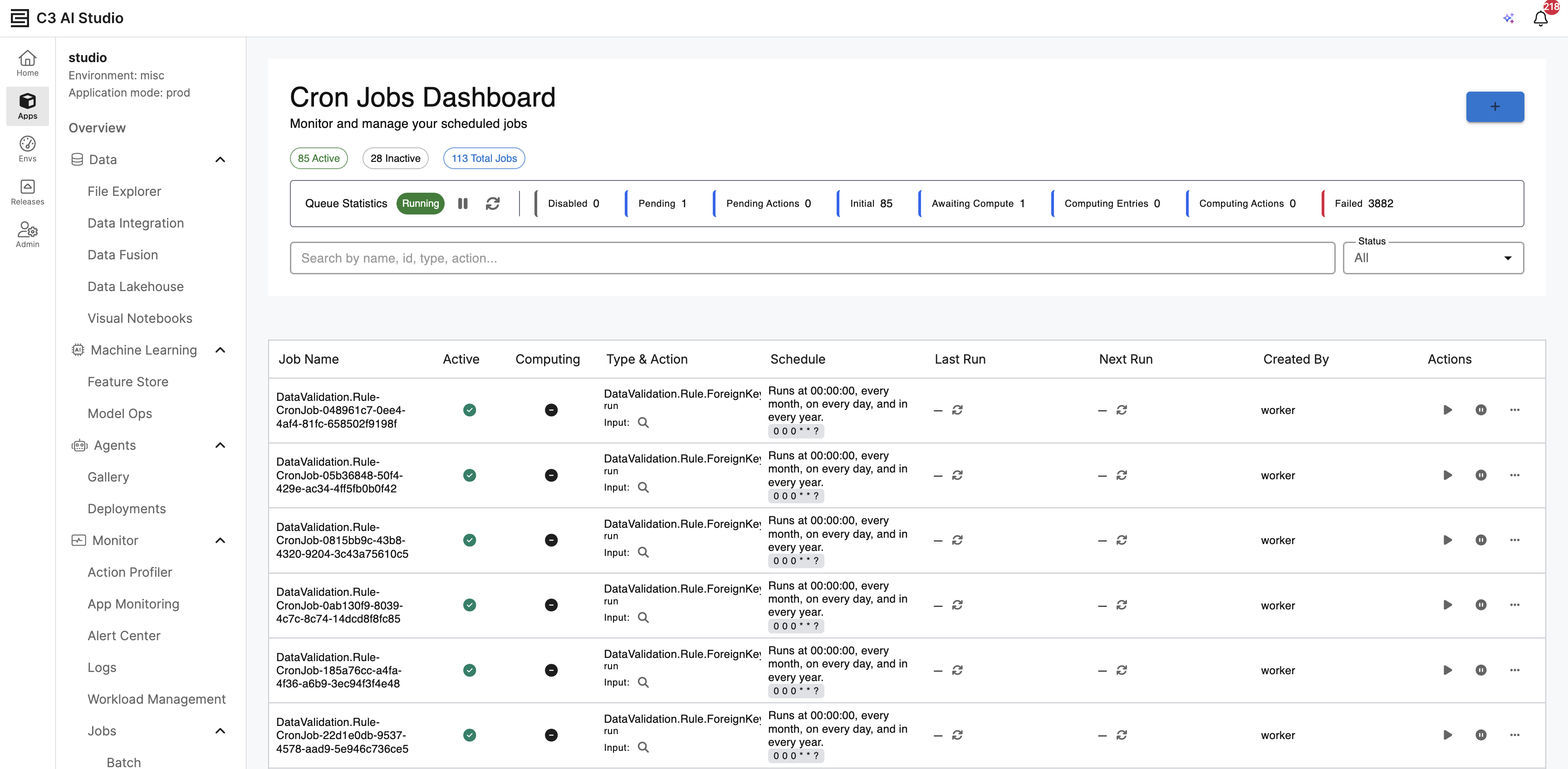 |
| Cron Job Dashboard |
Key Features:
View total job counts with quick filters for Active, Inactive, and Total Jobs.
Real-time Queue Statistics showing job states: Running, Disabled, Pending, Initial, Awaiting Compute, Computing, and Failed.
Search jobs by name, ID, type, or action.
Create new Cron jobs.
C3 Generative AI
The C3 Agentic AI Platform includes pre-configured and advanced embedders and large language models (LLMs). C3 Generative AI orchestrates AI Agents to retrieve data, analyze information, surface insights, and take actions in high-value enterprise use cases that require accurate and reliable performance.
Generative AI Models
The C3 Agentic AI Platform includes ready-to-use and state-of-the-art LLMs and embedders. The models available are dependent on the cloud provider the customer’s account is hosted on. The following table displays available models and their corresponding cloud providers:
| Model Name | Model Type | Cloud Provider |
|---|---|---|
| Claude Sonnet 4.5 | LLM | Azure |
| Cohere Embed v4 | Embedder | Azure |
| Claude Sonnet 4.5 | LLM | GCP |
| Gemini Embedding 001 | Embedder | GCP |
| Claude Sonnet 4.5 | LLM | AWS |
| Cohere Embed Multilingual v3 | Embedder | AWS |
Model availability depends on the region of the account/project that the platform is hosted on.
Generative AI and Agent Management and Configuration
Agent Workbench and Gallery
Version 8.9 introduces the Agent Workbench, a unified visual interface within C3 AI Studio for defining, testing, and deploying agents. From the Agent Gallery, users can select from pre-configured templates to quickly deploy specialized agents into their environment. Deployed Agents can then be used through the Generative AI search UI or embedded in Agentic Workflows. See Agent Lifecycle Management section in this release notes for more information.
Key capabilities of Agent Workbench include:
- Template-Based Deployment: Start with one of three specialized templates provided out-of-the-box:
- Dynamic Agent: The foundation for ad-hoc queries, multi-step reasoning, and flexible tool use.
- Dynamic Canvas Agent: Combines reasoning capabilities with a rich-text editor for iterative content generation.
- Deep Research Agent: Optimized for research-intensive tasks that require multi-source synthesis and comprehensive reporting.
- Lifecycle Management: Manage agents through their entire lifecycle—from Draft (editable) to Store (published templates) and Deployed (active instances).
- Integrated Testing: Use the Preview panel to interact with your agent in real-time, with full visibility into Traces to debug reasoning steps and tool calls.
- Simplified Configuration: Easily adjust system prompts, models, and assigned toolkits through a structured, visual form.
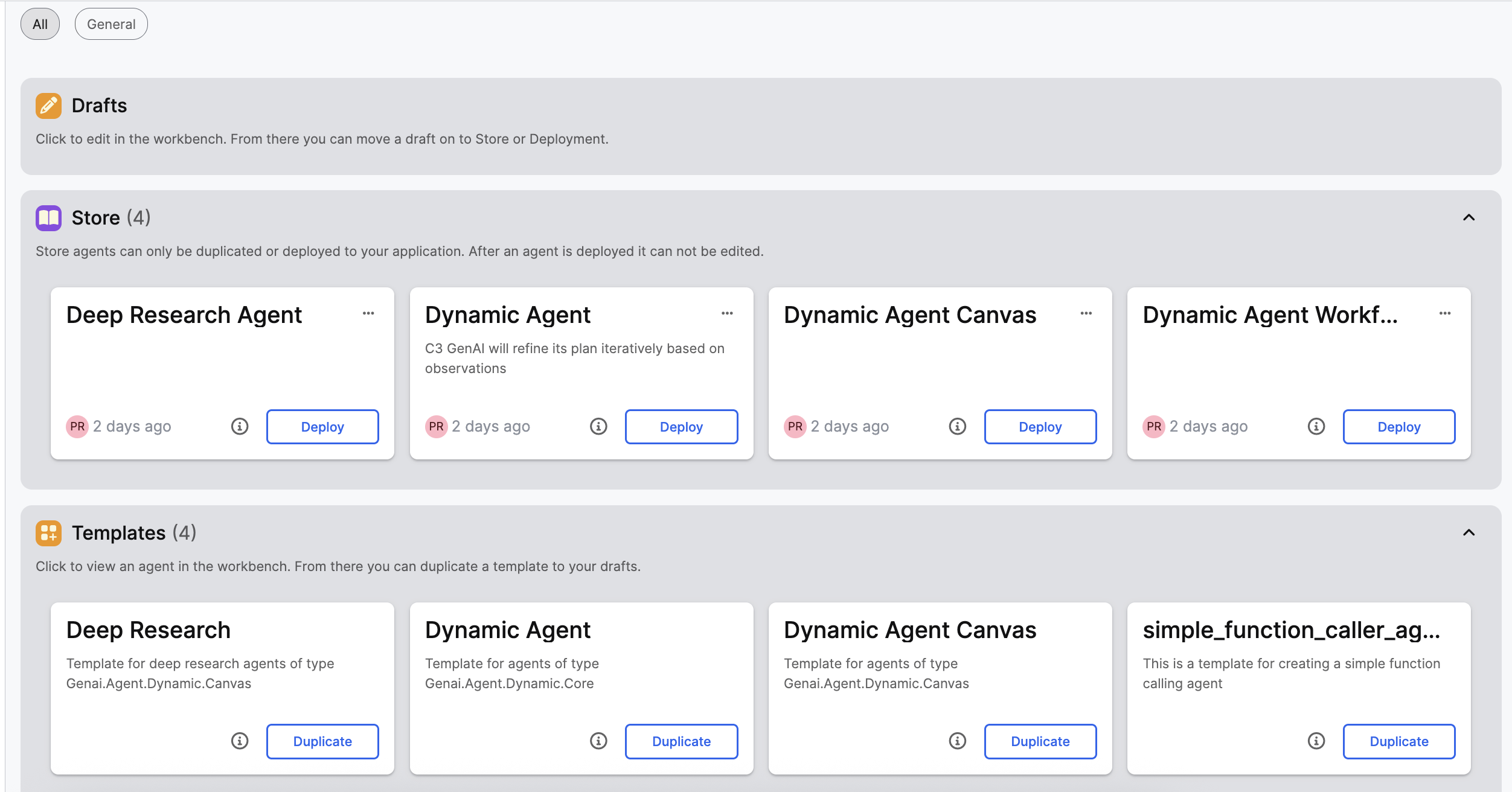 |
| Agent Workbench Gallery |
Agentic Workflows
Version 8.9 introduces Agentic Workflows, a framework that allows users to define, automate, and scale complex business processes. Users can describe a task in natural language, which the system converts into a visual workflow composed of specialized nodes.
Key capabilities include:
- Natural Language Authoring: Describe your process in plain English to generate a workflow draft.
- Human-in-the-Loop: Specify steps where the workflow pauses for human approval or input.
- Flexible Triggers: Execute workflows manually, on a schedule, or automatically when specific C3 Type instances (e.g., Alerts) are created.
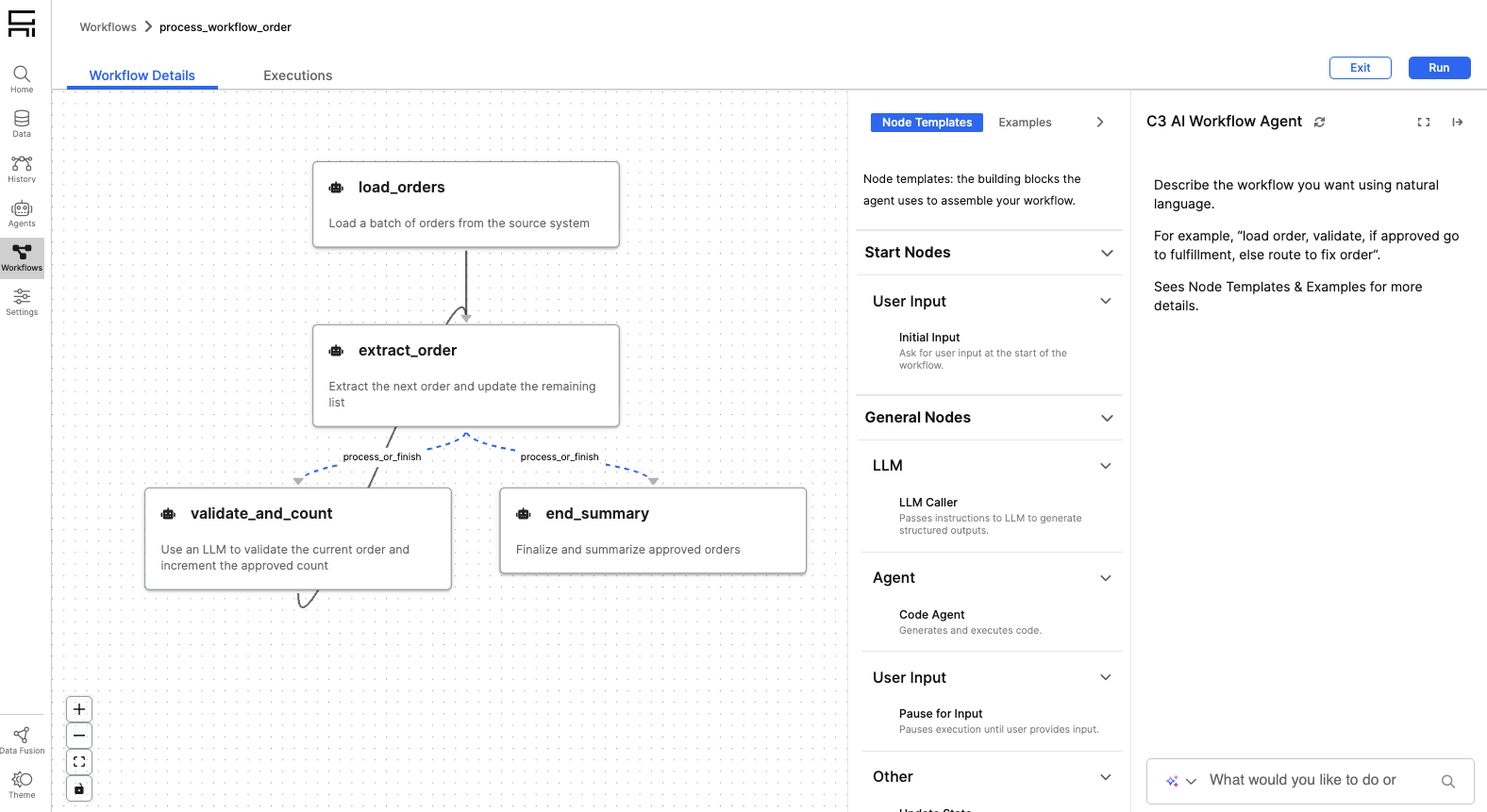 |
| Workflow Authoring UI |
Canvas Experience
The Canvas Experience provides a persistent workspace for long-form content generation and in-depth research. It combines a conversational agent with a rich-text editor, allowing for iterative refinement of complex documents.
Features include:
- Iterative Refinement: Make direct edits to content in the rich-text editor or request modifications from the agent—such as rephrasing text or expanding on specific topics—using natural language.
- Support for Multi-Modal Resources: Interact with a variety of agent-generated artifacts beyond text, including interactive visualizations (Plotly), structured data tables, and dynamic forms.
- Context-Aware Generation: Combine information from chat history, uploaded files (PDFs and images), and enterprise data sources to inform research and content generation.
- Exporting: Save and export your work to Word Documents or other formats.
For more details, see Canvas Agent.
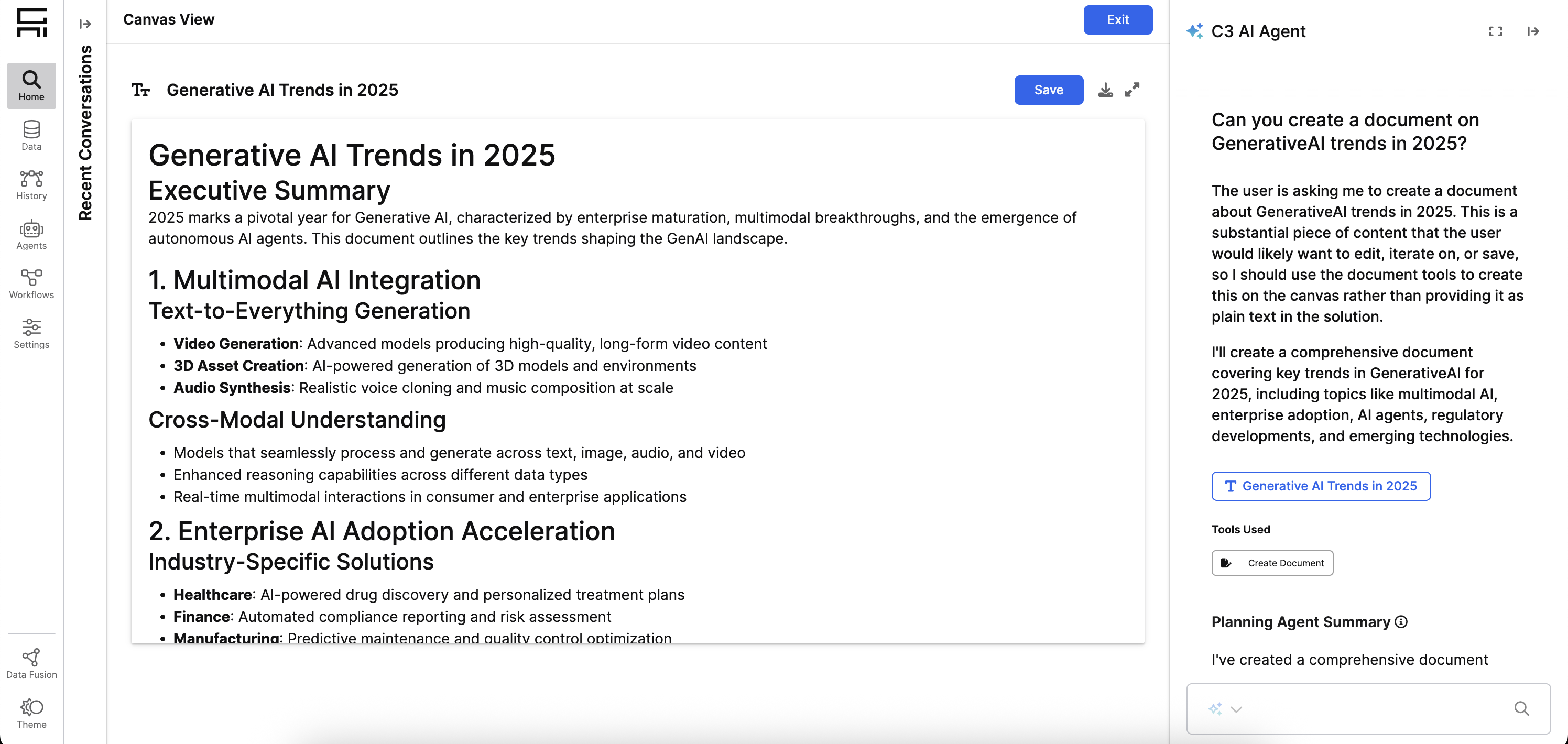 |
| Canvas Focus View |
Deep Research Agent
The Deep Research Agent is a specialized agent type designed to produce structured, comprehensive results for complex questions. It specializes in research-intensive workflows that require multi-step reasoning and document generation.
Key features include:
- Transparent Reasoning: View the agent's intermediate thoughts and reasoning steps as it processes your query.
- Multi-Source Synthesis: Performs iterative research across structured and unstructured sources to build high-quality analyses.
- Editable Canvas Outputs: Automatically generates comprehensive reports based on its research findings, which can then be refined in the Canvas.
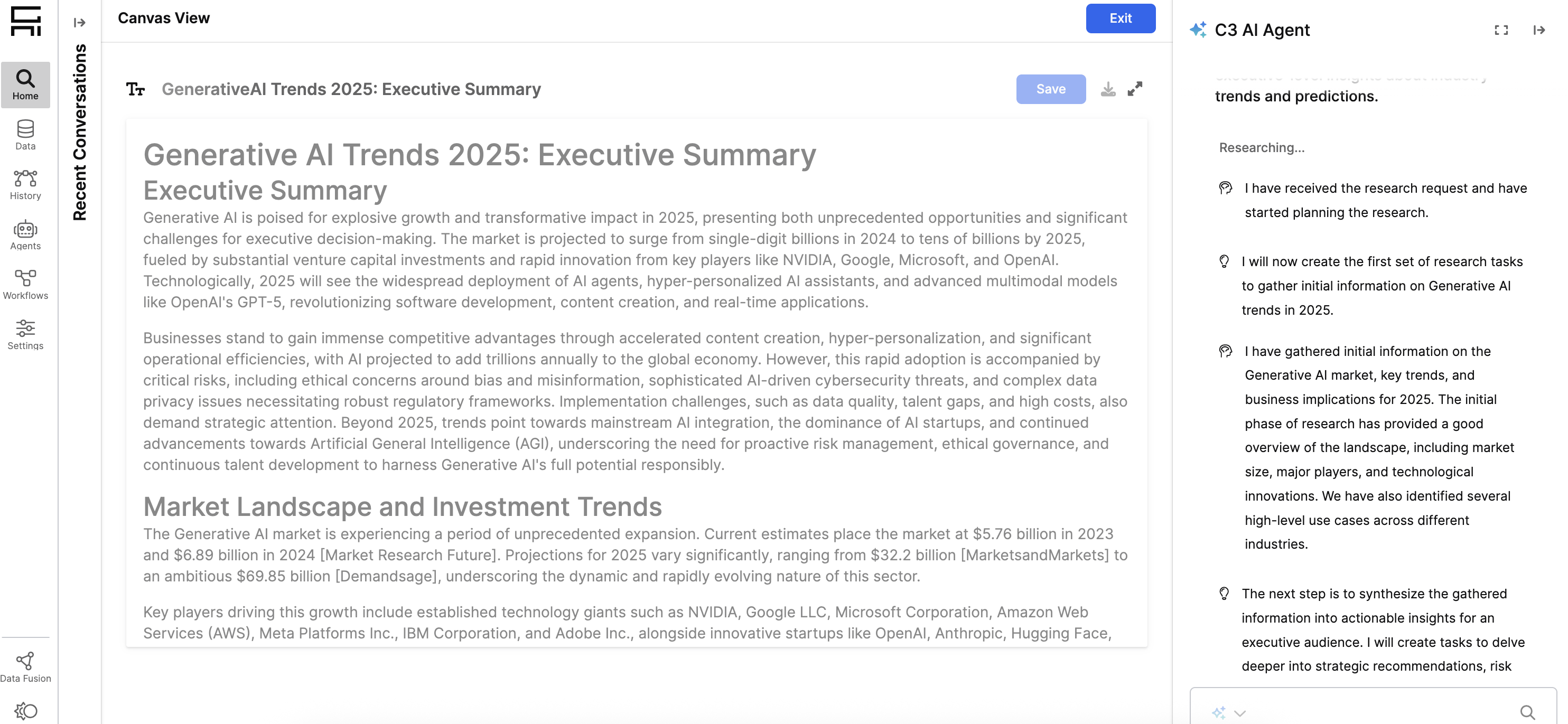 |
| Deep Research Agent Thoughts |
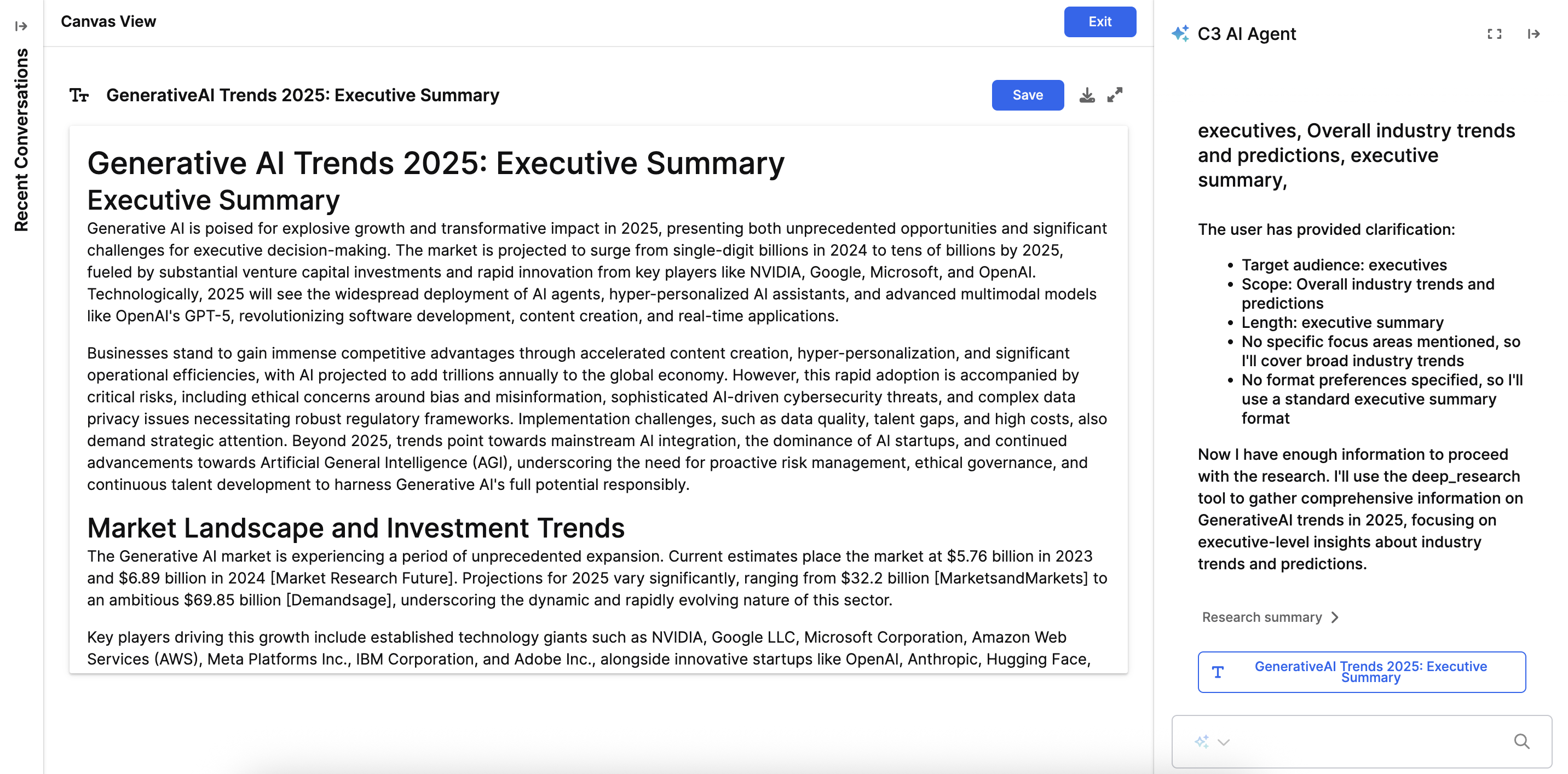 |
| Deep Research Agent Final Output |
Files as Inputs
Users can now attach one or more files directly to a query to provide additional context for the agent. This supports PDF and images (depending on the LLM support), making it easier to perform analysis on specific documents without pre-indexing them.
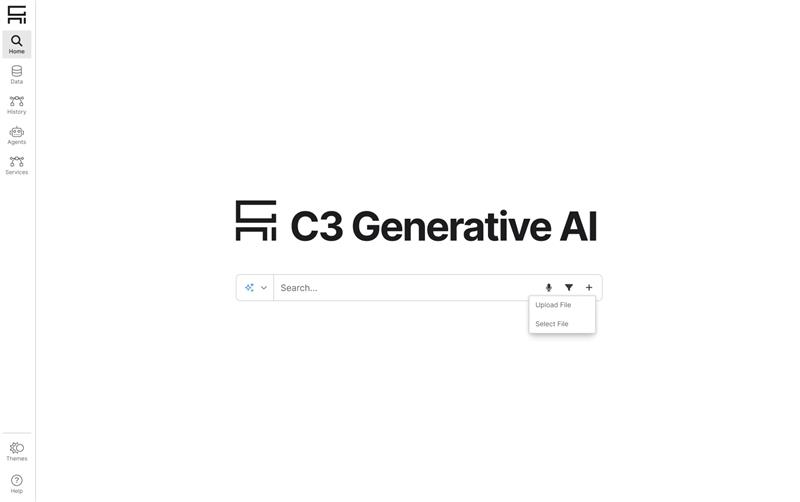 |
| File Upload UI |
Enhanced Transparency (Verbose Mode)
Verbose mode has been enhanced to provide greater transparency into the agent's operations. Users can now view the actual code generated and executed by the agent to produce each AI summary result, making it easier to validate the system's outputs.
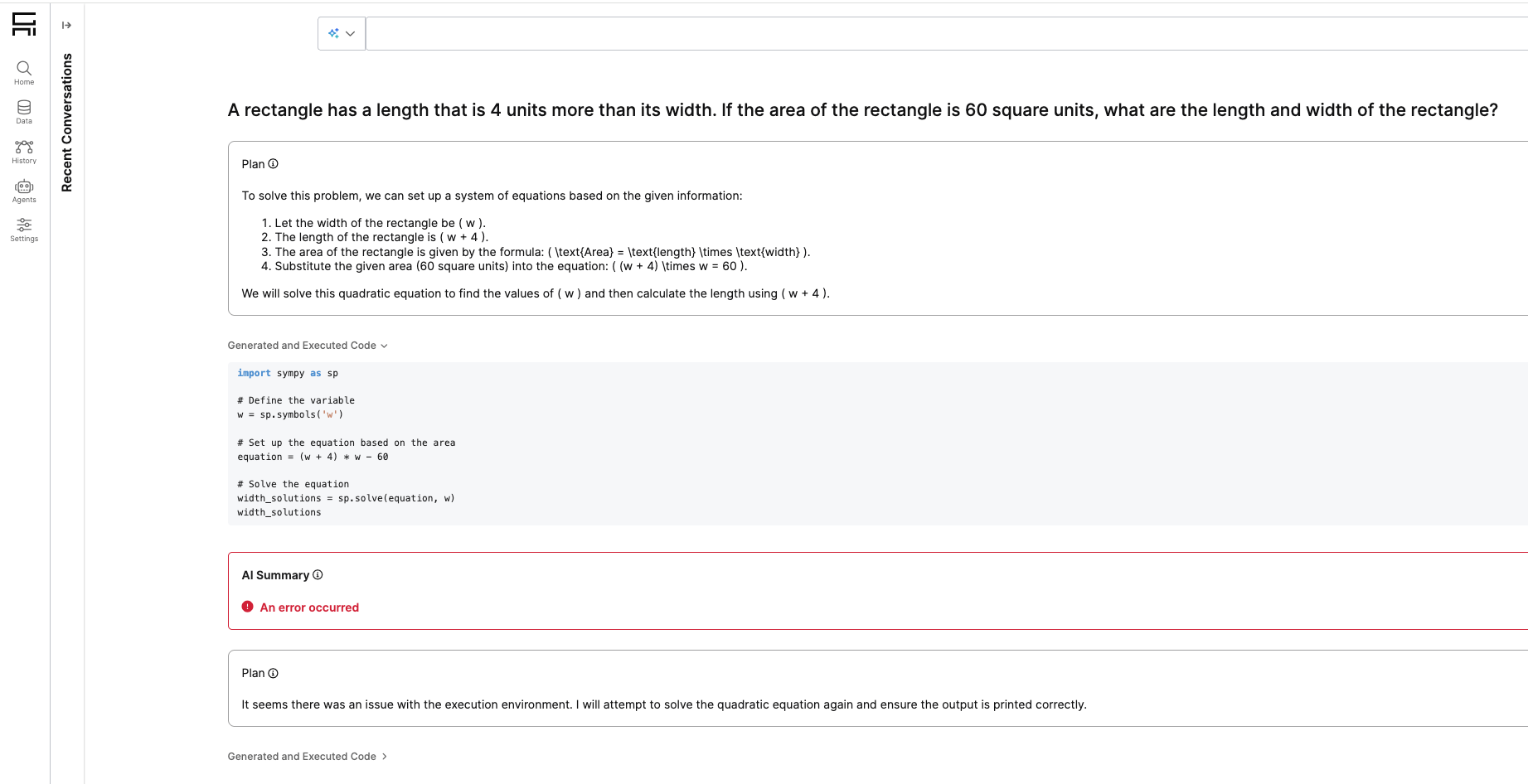 |
| Verbose Mode Expanded |
Data Capabilities
Metadata Management
Version 8.9 provides improved tools for managing document metadata. Administrators can define categories (Open or Closed lists), and users can perform bulk-tagging to ensure high-quality retrieval and organization.
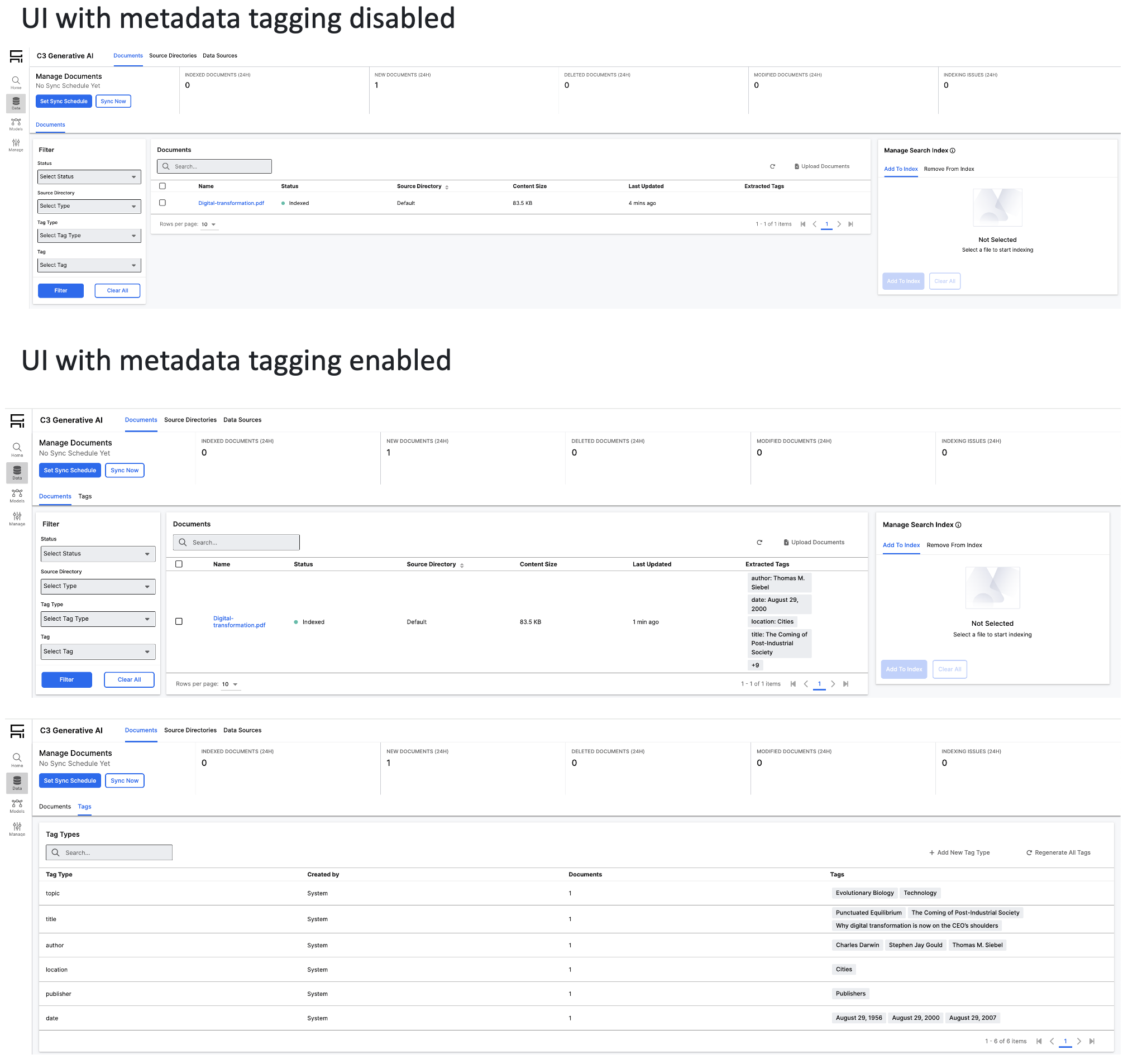 |
| Metadata Tagging |
Advanced Document Processing (Mew3)
Version 8.9 includes significant performance improvements for document processing. The Mew 3 multimodal chunker now processes files up to 40% faster through parallelized LLM calls and enhanced table processing.
C3 AI Model Context Protocol (MCP)
The Model Context Protocol (MCP) is an open framework that connects AI coding assistants with external tools, data sources, and services. It defines a common format for structured requests and responses, allowing coding assistants to act on real system data. Application developers can enhance their agents and Integrated Development Environments (IDE) with deep, application-specific context through the MCP. Agents and IDEs such as VS Code and Cursor, can access relevant information directly from the application's environment when this MCP capability is enabled.
Key features:
Multiple IDEs: Works with multiple IDEs including Cursor, and VSCode CoPilot.
Tools used in MCP: Any Agent Tool created through the Agent Lifecycle Management UI can be called through MCP.
MCP Server: The central MCP server provides a collection of tools and prompts to accelerate development on the C3 platform.
See the following for more information on Model Context Protocol:
- Model Context Protocol (MCP) Overview
- Connect to the C3 Central MCP Server
- Configure and Use C3 Central MCP Server
Platform Integration and Updates
- Studio Integration: Unified deployment and management of agents directly within C3 AI Studio.
- Unified Release Process:
genAiBaseandgenAiSearchare now delivered as part of the core C3 AI platform release. - Python 3.12: Updated runtimes to Python 3.12 for improved performance and ecosystem support. See Upgrade to use Python 3.12 section in this release notes for more information.
C3 AI Data Science and Machine Learning
The C3 Agentic AI Platform integrates leading technologies favored by data science teams into the C3 AI experience. Teams can develop, deploy, and operate machine learning (ML) models at scale. Enhancements in version 8.9 include:
Upgrade to use Python 3.12
Starting from C3 Agentic AI Platform version 8.6, the Platform supports Python versions 3.9 through 3.12. The Platform version 8.9 and higher defaults to Python version 3.12 rather than Python 3.9. Python version 3.9 will continue to run on the platform. The Python Core Team no longer supports Python version 3.9 as of October 2025. Related changes include:
Upgrade of the Pandas version from 1.3 to 2.2: Provides new capabilities to the Platform DataFrame APIs, but may introduce some incompatibilities.
The JupyterLab Image upgrade: JupyterLab update to incorporate Python 3.12.
New runtime definitions: A set of mutually compatible Python runtimes have been defined which correspond to existing Platform runtimes, but use Python 3.9 along with newer versions of the associated data science libraries where appropriate. For each platform runtime, C3 AI provides a new runtime based on Python version 3.12. For example, for the platform runtime py-data, use py-data_312 instead.
For more details, see Upgrade Python in the C3 AI Agentic Platform.
JupyterHub & JupyterLab Improvements
Support for Runtime File Upload and Download: Import Conda environment.yml files directly in the UI during runtime creation. Export environment.yml file to share runtimes with other users.
Read-Only Notebook Enhancements: The sync icon for read-only notebooks displays what is being synced.
Protections for Notebooks: Only administrators and owners of notebooks can delete notebooks in a shared space. This avoids data loss events.
General Stability: General bug fixes and improvements to JupyerHub and JupyerLab stability.
See the following for more information on JupyterLab:
- Configure and Use C3 AI-Managed JupyterLab Notebooks
- Access Documentation in JupyterLab with Contextual Help
- Common Errors in Jupyter
Deprecated APIs on c3.Data
The following APIs on Data which emulate Pandas functionality have been deprecated as part of the Python upgrade. It is recommended to convert any Data value immediately to a native Pandas DataFrame using to_pandas().
- Pandas.CategoricalIndex.c3typ
- Pandas.CombinedDatetimelikeProperties.c3typ
- Pandas.DataFrame.c3typ
- Pandas.DataFrameGroupBy.c3typ
- Pandas.DataFrameStatic.c3typ
- Pandas.DatetimeIndex.c3typ
- Pandas.Expanding.c3typ
- Pandas.ExponentialMovingWindow.c3typ
- Pandas.ExponentialMovingWindowGroupby.c3typ
- Pandas.Float64Index.c3typ
- Pandas.Index.c3typ
- Pandas.Int64Index.c3typ
- Pandas.IntervalIndex.c3typ
- Pandas.MultiIndex.c3typ
- Pandas.PeriodIndex.c3typ
- Pandas.RangeIndex.c3typ
- Pandas.Resample.c3typ
- Pandas.Rolling.c3typ
- Pandas.Series.c3typ
- Pandas.SeriesGroupBy.c3typ
- Pandas.Static.c3typ
- Pandas.StringMethods.c3typ
- Pandas.TimedeltaIndex.c3typ
- Pandas.UInt64Index.c3typ
Model Deployment Framework Improvements
The Model Deployment Framework (MDF) helps data scientists and application developers train, deploy, and manage the life cycle of machine learning models.
- MlSubjectToModelRelation Improvement: MlSubjectToModelRelation
tofield can now be specialized for custom MlModel types. - Bug that prevented specializing MlSubjectToModelRelation
tofield for custom MlModel type.
Model Inference Service Enhancements
C3 AI Model Inference Service (MIS) is a microservice for low-latency serving of machine learning (ML) models, including large language models (LLMs).
The 8.9 Platform release includes the 2.0 release of the MIS package. The following versions of vLLM have been added to the new release:
- 0.9.2 - Added support for models such as ModernBERT, OLMo3, Mistral Large 3, Mistral Small 3, Qwen3-VL, and DeepSeek-V3/R1.
- 0.10.1 - Introduced performance enhancements with the V1 architecture and added support for GPT-OSS.
See the following for more information on Model Inference Service (MIS):
- Overview of C3 AI Model Inference Service Administration
- Create and Configure the C3 AI Model Inference Service
- Create and Deploy a VllmPipe
- Manage Routes of the C3 AI Model Inference Service to Change or Upgrade LLMs
- Monitor and Scale the C3 AI Model Inference Service
- Use C3 AI Model Inference Service for LLM Text Generation and Inference Requests
Improved Py4j Startup
The Py4j executor now caches Python interpreters. This reduces the startup time for Python actions running in the server that leverage custom runtimes.
C3 AI UI Stack
C3 AI UI Framework and C3 AI Component Library make it faster to develop, test, and deploy the front end of your AI-enabled application.
Design System Documentation Application
This version introduces the Design System Documentation application. This application is a single point to learn everything about UI Framework and UI Component Library.
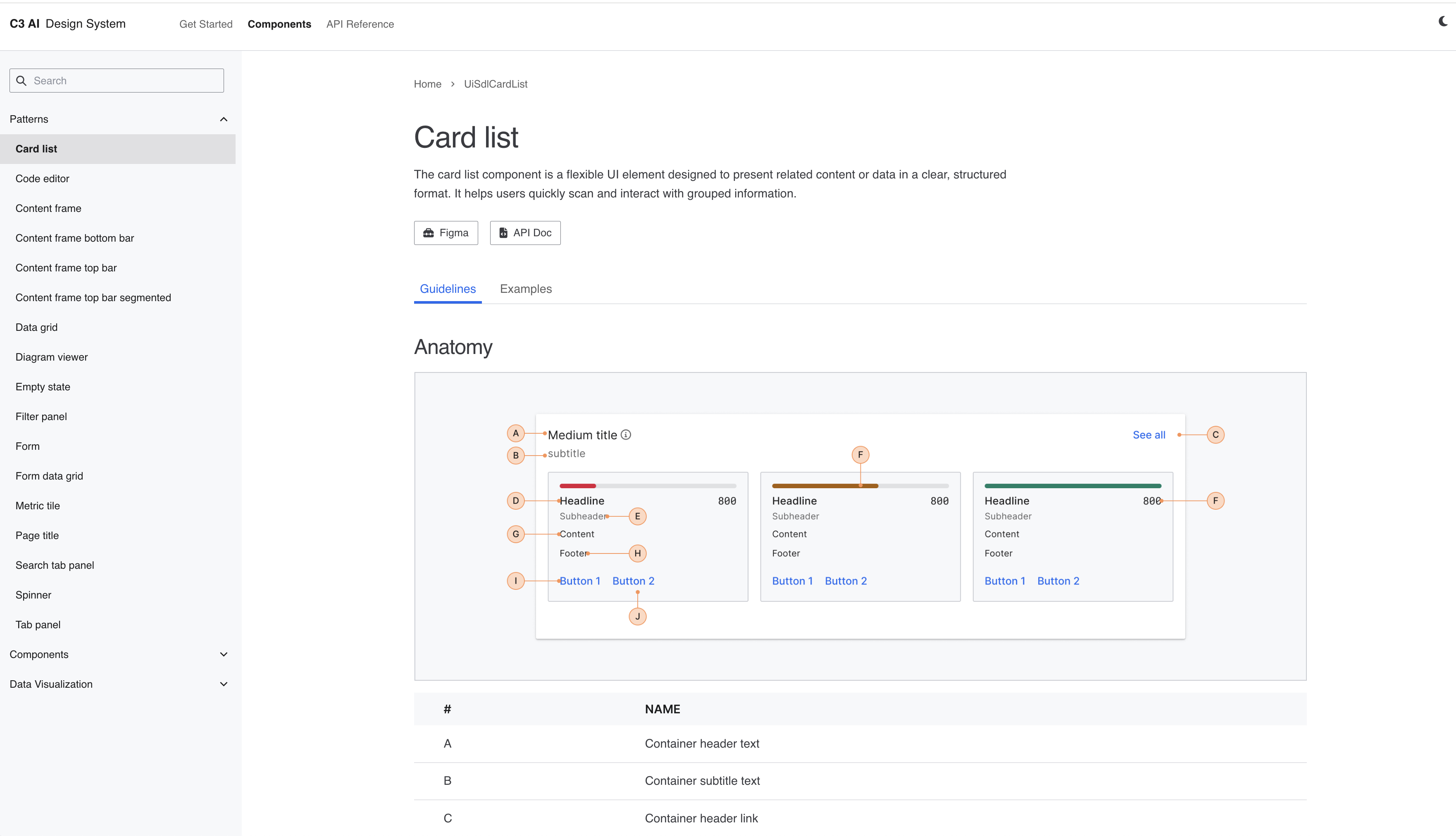 |
| Design System Documentation Application |
- Design System Documentation Application contains guides, reference API documentation, and a full list of declarative (JSON) components.
- This version also includes 150+ improvements and bug fixes to UI Framework and UI Component library. For more information on the changes, consult the change logs for this product area.
Changelogs:
- aiVision Changelog
- uiInfrastructure Changelog
- cssLibrary Changelog
- uiBundler Changelog
- uiComponentLibrary Changelog
- uiComponentLibraryReact Changelog
- uiDemo Changelog
- uiGanttChart Changelog
- uiGanttChartReact Changelog
- uiGraphComponent Changelog
Breaking Changes
UiSdlExtraFilesInvalidatingCacheLoaderis disabled by default to overcome bundling memory and performance issues. Files inui/c3/src/folders (except ui/c3/src/customInstances) can no longer be imported through@c3/ui/and are no longer flattened during bundling.Fix: Please import these files from
@c3/app/ui/src/instead with their full path.Workaround: If necessary, you can re-enable it by setting
UiSdlConfig#infrastructure.disableExtraFilesLoaderto false but be aware that it will significantly decrease performance and prefer to change your imports.
Custom React Components CSS Styling Changes for HTML tag in 8.9. Default CSS styles that directly applied to button tag have been removed.
Fix: Please add data-attribute: data-c3-button to your HTML button tag if you wish to keep using button default styling.
Reason: Historically, we provided basic styles to HTML tags, these styles were implicitly applied without being explicitly requested by developers. Now that SDL restrictions have been lifted and developers can freely use pure React, we want to ensure that pure React elements behave exactly as expected; without unintended styling.
C3 AI Infrastructure
The C3 Agentic AI Platform offers robust data integration, storage, and processing capabilities. It enables the integration of diverse data from various sources such as object storage, databases, data warehouses, data lakes, streaming systems, business applications, and operational systems. The following new capabilities and improvements were added for version 8.9.
System Performance (KV Store & CCK)
Optimize packing algorithms for Key Value (KV) Store and Cassandra Composite Key (CCK) components. These changes improve data compression ratios, reduce retrieval latency, and enhance overall system reliability.
Version 8.9 includes optimizations to SqlKvStore that deliver faster and more efficient read operations.
Connectors
Google Drive Connector
Native Google Drive connector that leverages the Java SDK for external file access.
Authentication: Supports Service Principal.
Capabilities: Includes full file system API coverage, metadata capture, and built-in handling for rate limiting and errors.
Box Connector
Native Box connector that leverages the official Java SDK for external file access.
Authentication: Supports modern authentication patterns such as Service Principal and OAuth 2.0. Authentication behavior is tuned for token lifetimes and refresh semantics in enterprise environments.
Capabilities: Provides broad coverage of Box file system operations (browse, read, write, move, delete), aligns metadata capture requirements, and robustly handles rate limiting and API errors.
Confluence Connector
The Confluence connector allows users to securely retrieve documents in a Confluence space. and uses API tokens for authentication.
Developer Hub
The C3 AI Developer Hub is a comprehensive set of tools, resources, and support systems designed to streamline the development, configuration, and maintenance of applications on the C3 Agentic AI Platform.
C3 AI VS Code Extension
The C3 AI VS Code extension streamlines development on the C3 AI Platform from both desktop and browser-based environments. The following new capabilities and improvements were added for version 8.9.
VS Code in the Browser
Browser-based VS Code is now a first-class, browser-only development environment for the C3 AI Platform. Developers can connect to single node environments (SNEs), edit code, sync packages, and bundle UIs entirely from the browser, with no local VS Code or extension installation required. This makes it much easier to onboard new developers, support restricted laptops or virtual desktop infrastructures (VDIs), and standardize tooling across teams.
Zero-install development: Launch VS Code directly from Studio in the browser and work from any machine without installing VS Code or the C3 extension.
Fewer connection issues: Runs inside the same network as your development environment, avoiding many desktop–VPN–proxy issues that block or slow down connections from local VS Code.
Reliable sessions: Hibernation and resume flows are hardened so browser VS Code reliably comes back after overnight or weekend pauses with clear “resuming workspace” messaging.
Secure and robust connectivity: Smarter use of internal versus external URLs, clearer unauthorized/expired-token pages, and fixes for DNS/auth edge cases.
Quickstart Packages Available Directly from VS Code
Quickstart packages are easier to discover and use directly from VS Code. This reduces setup friction for new projects and training scenarios.
Automatic quickstart download: Automatically downloads Quickstart packages from Studio as part of the VSCE sync flow.
Configurable sync behavior: The VSCE welcome page includes an improved Advanced Settings dropdown that lets you customize how to handle packages that exist on the server but not in the local workspace.
Faster onboarding: Minimize manual steps and edge cases when setting up Quickstarts.
See the following for more information on C3 AI VS Code Extension:
- C3 AI VS Code Extension Features
- Remote Debugger with the C3 AI VS Code Extension
- C3 Server Logs
- Configure Advanced Settings for Connecting to an Environment
Cache Invalidation
Cache invalidation is now enabled by default for environments and applications. It prevents stale state issues and ensures consistent updates without manual intervention, resulting in fewer mismatches and more predictable behavior.
Security Improvement
This version of the platform addresses authentication errors caused by stale public key values. A new authentication flow allows users to reuse names when they create environments or applications.
C3 AI Package Store & Type System
The C3 Agentic AI Platform includes a unified Type System and Package Store that underpin scalable, modular application development. They support composable, metadata-driven design for entities, time series, ML pipelines, analytical services, and UI components, all versioned and shareable across the enterprise.
Package Lock (
Pkg.Lock) for deterministic buildsLock file generation: The platform now generates
{packageName}.c3pkg.lock.jsonfiles mapping each dependency to an exact semantic version.CI integration: Developers should commit generated lock files when dependencies are modified. CI pipelines validate lock files to prevent dependency drift across environments and releases.
Development mode performance improvements
- Application startup in development mode is significantly faster through intelligent caching of type names and
Pkg.Store.Config. This eliminates the need to load all types at initialization.
- Application startup in development mode is significantly faster through intelligent caching of type names and
Production safety and isolation
- Production mode now enforces stricter separation of test artifacts: folders named
testand their associated types/methods are automatically excluded. This reduces the risk of test-only code being accessible in production.
- Production mode now enforces stricter separation of test artifacts: folders named
C3 AI Console
The C3 AI Console now supports a tabbed interface. c3 commands that previously changed the HTML page view will now create separate tabs. Multiple views are displayed simultaneously. Tabs can also be organized into multiple windows or tab stacks.
Configurable Tab Behavior
New tab creation is now customizable. The Console Options dialog (Tools | Options) has been reorganized into multiple tabs. It includes a new Tabs section that allows you to configure how new tabs are created for each tab type (tab type corresponds to a c3 command). The default is Reuse Same, which has the behavior of replacing the contents of a tab with the "same view of the same thing" and creating a new tab otherwise.
Reuse Any: Reuses any tab of the same kind.
Reuse Same: Reuses tabs with the same kind and title (default).
New: Creates a new tab.
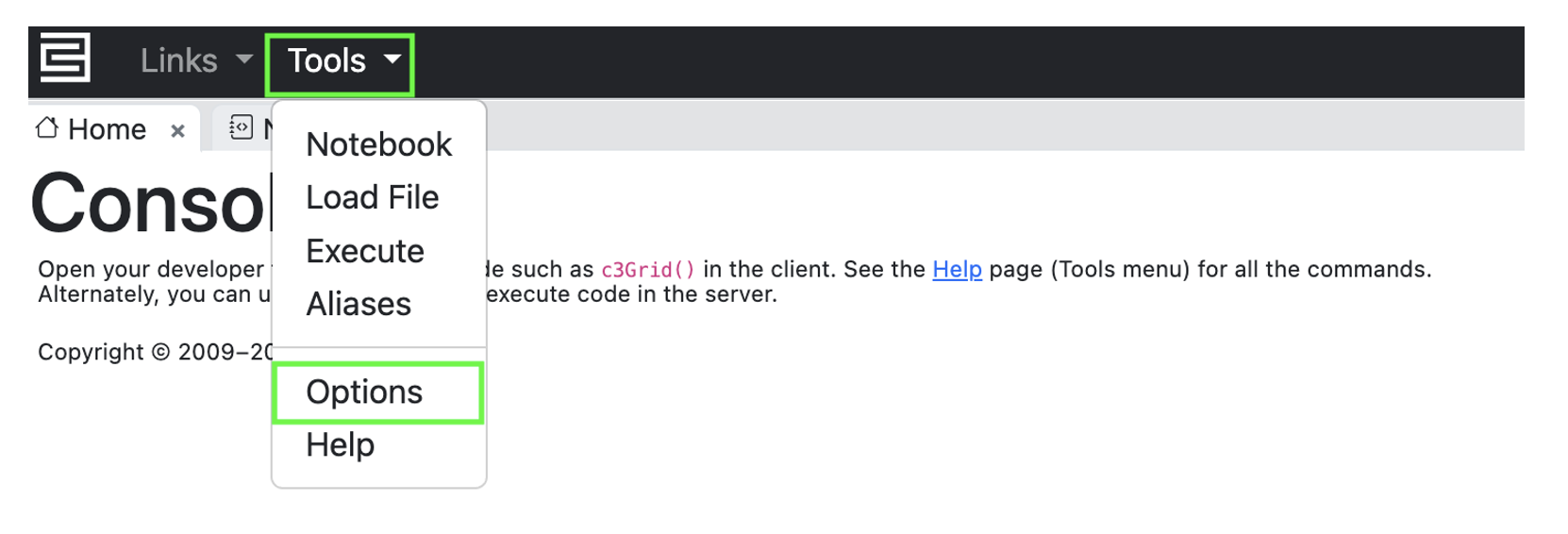 |
| Tools/Options |
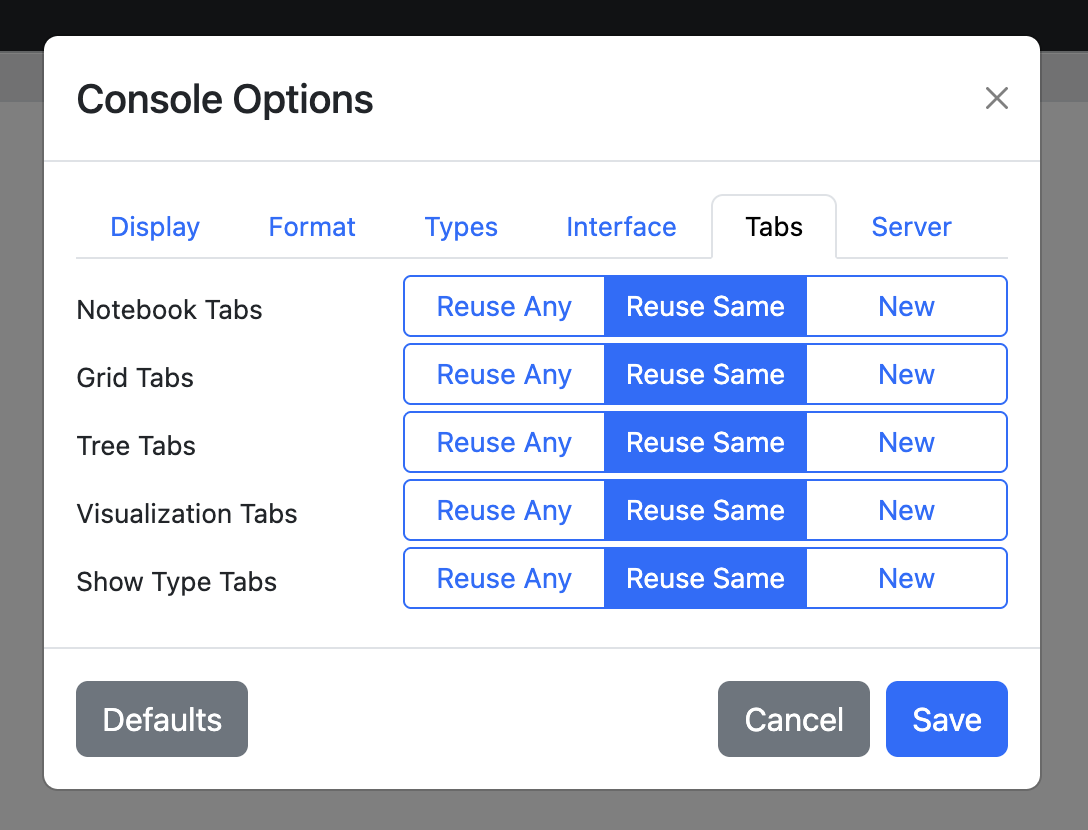 |
| C3 AI Console Options Dialog Box |
New Tab Features
Tabs can be moved to create a new stack.
Context menu on the stack header bar provides VSCode-like split operations.
Context menu on each tab provides tab-specific operations.
Most common
c3commands (such asc3Viz) work in the notebook as well and have the new-tab behavior.Notebook cell can be opened in a new Notebook tab from the cell header menu (right side).
Notebook cell output can be opened as a
c3Viztab from the output menu (left side).Help page (Tools | Help) documents several new commands as well. Refer to the C3 AI Console Functions Reference document for the full list of
c3commands.Output from
console.logand similar functions show up in a new output tab.
Console Functions
Standard JavaScript console functions (browser and Node.js), such as console.log() and console.table(), are now supported in Notebook cells. Output from these calls is captured and displayed in a new Logs tab within the cell output.
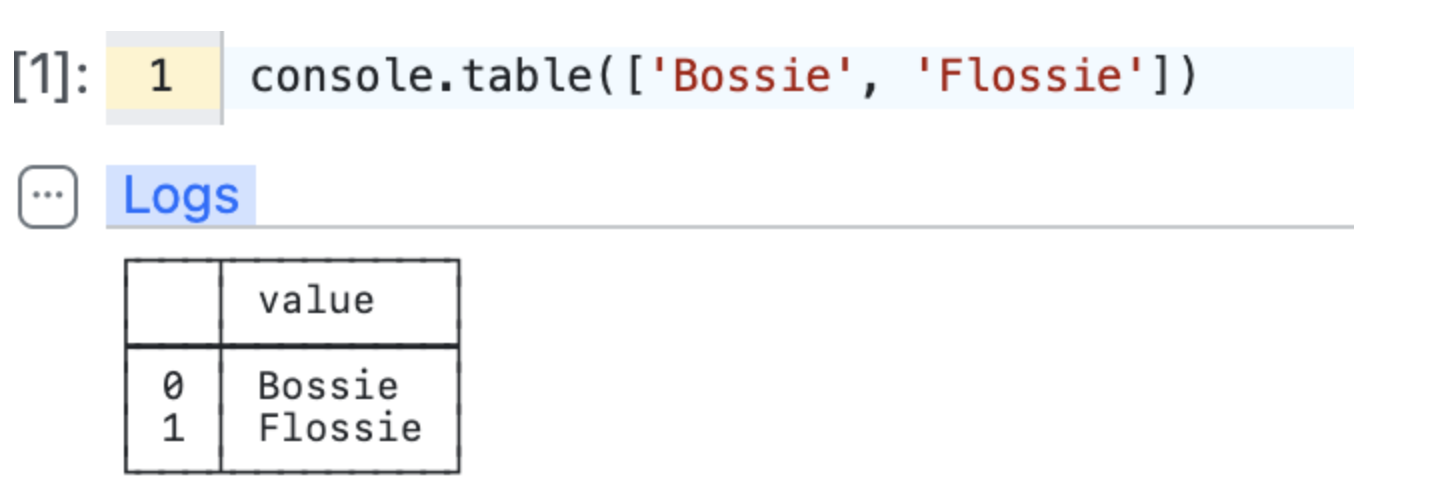 |
| Logs Tab in Cell Output |
Notebook
The following are various small improvements to the Console:
- Cell Interrupt: You can now interrupt individual Notebook cell executions using a stop button displayed above the cell while it runs.
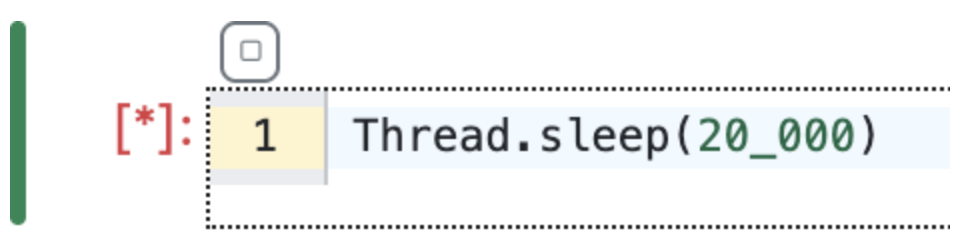 |
| Interrupt Individual Notebook Cell Execution |
Last Cell Result Execution: Rhino stores the result of the most recently executed cell in the $_ variable, allowing you to use it in subsequent cells. This behavior matches the Chrome Developer Tools console.
Notebook Open and Save Locations: You can now open and save Notebooks to the database and the current package (if writable), in addition to the Artifact Hub. When opening a Notebook from the toolbar, the dialog shows three storage options.
"Seed" is the current application's package, visible to everyone with access to this package
"Save" is the database, visible only to the user
"Public" is the artifact hub, visible to everyone
Clicking the Save button on an opened Notebook will save it to the same location without any prompts. Hold Shift while clicking Save to open the Save As dialog box. Notebooks automatically preserve their state in browser local storage between sessions, but explicitly saving is recommended to enable access from other browsers or users. A modified notebook displays an asterisk (*) next to its file name.
Upgrade Information
Before upgrading to C3 Agentic AI Platform version 8.9.0, review the following requirements and compatibility considerations to ensure a smooth transition.
For additional upgrade information see 8.9 C3 AI Platform Install and Upgrade Requirements
Supported Pre‑Upgrade Versions
All environments and applications must be running one of the following minimum versions before upgrading:
- 8.6.15 or later
- 8.7.17 or later
- 8.8.13 or later
Upgrading from earlier versions is not supported.
Kubernetes Version Requirement
Platform 8.9 requires Kubernetes version 1.34. Upgrade the underlying cluster before applying this release.
Python 3.12 Compatibility
The 8.9 release defaults to Python 3.12. Review the guidance in Upgrade to use Python 3.12 section of the release notes to ensure notebooks and Python dependencies remain compatible.
Generative AI
C3 Generative AI capabilities are now delivered natively within the platform, providing consistent access to high‑quality large‑language models and embedders across all applications. This enables:
Improved developer productivity through integrated model access.
Simpler application architectures with fewer external dependencies.
Consistent, governed AI behavior across environments.
Faster adoption of new AI‑powered features throughout the platform.
Applications may require updates to dependency declarations or import paths to align with these platform‑bundled Generative AI components.
If you have a Standalone C3 AI Generative AI Search deployment, contact the C3 AI Operations team before upgrading. Additional coordination may be required to ensure compatibility.
Additional Breaking Changes
This release includes changes that may affect UI components, bundling behavior, and deprecated APIs. See the following sections within this document for complete code updates and migration steps:
We Value Your Feedback
Your input is crucial to our continuous improvement. If you encounter any issues or have suggestions for further enhancements, please reach out:
Provide feedback on specific topics in our new Documentation Site.
Questions? Post them in the Community Category for version 8 course support.
Want to speak with a C3 AI Academy instructor directly? Book time with them for support on the Help Center.